
API Testing with Postman: A Complete Guide for Beginners and QA Testers
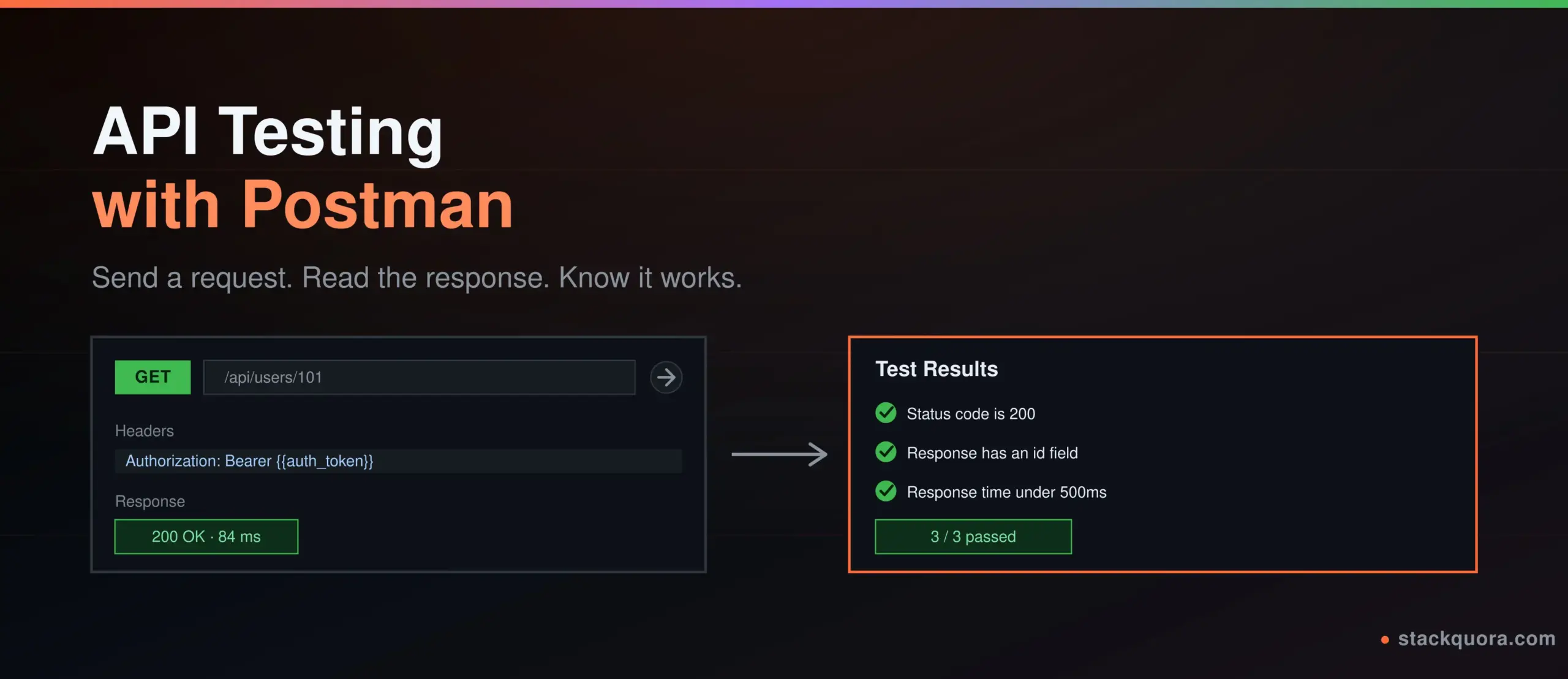
Every app you use talks to a server behind the scenes. Your banking app checks your balance. Your food delivery app tracks your order. Your weather app pulls today’s forecast. All of that happens through an API, and before any of it reaches a real user, someone has to check that it actually works.
That is API testing. And Postman is the tool most QA testers and developers reach for first, because it turns a job that used to need command-line scripts and patience into something you can do by clicking a button and reading a clear response.
This guide takes you from zero to confident. You will learn what API testing actually means, how to send your first request in Postman, how to read status codes properly, how to validate a response with a real test script, how authentication works, and how to move from clicking “Send” by hand to running your entire test suite automatically in a pipeline. Every example here is something you can try in Postman today, free of cost.
What Is API Testing?
An API, short for Application Programming Interface, is how two pieces of software talk to each other. When your mobile app shows you a list of products, it is not storing that list on your phone. It is asking a server for it through an API, and the server sends back an answer.
API testing means checking that this conversation happens correctly, without needing to open the actual app or website. You send a request straight to the API and inspect what comes back: the data, the status code, the response time, the format, all of it.
This is different from testing through the user interface. UI testing checks buttons, screens and clicks. API testing skips the screen entirely and checks the engine underneath it. That makes it faster to run, less likely to break from a small design change, and often the first place a bug actually shows up.
Teams test APIs for several reasons:
- To confirm the API returns the right data in the right format
- To catch bugs before the front-end team even builds a screen around them
- To check how the API behaves with bad input, missing fields or wrong data types
- To verify authentication and permission rules actually hold
- To measure response time and catch performance issues early
- To make sure a new code change did not silently break something that used to work
If you have ever heard the phrase “shift-left testing,” this is a big part of what it means. Test the API early, before the bug has a chance to travel downstream into the finished product.
What Is Postman?
Postman is an API platform that lets you build, send, test, document and automate API requests, all from one application. It started as a simple Chrome extension years ago and has grown into the tool most QA teams and backend developers open first when working with an API.
You do not need to write a single line of code to send your first request in Postman. Type a URL, pick a method, click Send, and you get a full response back, formatted and readable.
Postman API testing covers a lot more ground than just sending requests, though. The core things you will actually use are:
- Requests — send GET, POST, PUT, PATCH or DELETE calls to any API endpoint
- Collections — group related requests together so your whole test suite lives in one organized place
- Environments — switch between development, staging and production URLs and credentials with one click
- Tests — write short JavaScript checks that run automatically after every request
- Collection Runner — run every request in a collection in one go and see a pass/fail summary
- Newman — run the exact same collection from the command line, which is what makes CI/CD automation possible
- Mock servers — simulate an API’s responses before the real backend even exists
- Documentation — Postman can generate clean, shareable docs straight from your collection
Postman is free to start with, and the free plan covers everything a beginner or a small QA team needs to learn properly and do real work.
Why QA Testers Use Postman for API Testing
There are other ways to test an API. You could use curl from a terminal, write a script in Python, or use a code library. Postman became the default choice for most QA teams for a few practical reasons.
- No coding required to get started. You can test a real API on day one, before you know any JavaScript.
- Everything is visible. Headers, body, cookies, response time and status all sit in one clean screen instead of scrolling terminal text.
- Collections keep your test suite organized. A new team member can open a collection and immediately see what is being tested.
- Variables remove repetition. Store a base URL or a token once, reuse it across a hundred requests.
- Testing and automation live in the same tool. You do not need to hand off your manual tests to a separate framework; the same collection can run manually and in CI.
- Team collaboration is built in. Share a collection with your team through a shared workspace instead of emailing files back and forth.
None of this replaces good testing judgment. Postman is the tool. What you test, and how carefully you test it, is still on you.
HTTP Methods Explained: GET, POST, PUT, PATCH and DELETE
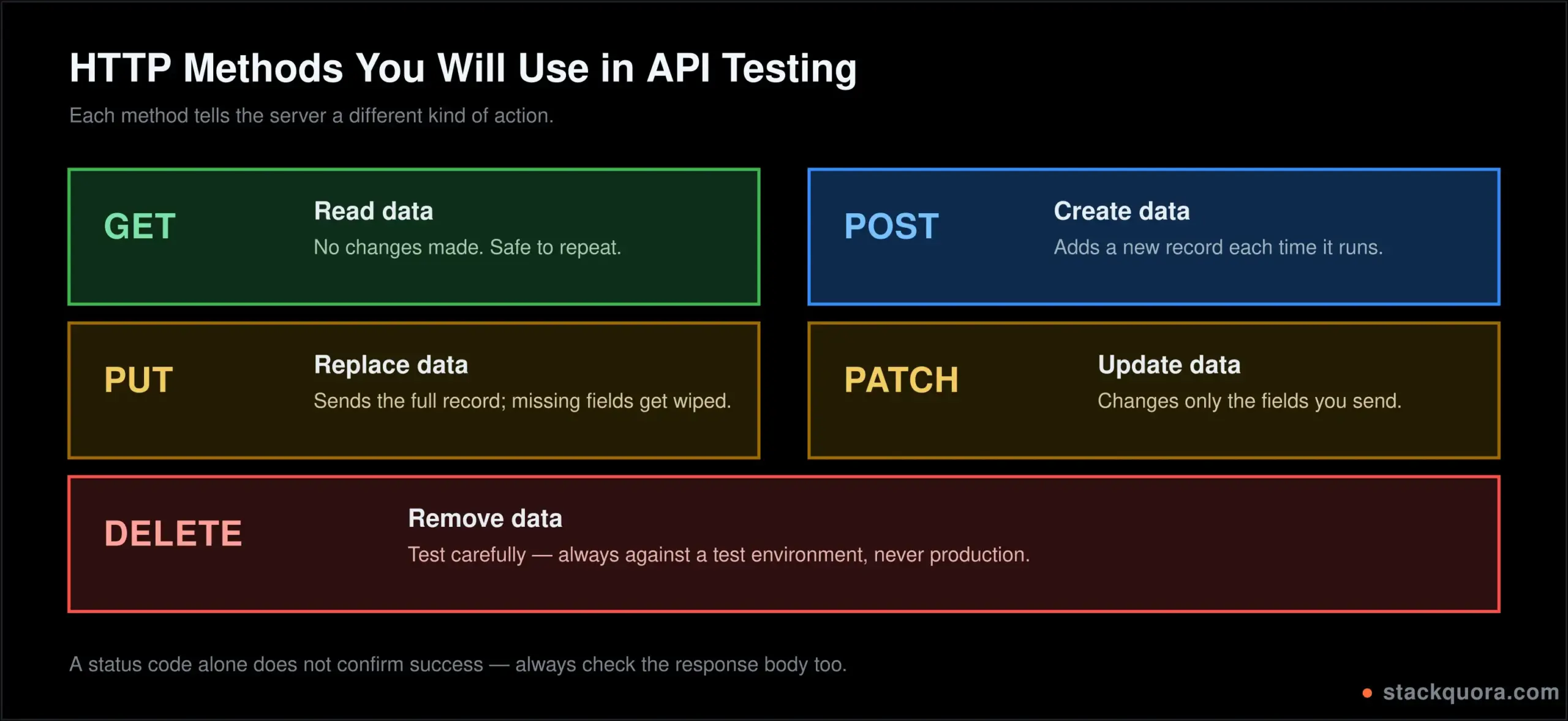
Before you send a single request, it helps to understand HTTP methods, sometimes called HTTP verbs. Each one tells the server what kind of action you want to perform.
GET
GET asks the server for data. It does not change anything. Loading a list of products, checking a user’s profile, fetching a weather forecast — all GET.
GET https://api.example.com/users/101A GET request should be safe to run a hundred times without side effects. If clicking Send on a GET request changes data on the server, something is designed incorrectly.
POST
POST creates something new. Signing up a new user, placing an order, submitting a form — all POST.
POST https://api.example.com/users
Content-Type: application/json

{
  "name": "Aditi Sharma",
  "email": "aditi@example.com"
}
Run the same POST request twice and you usually get two new records, not one. That is worth remembering when you are writing test data.
PUT and PATCH
Both update an existing record, with one difference. PUT replaces the whole record. PATCH updates only the fields you send.
PUT https://api.example.com/users/101
Content-Type: application/json

{
  "name": "Aditi Sharma",
  "email": "aditi.new@example.com",
  "phone": "9876543210"
}
If you PUT and leave out the phone field, many APIs will wipe it out, because PUT expects the full object. PATCH with just { "phone": "9876543210" } changes only that one field and leaves the rest alone.
DELETE
DELETE removes a record.
DELETE https://api.example.com/users/101Test DELETE carefully. Running it against real data by accident is one of the more common and more painful mistakes in manual API testing. Always point test requests at a test environment, never production, unless you genuinely mean to.
Understanding API Status Codes
Every API response comes back with an API status code, a three-digit number that tells you, at a glance, what happened. Learn these five ranges and you can read almost any response without opening the documentation.
- 1xx — Informational. Rare in day-to-day testing. The request was received and processing continues.
- 2xx — Success. The request worked.
200 OKis the general success code.201 Createdconfirms a new record was made.204 No Contentmeans it worked but there is nothing to send back, common after aDELETE. - 3xx — Redirection. The resource has moved.
301is a permanent redirect,302is temporary. - 4xx — Client error. Something about your request was wrong.
400 Bad Requestmeans malformed input.401 Unauthorizedmeans you are not authenticated.403 Forbiddenmeans you are authenticated but not allowed to do this.404 Not Foundmeans the resource does not exist. - 5xx — Server error. Something broke on the server’s side, not yours.
500 Internal Server Erroris the general catch-all.503 Service Unavailableusually means the server is overloaded or down for maintenance.
A very common beginner mistake: assuming any 2xx response means the test passed. It does not. An API can return 200 OK with the wrong data inside it, or an empty array when you expected ten records. The status code tells you the request was handled. It does not tell you the answer was correct. You still have to check the body.
How to Create Your First Postman Request
Let’s build a real request from scratch. This is the fastest way to actually understand Postman, faster than reading about it.
- Open Postman and click New → HTTP Request, or the plus tab at the top.
- Set the method dropdown to
GET. - In the URL bar, type a free public test API, for example:
https://jsonplaceholder.typicode.com/posts/1 - Click Send.
- Look at the response panel below. You should see a
200 OKstatus, the response time, and a JSON body with a post’s data.
That is a working API test right there, even without a single assertion written. Now let’s make it a real, repeatable test.
- Click the Tests tab, just above the request body area.
- Paste in a simple check:
pm.test("Status code is 200", function () {
  pm.response.to.have.status(200);
});

pm.test("Response has an id field", function () {
  const body = pm.response.json();
  pm.expect(body).to.have.property("id");
});- Click Send again. Open the Test Results tab in the response panel. You should see both checks with a green pass mark.
That is the entire loop of API testing with Postman in miniature: build a request, send it, read the response, and write an assertion that checks it automatically from now on.
Postman Collections Explained
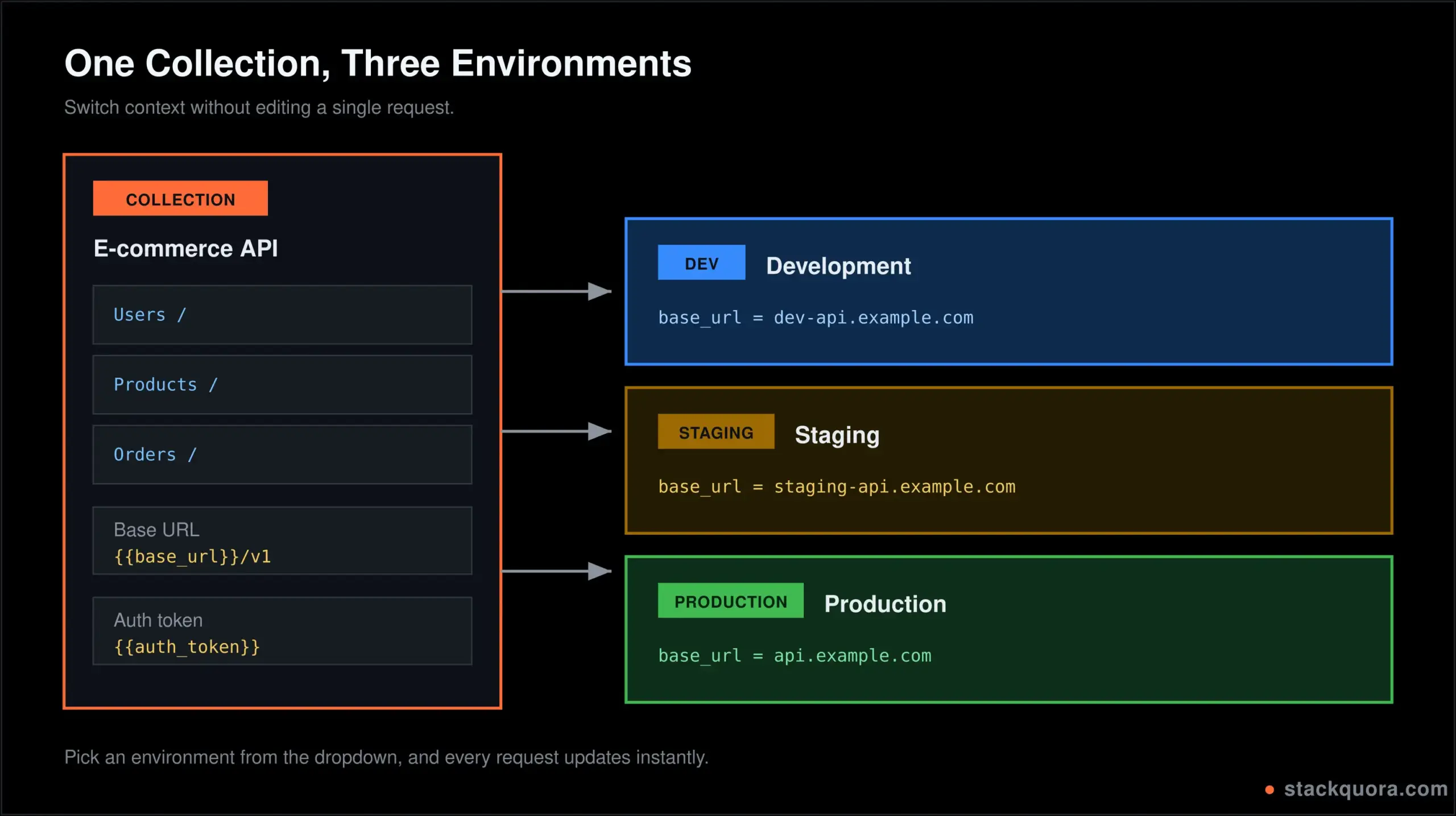
A Postman collection is a folder that holds a group of related requests. Instead of forty loose requests scattered around, you organize them into one collection per API, or one per feature.
A typical collection for a small e-commerce API might look like this:
- Users folder — signup, login, get profile, update profile, delete account
- Products folder — list products, get one product, search products
- Orders folder — create order, get order status, cancel order
Collections are not just for tidiness. They unlock three things that matter a lot once you move past single, one-off requests:
- Shared variables. Set a base URL or a token once at the collection level, and every request inside it can use it.
- Run the whole thing at once. The Collection Runner executes every request in order and gives you a pass/fail summary.
- Export and share. Send a collection as a JSON file, or share it through a team workspace, so everyone tests against the exact same setup.
To create one: click Collections in the left sidebar, click +, name it, and start saving requests into it. Every request you build has a Save button that lets you choose which collection it belongs to.
Postman Environments and Variables
Postman environments solve a very specific, very common problem: you test against a development URL, then a staging URL, then production, and you do not want to manually edit every request each time.
An environment is a named set of variables. You might have three:
- Dev —
base_url = https://dev-api.example.com - Staging —
base_url = https://staging-api.example.com - Production —
base_url = https://api.example.com
Inside your requests, instead of hardcoding the URL, you write:
{{base_url}}/users/101Switch the active environment from the dropdown in the top-right corner, and every request in your collection now points somewhere new, instantly, with zero editing.
Variables are not just for URLs. Store an auth token, an API key, a user ID from a previous response, or any value you reuse often. There are a few variable scopes worth knowing:
- Global variables — available everywhere, across every collection
- Collection variables — available only inside one collection
- Environment variables — tied to whichever environment is active
- Local variables — exist only for a single request run
One genuinely useful trick: capture a value from one response and reuse it in the next request automatically.
// In the Tests tab of a login request
const response = pm.response.json();
pm.environment.set("auth_token", response.token);
Now any later request can use {{auth_token}} in its headers, without you copying and pasting a token by hand every time it expires.
API Response Validation in Postman
API response validation is the real substance of testing. Sending a request is the easy part. Deciding what “correct” looks like, and checking for it automatically, is where the actual testing skill lives.
Writing Your First Test Script
Postman uses a JavaScript library called Chai, wrapped in a friendly pm object, to write assertions. Here is a fuller example against a fictional products API:
pm.test("Status code is 200", function () {
  pm.response.to.have.status(200);
});

pm.test("Response time is under 500ms", function () {
  pm.expect(pm.response.responseTime).to.be.below(500);
});

pm.test("Product has required fields", function () {
  const product = pm.response.json();
  pm.expect(product).to.have.property("id");
  pm.expect(product).to.have.property("name");
  pm.expect(product).to.have.property("price");
  pm.expect(product.price).to.be.a("number");
});

pm.test("Price is a positive number", function () {
  const product = pm.response.json();
  pm.expect(product.price).to.be.above(0);
});
Read that last one carefully. This is the kind of check a lot of manual testing skips, and it is exactly the kind of bug that reaches production: a price of 0 or a negative number slipping through because nobody checked, only that a price field existed.
Common Assertions You Will Use Often
pm.response.to.have.status(200)— checks the exact status codepm.response.to.be.success— checks any2xxstatuspm.expect(body.name).to.eql("Aditi")— checks an exact valuepm.expect(body.items).to.be.an("array")— checks the data typepm.expect(body.items.length).to.be.above(0)— checks a list is not emptypm.response.to.have.header("Content-Type")— checks a header existspm.response.to.have.jsonSchema(schema)— validates the full response shape against a schema, useful once your API stabilises
A habit worth building early: test the unhappy path, not just the happy one. Send a request with a missing field, an invalid ID, or no auth token, and check that the API fails the way it is supposed to. An API that returns 500 Internal Server Error for bad input, instead of a clean 400 Bad Request, is a bug, even though the “feature” technically still works.
API Authentication in Postman
Most real APIs are not open to the public. API authentication proves who is making the request, and Postman has built-in support for the common methods, so you rarely need to construct auth headers by hand.
API Key
A simple key sent with every request, either as a header or a query parameter.
GET https://api.example.com/weather?key=your_api_key_hereIn Postman, go to the Authorization tab, choose API Key, and enter the key name and value. Postman attaches it automatically.
Bearer Token
Very common with modern REST and OAuth-based APIs. You get a token after login and send it in the Authorization header on every following request.
Authorization: Bearer eyJhbGciOiJIUzI1NiIsInR5cCI6IkpXVCJ9...Select Bearer Token in the Authorization tab and paste the token, or better, reference it as {{auth_token}} so it updates automatically once you capture it from a login request, as shown earlier.
Basic Auth
Sends a username and password, base64-encoded, in the header. Older but still common internally.
Authorization: Basic dXNlcjpwYXNzd29yZA==Choose Basic Auth in the Authorization tab and enter the username and password directly; Postman handles the encoding.
OAuth 2.0
The most involved of the four, and the most common for third-party integrations like Google or GitHub login. Postman has a built-in OAuth 2.0 flow under the Authorization tab that walks you through getting an access token without writing any code, then attaches it to your requests automatically.
Whatever method your API uses, never hardcode a real token or password directly into a request you plan to share or commit anywhere. Store it as an environment variable instead, and keep sensitive environments out of anything you export or push to version control.
API Testing Methods and Techniques
API testing methods go beyond just checking that a request works. A thorough QA tester checks several angles.
- Functional testing — does the API do what it is supposed to do, for valid input
- Negative testing — does it fail correctly for invalid input, missing fields or wrong data types
- Boundary testing — what happens at the edges: an empty string, a zero, a very large number, a maximum-length field
- Load and performance testing — how does the API behave under many requests at once (tools like k6 or JMeter go deeper here, but Postman’s response time metric is a useful first signal)
- Security testing — can you access data you should not be able to, by changing an ID in the URL or skipping the auth header
- Contract testing — does the response always match the agreed shape and data types, so front-end and backend teams do not drift apart
You do not need to run all six on every single endpoint every time. But a login endpoint, a payment endpoint, or anything touching user data deserves more than a single happy-path check.
Manual API Testing vs Automated API Testing
Both matter, and they solve different problems.
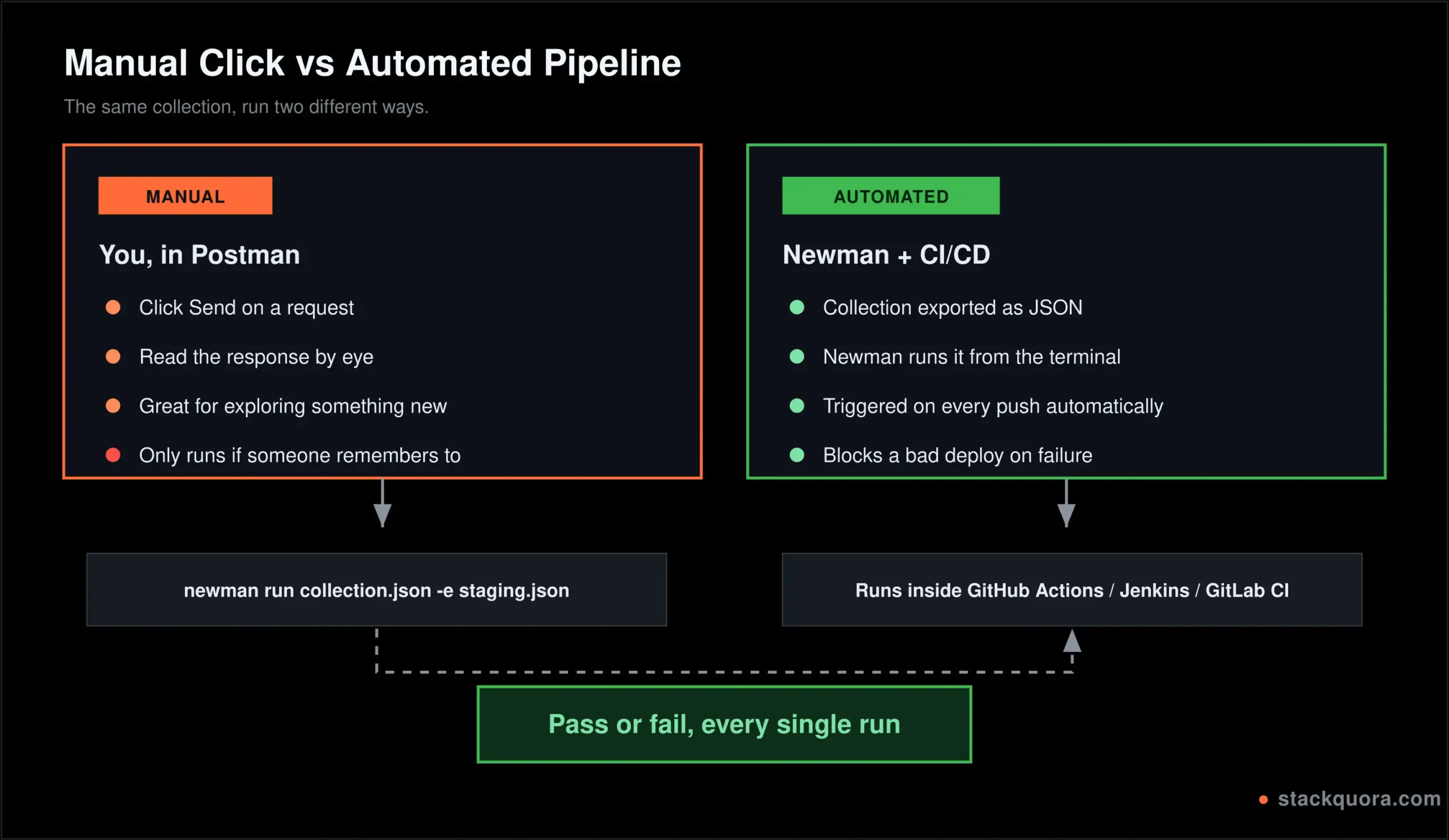
Manual API testing is you, in Postman, sending a request, reading the response, and deciding by eye whether it looks right. It is how you explore a new API, debug something odd, or test a one-off scenario nobody thought to automate. It is fast to start and needs no setup, but it does not scale, and it depends entirely on someone remembering to run it.
Automated API testing is the same checks written once as test scripts, then run automatically, every time code changes, without a person clicking anything. It catches regressions the moment they happen, runs the exact same way every time, and can run hundreds of checks in the time it takes a person to test three by hand. The cost is the upfront time to write the tests properly.
In practice, good QA teams use both. Explore and test new features manually first. Once a feature is stable, turn the important checks into automated tests so nobody has to repeat them by hand every release.
API Testing Automation With Postman
API testing automation in Postman happens on three levels, each one building on the last.
Collection Runner
The simplest level. Click Runner in Postman, pick a collection, pick an environment, and it runs every request in order, showing a pass or fail for every test assertion along the way. Great for running your whole suite manually before a release, or for a quick regression check after a change.
Newman: Running Collections From the Command Line
Newman is Postman’s command-line companion. It runs the exact same collection you built in the Postman app, but from a terminal, which means it can run inside a build pipeline where no one is sitting at a screen clicking buttons.
npm install -g newman

newman run my-collection.json -e my-environment.json
Export your collection and environment as JSON files from Postman first (three dots next to the collection name → Export), then point Newman at them. It prints a clean pass/fail report and exits with a non-zero code if anything fails, which is exactly the signal a CI pipeline needs to stop a bad deployment.
Connecting Postman to a CI/CD Pipeline
Once Newman works locally, wiring it into automation is a short step. A GitHub Actions example:
name: API Tests

on: [push, pull_request]

jobs:
  api-tests:
    runs-on: ubuntu-latest
    steps:
      - uses: actions/checkout@v6
      - uses: actions/setup-node@v6
        with:
          node-version: "22"
      - run: npm install -g newman
      - name: Run Postman collection
        run: newman run collections/api-tests.json -e environments/staging.json
Now every push and every pull request automatically runs your full API test suite, with no one needing to open Postman at all. This is the same idea covered in more depth in our guide to building an automated testing pipeline, if you want to go further into the CI/CD side.
Postman Mock Servers and Monitors
Two features that go beyond basic request-and-response testing, worth knowing even as a beginner.
Mock servers simulate an API’s responses before the real backend exists. If the front-end team is waiting on a backend endpoint that is not built yet, a mock server in Postman can return realistic fake responses in the meantime, so both teams can keep working in parallel instead of one blocking the other.
Monitors run a collection on a schedule, automatically, in the cloud, even when your laptop is closed. Point one at your production API every 15 minutes, and get alerted the moment something breaks, long before a customer notices.
Common API Testing Mistakes and How to Fix Them
These come up constantly, especially with people newer to API testing for beginners.
“I only checked the status code.” A 200 OK does not guarantee correct data. Always inspect the response body too.
“My tests only cover the happy path.” Add at least one negative test per endpoint: bad input, missing auth, an ID that does not exist.
“I hardcoded values that keep changing.” IDs, tokens and timestamps that come from a previous response should be captured into variables, not typed in by hand every time.
“My tests depend on each other in a fragile order.” If test three only works because test one happened to create a record first, a single failure early on causes a wave of unrelated failures later. Where you can, make each test able to stand on its own.
“I tested against production by mistake.” Always double-check the active environment in the top-right corner before running anything that creates, updates or deletes data.
“I never checked response time.” A 200 OK that takes eight seconds is still a problem. Add a response-time assertion to at least your critical endpoints.
“My test data collided with someone else’s.” If two testers run the same collection against a shared environment at the same time, hardcoded test data (the same email address, the same username) will collide. Use dynamic values, for example Postman’s built-in {{$randomEmail}} or {{$timestamp}} variables, to avoid this.
API Testing Best Practices
- Test the contract, not just the happy path. Check field names, data types and required fields every time, not only when a bug is suspected.
- Use environments properly. Never hardcode URLs or tokens directly in a request meant to be reused.
- Keep collections organized into folders. A messy collection with sixty ungrouped requests helps nobody six months from now.
- Write assertions, not just requests. A request with no test script tells you a call was made. It does not tell you it worked.
- Test negative and edge cases deliberately. Bad input, missing fields, wrong types, empty arrays, very large numbers.
- Chain requests where it makes sense. Login, capture the token, use it in the next fifty requests automatically.
- Automate the checks that matter most. You do not need to automate everything on day one; start with your critical paths.
- Keep sensitive data out of shared collections. Real passwords, production tokens and personal data should never sit inside a collection you export or share with a team.
- Run your suite in CI, not just locally. A test that only runs when someone remembers to run it will eventually get forgotten.
- Review and prune old tests. An API changes over time. A test suite that never gets updated slowly turns into noise nobody trusts.
Postman vs Other API Testing Tools
Postman is popular, but it is not the only API testing tool, and it is worth knowing where it sits.
Postman vs Insomnia. Insomnia is lighter and has a cleaner, more minimal interface. Postman has a larger feature set overall, including built-in mock servers, monitors and a bigger collaboration layer, which is why most teams beyond a solo developer lean toward Postman.
Postman vs curl. curl is a command-line tool, always available, scriptable, and very fast for a single quick check. It has no visual interface, no saved collections and no built-in test assertions. Most testers use both: curl for a one-off quick check, Postman for anything you will run more than once.
Postman vs REST Assured. REST Assured is a Java library for writing API tests as actual code, integrated directly into a developer’s existing test suite and build process. It is more powerful for teams who are already writing automated tests in Java, but it has a real coding learning curve that Postman does not.
Postman vs SoapUI. SoapUI focuses more heavily on SOAP APIs alongside REST, and is common in older enterprise environments. Postman is the more modern, REST-first choice for most new projects today.
For most beginners and most small-to-mid QA teams working with REST APIs, Postman remains the easiest starting point, with a clear upgrade path into full automation once you need it.
API Testing Interview Questions
A short set of API testing interview questions you are likely to face, with the shape of a strong answer.
What is the difference between PUT and PATCH?
PUT replaces the entire resource. PATCH updates only the specified fields.
What does a 401 mean versus a 403?
401 means you are not authenticated at all. 403 means you are authenticated, but not allowed to perform this specific action.
How do you test an API without a UI?
Send requests directly to the endpoint using a tool like Postman, and validate the response status, body and headers against expected values.
What is a Postman environment used for?
To switch between different sets of variables, such as base URLs and tokens, for different stages like development, staging and production, without editing every request.
How would you test an endpoint that requires authentication?
Authenticate first, usually through a login request, capture the token from the response, store it as a variable, and attach it to subsequent requests through the Authorization header.
What is the difference between manual and automated API testing?
Manual testing is done by a person sending requests and checking results by hand. Automated testing runs pre-written test scripts automatically, often as part of a CI/CD pipeline, without manual intervention.
How do you handle test data that keeps changing?
Capture dynamic values from responses into variables instead of hardcoding them, and use built-in dynamic variables for things like emails or timestamps to avoid data collisions.
What is Newman?
Postman’s command-line tool for running collections outside the Postman app, most commonly used to integrate API tests into a CI/CD pipeline.
Is Postman Good for Beginners?
Yes, and it is genuinely one of the friendlier entry points into software testing as a whole, not just API testing specifically.
You do not need to know how to code to send your first request and read a real response. The interface shows you everything at once: what you sent, what came back, how long it took. When something goes wrong, the error is usually right there on screen instead of buried in a log file somewhere.
The one real learning curve is writing test scripts in JavaScript. Even that is gentler than it sounds, because Postman’s pm object handles most of the complexity, and you can get productive by copying and adjusting the patterns shown earlier in this guide.
A practical learning path for someone starting today:
- Send a
GETrequest to a free public API and read the response. - Add one test assertion checking the status code.
- Try
POST,PUTandDELETEagainst a test API. - Create a collection and move your requests into it.
- Set up an environment with a
base_urlvariable. - Capture a token from a login response and reuse it automatically.
- Run your whole collection through the Collection Runner.
- Export it and run it once through Newman.
Each step is small. By step eight, you have gone from zero to a working, automatable API testing tutorial of your own, and that same skill shows up constantly in QA and backend developer job postings.
Conclusion
API testing is one of those skills that pays off far more than the time it takes to learn. Postman lowers the barrier to almost nothing: no setup, no server, no coding required for your very first request. From there, the same tool grows with you, from a single manual check to a full collection running automatically inside a CI/CD pipeline on every code change.
Start small. Send one request. Add one assertion. Build one collection. Each piece you add compounds, and within a week of regular practice, you will be testing APIs with the same confidence QA teams bring to production releases.
The real goal is not clicking Send a thousand times. It is knowing, with evidence, that the API behind the app actually does what it claims to do.
Frequently Asked Questions
Is Postman free to use?
Yes. Postman’s free plan covers requests, collections, environments, test scripts, the Collection Runner and basic collaboration, which is enough for individual learning and most small teams. Paid plans add larger team features, more monitor runs and advanced governance controls.
Do I need to know how to code to use Postman?
No, not to get started. You can send requests and read responses with zero coding. Writing test assertions uses simple JavaScript, but Postman’s built-in snippets and the pm object make this approachable even with very little coding background.
What is the difference between REST API testing and SOAP API testing?
REST APIs typically use JSON and standard HTTP methods like GET, POST, PUT and DELETE, and are the most common style today. SOAP APIs use XML and a stricter message format, and are more common in older or highly regulated enterprise systems. Postman supports both, though it is best known for REST API testing.
How do I test an API that requires a login?
Send a login request first, capture the returned token from the response using a short test script, save it as an environment variable, and reference that variable in the Authorization header of your other requests.
Can Postman replace manual testing entirely?
Not entirely. Postman is excellent for both manual exploration and automated regression checks, but human judgment is still needed to design good test cases, think through edge cases, and interpret results that do not fit a simple pass or fail rule.
What is Newman used for?
Newman runs Postman collections from the command line instead of the desktop app, which makes it possible to run the same tests automatically inside a CI/CD pipeline on every code change.
How do I avoid hardcoding values in my Postman tests?
Use variables at the collection or environment level for anything reused, such as base URLs and tokens, and capture dynamic values like IDs or tokens directly from a previous response using a short script in the Tests tab.
What is the difference between a 4xx and a 5xx error?
A 4xx status code means something about the request itself was wrong, such as bad input or missing authentication. A 5xx status code means the server failed to handle a request that was otherwise valid, which usually points to a bug or outage on the server side.
How many tests should one API endpoint have?
There is no fixed number, but a reasonably thorough endpoint usually checks the status code, the response shape and data types, at least one negative case, and, for anything sensitive, an authentication or permission check.
Is Postman only for REST APIs?
No. Postman also supports GraphQL, SOAP, WebSocket and gRPC requests, though REST remains its most widely used and best-documented use case.