
Vibe Coding in 2026: How AI Is Changing Software Development
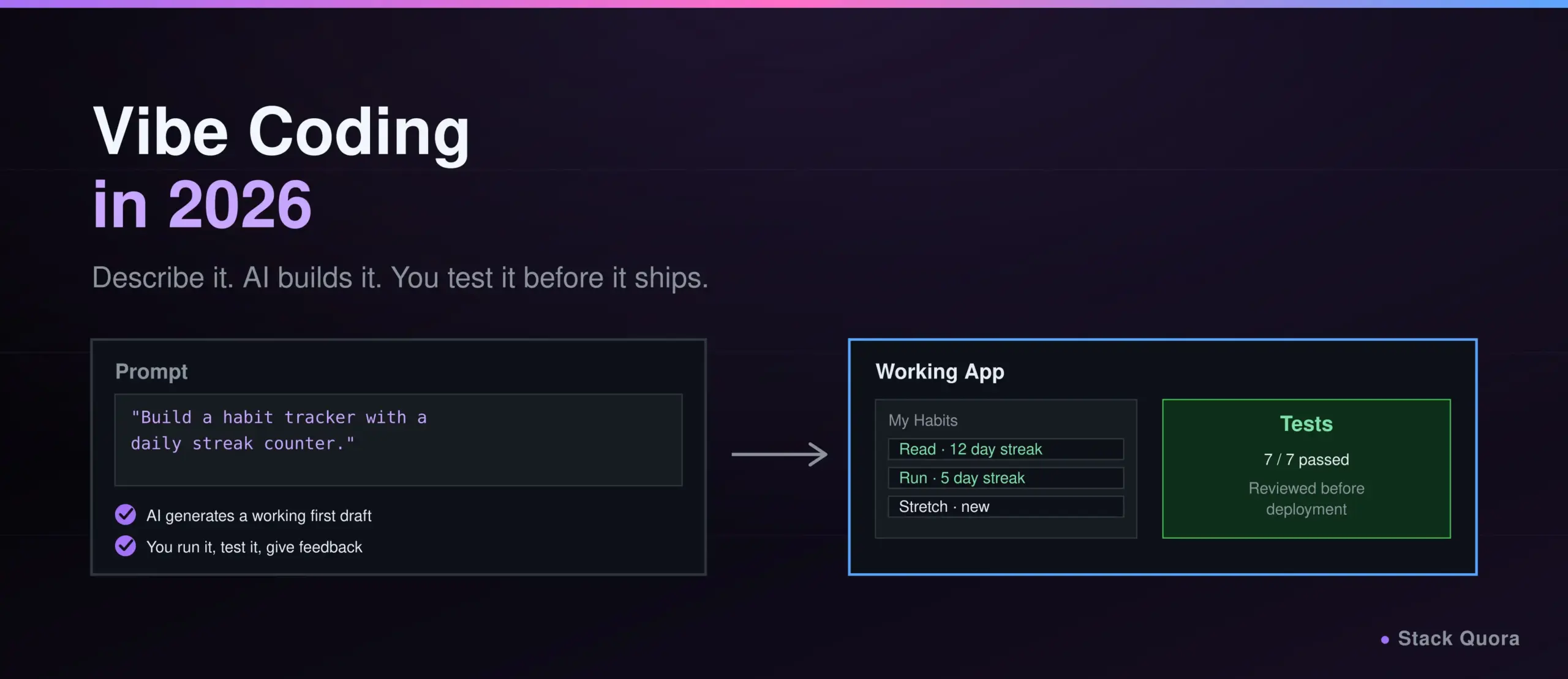
Two years ago, describing what you wanted in plain English and watching a working app appear was a party trick. In 2026, it is a normal Tuesday for millions of developers, and increasingly, for people who have never written a line of code in their life.
This is vibe coding: describing software in natural language and letting AI handle the implementation, while you steer, test and decide what actually ships. It has gone from a throwaway tweet to a term named Word of the Year by a major dictionary, and from a weekend hobby to a workflow used daily by a majority of professional developers.
This guide covers what vibe coding actually means, how it works underneath the buzzword, which tools people are really using this year, a practical step-by-step workflow you can follow today, and an honest look at what it does well and where it can quietly hurt you. No hype, no dismissal — just what you need to use it well.
What Is Vibe Coding?
Vibe coding is a style of building software where you describe what you want in plain language, and an AI tool generates, runs and refines the code, while you guide the direction through feedback rather than writing every line yourself. The phrase captures a real shift: instead of typing syntax, you are having a conversation about outcomes.
It is not one fixed technique. In practice it spans a spectrum. On one end, someone with no coding background describes an app and accepts whatever the AI produces, barely glancing at the code. On the other end, an experienced engineer uses AI to generate a first draft, then reads every line, tests it properly, and treats the AI’s output the way they would treat a junior teammate’s pull request. Both get called “vibe coding” today, and that gap is exactly where most of the controversy around the term comes from.
Where Did the Term Vibe Coding Come From?
The term was coined by Andrej Karpathy, a founding member of OpenAI and former AI director at Tesla, in a post on X on February 2, 2025. He described a way of working where you “fully give in to the vibes,” barely touch the keyboard, and let the AI handle the details while you focus on what you want to see happen.
The phrase spread fast. Merriam-Webster added it as a slang and trending term within weeks, and Collins Dictionary later named vibe coding its Word of the Year for 2025. You can read more about the term’s origin and how its meaning shifted as it spread on Wikipedia’s vibe coding entry.
Worth knowing: Karpathy’s original description leaned toward small, throwaway weekend projects, not production systems handling real user data. A lot of the debate around vibe coding today comes from that original, narrower meaning getting stretched to cover much higher-stakes work than it was ever meant for.
How Vibe Coding Differs From Traditional Programming
Traditional programming starts with you writing the logic yourself, line by line, using your own understanding of the language and the system. You are the author. The computer just executes what you wrote.
Vibe coding flips the starting point. You describe the outcome, the AI writes the first draft, and your job shifts toward direction, evaluation and judgment. You are closer to an editor or a reviewer than a first-draft author, at least for the parts you delegate.
This is not a small stylistic difference. It changes what skill actually matters day to day. Typing speed and syntax memorization matter less. Reading code quickly, spotting what looks wrong, writing a clear specification, and knowing when to trust versus double-check an AI’s output matter a great deal more.
How Vibe Coding Works
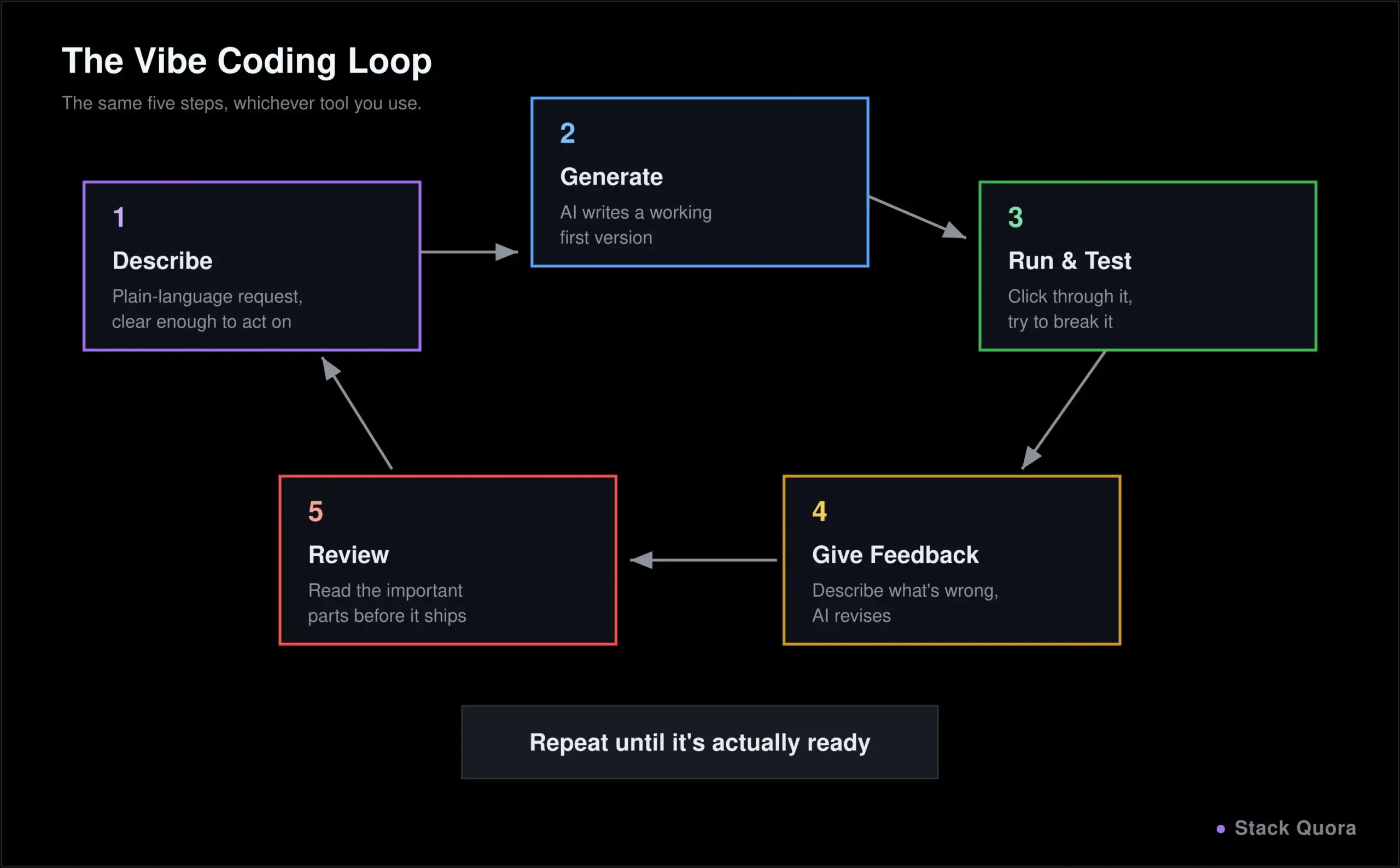
Underneath the different tools, the loop is roughly the same every time:
- You describe the software you want, in plain language, ideally with enough detail that the AI is not guessing at your intent.
- The AI generates the code, usually a working first version rather than a single function.
- You run and test the generated application, checking whether it actually does what you asked.
- You give the AI feedback, describing what is wrong or what should change, and it revises the code.
- You review and improve the final result, reading the important parts, cleaning up rough edges, and deciding what is actually ready to ship.
That loop can take thirty seconds for a small script or run for hours across a real feature. The tools have gotten dramatically better at handling more of each step autonomously, which is the whole story of how vibe coding has evolved from a novelty into daily practice. But the loop itself – describe, generate, test, refine, review – has stayed the same since Karpathy’s original post.
Why Is Vibe Coding Trending in 2026?
A few forces landed at the same time.
AI coding tools got genuinely good at understanding entire codebases, not just autocompleting the next line. The shift from “suggests the next few words” to “reads your whole project, plans a multi-step change, and executes it” is the single biggest reason vibe coding stopped being a toy and started being a real workflow.
The numbers back this up. According to JetBrains’ Developer Ecosystem Survey 2026, a large-scale study of more than 15,000 professional developers worldwide, 90% of professional developers were using AI coding agents at work at least weekly by mid-2026, and 68% were using them daily. That is not early adopters experimenting on the side. That is most of the industry, most days.
From Autocomplete to Coding Agents
The other big shift is what the AI is actually allowed to do. Early tools suggested a line of code and waited for you to accept it. Current coding agents can read your whole repository, plan a multi-step change, edit several files, run your test suite, look at the failures, and try again, all with minimal prompting in between.
This is the real story behind “vibe coding” in 2026: it is less about typing less and more about delegating longer, more complete chunks of work, then checking the result rather than watching every keystroke. You can read more about the specific numbers behind this shift on JetBrains’ AI coding agent adoption report.
Vibe Coding vs Traditional Software Development
Here is where the two approaches actually diverge, day to day:
- Coding workflow. Traditional development is you writing logic directly. Vibe coding is you specifying intent and reviewing generated output.
- Development speed. A first working version tends to arrive dramatically faster with vibe coding, especially for common patterns like CRUD apps, forms, dashboards and API wrappers. Novel, unusual logic sees a smaller speed gain.
- Code review. Traditional review checks a human’s reasoning. Reviewing AI-generated code needs a different mindset: assume nothing about why a choice was made, and verify behavior rather than trusting that the “obvious” implementation is correct.
- Debugging. Debugging your own code draws on memory of why you wrote it that way. Debugging AI-generated code often means understanding unfamiliar code for the first time while it is already broken, which is a harder starting position.
- Testing and quality assurance. Neither approach gets to skip this. If anything, AI-generated code needs testing more, not less, since the person shipping it may not have written or fully understood every line.
- Developer responsibility. This one does not change. Whoever ships the code owns the consequences, regardless of who or what wrote it. “The AI wrote it” has never been an acceptable answer for a production incident, and it is not becoming one now.
Popular Vibe Coding and AI Development Tools in 2026
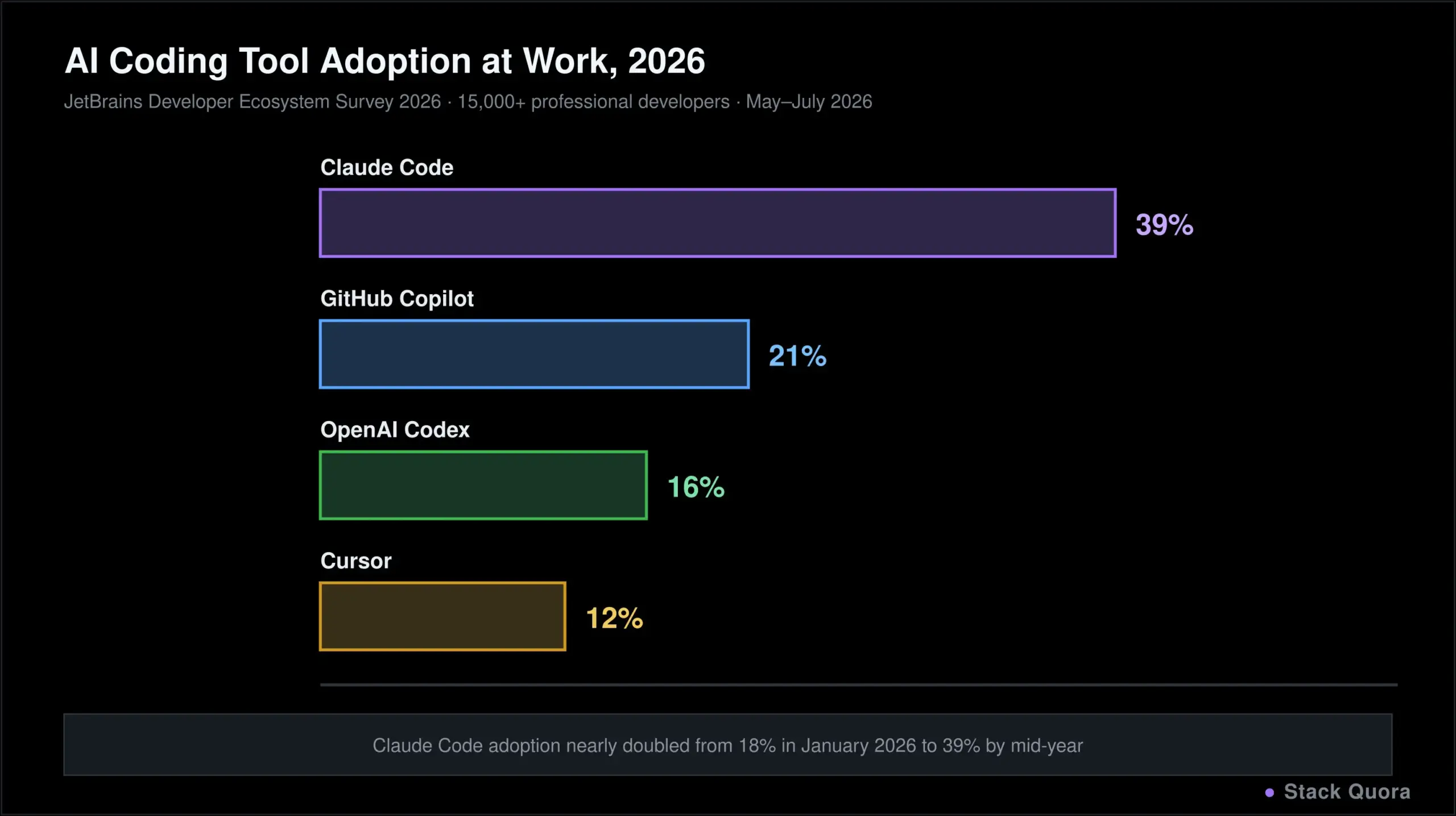
The market shifted hard in 2026. Based on JetBrains’ Developer Ecosystem Survey 2026, adoption changed significantly in just the first seven months of the year, so treat any single tool’s position as a snapshot, not a permanent ranking.
Claude Code
Claude Code is Anthropic’s agentic coding tool. It works from the command line, inside an IDE, in the desktop app, or through the browser, reading your codebase, answering questions about it, and making changes directly rather than only suggesting snippets for you to paste in.
According to JetBrains’ 2026 survey, Claude Code became the most widely adopted AI coding tool at work in 2026, used by roughly 39% of professional developers worldwide by mid-year, up sharply from 18% at the start of the year, and by close to half of developers in the United States specifically. For the current feature set and setup instructions, see the official Claude Code overview.
OpenAI Codex
Codex is OpenAI’s agentic coding platform, available through a terminal CLI, an IDE extension, a desktop app, and cloud-based sandboxed environments where tasks can run in isolation, often in parallel across several tasks at once. It grew quickly through 2026 as OpenAI pushed hard to close the gap with rival tools. Learn more at openai.com/codex.
GitHub Copilot
GitHub Copilot was the tool that first brought AI coding assistance into the mainstream, and it has evolved well past simple autocomplete. Its agent mode can now plan multi-file changes, run terminal commands, iterate on test failures, and turn a GitHub issue directly into a draft pull request. Its biggest strength remains reach: it works across nearly every major IDE and sits natively inside GitHub’s own workflows. See GitHub Copilot’s feature page for details.
Cursor
Cursor is a fork of VS Code rebuilt around AI as the primary interface rather than an add-on. Its agent mode can plan and execute multi-step changes across a project, and its background agents can work on tasks like opening a pull request from an issue without you actively watching. It supports several underlying AI models, letting you pick the right one for a given task. More at cursor.com.
Replit
Replit takes a different angle: everything, including the AI agent, the code editor, the database and the deployment step, lives in the browser with nothing to install locally. Replit Agent can go from a plain-language description to a deployed, working full-stack application in one session, which makes it a common starting point for non-developers, students and anyone prototyping an idea for the first time. See replit.com.
Other Tools Worth Knowing
A few more names are worth having on your radar. OpenCode, an open-source coding agent, gained meaningful adoption through 2026 without a major company’s marketing budget behind it. Google Antigravity, Google’s entry into the coding agent space, grew quickly in awareness and holds a particularly strong position among developers in India. Most JetBrains IDEs also now offer their own built-in AI assistant alongside support for third-party agents.
The practical takeaway from all of this churn: do not build deep, irreversible habits around one vendor’s proprietary features. Skills like writing a clear specification, reviewing generated code critically, and breaking a big task into verifiable steps transfer across every tool on this list. Vendor-specific tricks do not.
What Can You Build With Vibe Coding?
Vibe coding is not limited to toy projects anymore. In practice, people are using it for:
- Websites and web applications — landing pages, marketing sites, dashboards and full web apps with a frontend and backend.
- Internal business tools — small admin panels, reporting tools and workflow apps that would never have justified a dedicated engineering sprint before.
- Prototypes and MVPs — testing an idea with a working demo in hours instead of weeks, before committing real engineering time to it.
- Automation scripts — one-off scripts for data cleanup, file processing, scheduled tasks and small integrations between tools.
- APIs and backend applications — REST endpoints, database-backed services and integrations, though these deserve real scrutiny before going live; testing the API layer with Postman is a sensible step even for AI-generated endpoints, not an optional one.
- Small productivity tools — browser extensions, CLI utilities and personal automation that used to be more trouble than they were worth to build by hand.
The common thread: the lower the stakes and the more standard the pattern, the better vibe coding tends to work. The higher the stakes, or the more unusual the requirements, the more it needs a skilled human steering closely.
A Practical Vibe Coding Workflow
This is the workflow that separates a usable result from a mess. It applies whether you are a complete beginner or an experienced engineer moving fast.
Step 1: Define the Requirements
Before you open any tool, write down what the software actually needs to do, in plain sentences. What does a user do first? What data does it store? What does success look like? Skipping this step is the single most common reason a vibe-coded project spirals into confused, contradictory prompts later.
Step 2: Choose the Technology Stack
Even when AI will write most of the code, you still benefit from picking a stack deliberately: a language and framework you can at least read, hosting that fits your budget, and a database that matches how much data you actually expect. A stack you cannot evaluate is a stack you cannot safely review.
Step 3: Give AI a Clear Prompt
Vague prompts produce vague, generic output. A strong prompt states the goal, the key constraints, the tech stack, and what “done” looks like. “Build me a task tracker where users can sign up, create tasks with due dates, mark them complete, and see overdue tasks highlighted in red” will get you much further than “build me a to-do app.”
Step 4: Generate the First Version
Let the AI produce a working first draft. Resist the urge to interrupt every few seconds with small corrections; let it finish a coherent first pass, then evaluate the whole thing together rather than nitpicking mid-generation.
Step 5: Run and Test the Application
Actually run it. Click through every flow you described. Try to break it: empty fields, invalid input, a page refresh mid-action. If there is an API involved, testing the API layer with Postman separately from the UI will catch problems that clicking through screens alone will miss.
Step 6: Debug and Improve the Code
When something breaks, describe exactly what happened and what you expected instead, and let the AI attempt a fix. If it fails on the same issue two or three times in a row, that is usually your signal to step in directly rather than keep re-prompting the same request differently.
Step 7: Review the Code Before Deployment
Before anything goes live, read through the parts that matter most: authentication, payments, anything touching personal data, and anything that talks to the outside world. This is also the right moment to wire the project into an automated CI/CD pipeline so that every future change gets built and tested automatically, instead of relying on someone remembering to check by hand.
A Worked Example: Building a Simple App With Vibe Coding
The Idea
Say you want a simple habit tracker: users can add a habit, check it off each day, and see a streak counter. Nothing exotic, but enough moving parts to be a real, useful example.
From First Prompt to Working Prototype
You describe the app in detail: the data model (habits, daily check-ins, streak calculation), the screens you need (a list view, an add-habit form, a simple stats view), and the stack you want to use. The AI generates a working first version, usually including the frontend, a basic backend and a database schema, in a single pass.
From there, it is iteration. You run it, notice the streak counter resets incorrectly if you check in twice in one day, describe that exact bug, and the AI patches it. You ask for a small UI change, a confirmation before deleting a habit, better spacing on mobile. Each round trip is faster than writing the equivalent change by hand would have been.
Testing and Preparing for Deployment
Before this leaves “personal project” territory, it earns a proper pass: check the authentication flow if there is one, check what happens with bad input, check that one user cannot see another user’s habits. If it has an API layer, this is exactly where Playwright MCP for AI-driven test automation or a manual Postman pass earns its keep, catching the kind of edge case that “it worked when I clicked through it” tends to miss. Only after that does it make sense to wire up a real deployment pipeline and put it in front of other people.
Benefits of Vibe Coding
- Faster prototyping. Turning an idea into something clickable happens in hours, not sprints, which makes testing an idea with real people far cheaper.
- Lower barrier to software development. People who never learned to code can now build real, working tools for themselves, which was simply not true a few years ago.
- Faster experimentation. Trying three different approaches to a feature costs a fraction of what it used to, so more ideas actually get tested instead of debated.
- Reduced repetitive coding. Boilerplate, CRUD scaffolding and standard patterns that used to eat hours now take minutes, freeing time for the parts of a project that actually need human judgment.
- Better developer productivity — with a real caveat. A large 2026 systematic review covering 116 empirical studies found controlled coding-stage productivity gains of roughly 20 to 30% on average, but the evidence was not uniform: some field experiments, including a randomized trial run by Google, found smaller or even negative effects depending on the task and the team. Separately, longitudinal research into what some researchers call an “AI productivity paradox” found that individual velocity gains in the first few weeks can be followed by rising technical debt that erodes team-level throughput by month six, unless teams actively manage code quality alongside the speed. The honest summary: vibe coding can meaningfully speed up real work, but “faster” is not automatic, uniform, or free of trade-offs, and treating it as a guaranteed multiplier is how teams end up surprised months later.
Limitations and Risks of Vibe Coding
- AI-generated code can contain bugs. Generated code often looks confident and clean while quietly doing the wrong thing in an edge case nobody thought to test.
- Security vulnerabilities. This is the risk most beginners underestimate. Veracode’s 2026 GenAI Code Security Report, which tested more than 100 AI models across repeated snapshots through the year, found an average security pass rate of just 56%, essentially unchanged from the prior year despite major gains in general AI capability. In plain terms: close to half of AI-generated code samples failed a basic security check when the prompt did not specifically ask for secure code, and coding-specialized models were not meaningfully safer than general-purpose ones.
- Poor code quality and maintainability. Fast, working code is not the same as code someone can safely extend six months later. Generated code can accumulate inconsistent patterns, unclear naming and duplicated logic quickly if nobody is actively steering toward maintainability.
- Lack of understanding of generated code. If you cannot explain why a piece of code works, you cannot reliably predict how it will fail, and you definitely cannot safely change it later.
- Debugging AI-generated applications. Fixing a bug in code you did not write and have not fully read is genuinely harder than fixing your own mistakes, especially once a project grows past a single session’s context.
- Privacy and sensitive data concerns. Pasting real customer data, credentials or proprietary logic into a prompt sent to a third-party AI service carries real privacy and compliance risk that many people vibe coding casually never stop to consider.
- Over-reliance on AI. Accepting every suggestion without question is exactly the failure mode Karpathy’s original description warned about, and it is precisely how avoidable bugs and security holes end up in production.
None of this means vibe coding is unsafe by nature. It means it needs the same discipline any powerful tool needs, and skipping that discipline is where the real risk lives.
Does Vibe Coding Replace Software Developers?
Not currently, and not in the way the more breathless headlines suggest.
What AI can handle well: boilerplate, standard patterns, first drafts, repetitive refactors, and generating a reasonable starting point for something you can describe clearly. It is genuinely good at compressing the “blank page” problem down to almost nothing.
What developers still need to do: define the actual requirements correctly, catch subtle logic errors an AI has no way to know are wrong, make architectural decisions that require judgment about trade-offs the AI cannot see, and take responsibility for what ships. None of that has gone away. If anything, it has become the whole job, now that typing the code itself takes up less time.
Why code review and testing still matter more, not less: every study on AI-generated code security and quality points the same direction: the bottleneck has shifted from writing code to reviewing and verifying it. Interestingly, that shift is happening on the QA side too. How AI agents are changing QA shows the same pattern from the testing angle: AI is not removing the need for verification, it is changing who and what does the verifying.
The developer’s evolving role: less typing, more specifying, reviewing and deciding. The job is shifting from “person who writes code” toward “person who directs and validates code,” which is a different skill set, not a smaller one.
Vibe Coding vs AI Coding Agents
These two terms get used interchangeably, but they describe different things, and mixing them up leads to real confusion about what a tool is actually doing.
What Is an AI Coding Agent?
An AI coding agent is software that can independently plan and execute multi-step coding tasks: reading a codebase, deciding what needs to change, editing multiple files, running commands, checking whether tests pass, and repeating that loop until the task is done, all with minimal back-and-forth. Playwright MCP for AI-driven test automation is a good concrete example of this idea applied to a specific domain: an agent that can plan and run a whole test session, not just suggest one line of test code.
Vibe Coding vs Agentic Software Development
Vibe coding describes the overall workflow and mindset: describe the outcome, let AI implement it, review the result. An AI coding agent is one of the tools that makes a more advanced version of that workflow possible. You can vibe code with a simple chat-based tool that has no agentic capability at all, just less efficiently. Agentic development is what vibe coding looks like once the tool can reliably handle longer, multi-step tasks with less supervision at each individual step.
When Should Developers Use Each Approach?
Reach for a lighter, more supervised approach — reviewing each suggestion as it comes — on unfamiliar, high-stakes, or security-sensitive code, where you want to catch problems before they compound. Reach for a more autonomous agentic approach on well-understood, lower-stakes, repetitive work, where the pattern is standard enough that verifying the finished result is faster than supervising every step along the way.
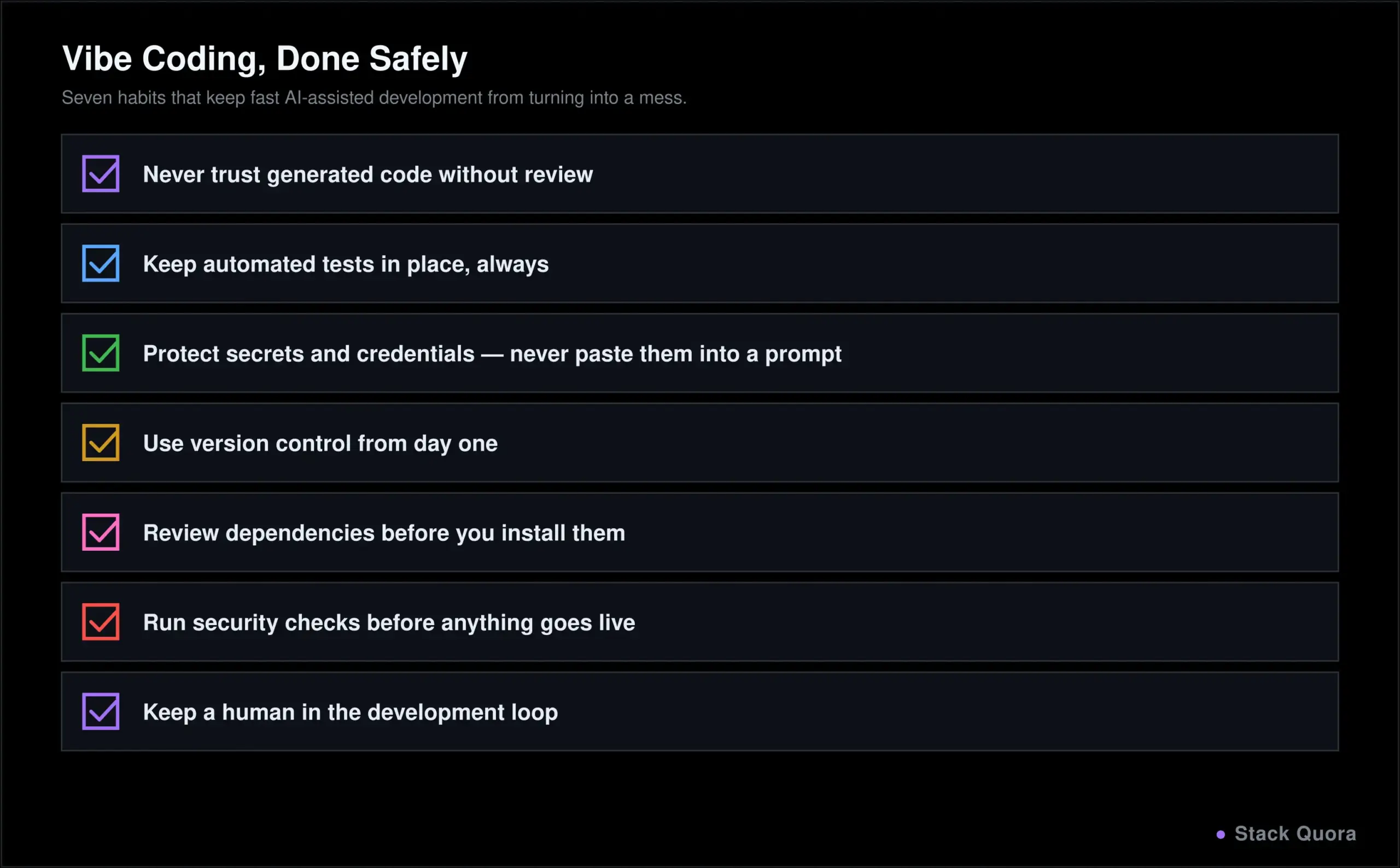
How to Use Vibe Coding Safely
- Never trust generated code without review, especially anything touching authentication, payments or personal data.
- Keep automated tests in place. A good test suite catches what a quick read-through will not, and it is what makes fast iteration safe rather than reckless. Wiring that suite into an automated CI/CD pipeline turns “someone should test this” into something that actually happens every time.
- Protect secrets and credentials. Never paste real API keys, passwords or tokens into a prompt, and never let generated code hardcode them either.
- Use version control from day one, even on a small solo project. It is your undo button when an AI-generated change makes things worse, not better.
- Review dependencies. AI tools can suggest packages that are outdated, poorly maintained, or occasionally entirely made up. Check that anything you are told to install actually exists and is actively maintained.
- Run security checks, especially before anything goes live. Given that even leading models fail basic security checks close to half the time by current industry testing, skipping this step is not a small risk to accept.
- Keep humans in the development loop. The fastest path to a bad outcome is a fully autonomous pipeline with nobody reviewing what actually ships.
Is Vibe Coding the Future of Software Development?
From AI-assisted coding to agentic development. The clear direction of travel through 2026 has been toward tools handling longer, more complete tasks with less step-by-step supervision, not toward AI replacing judgment entirely. That trend shows no sign of reversing.
How developer workflows are changing. Time spent typing syntax keeps shrinking. Time spent specifying requirements clearly, reviewing generated output critically, and deciding what is actually ready to ship keeps growing. The tools change constantly; that shift in where your time goes looks like the more durable trend.
Skills developers should build in 2026. Writing a clear, complete specification. Reading unfamiliar code quickly and spotting what looks wrong. Knowing when to trust an AI’s output and when to slow down and check it by hand. Testing thoroughly, especially the parts an AI is least likely to have gotten right on its own. None of these skills go out of date when the next tool launches, which is exactly why they are worth building deliberately instead of picking up by accident.
Vibe coding is not replacing software engineering. It is changing what a much bigger share of a developer’s time actually goes toward, and lowering the barrier for people who are not professional developers to build real, working things for the first time. Both of those are significant, lasting shifts, whatever the term itself is called five years from now.
Final Thoughts
Vibe coding is not a passing trend, and it is not a shortcut around learning how software actually works either. It is a real shift in where a developer’s time and attention go: less on typing syntax, more on specifying clearly, reviewing critically, and deciding what is actually ready to ship.
Used well, with real testing and real review, it is one of the biggest productivity shifts software development has seen in years, and it has opened building software to people who never had access to it before. Used carelessly, with nobody actually checking what got generated, it produces exactly the security and quality problems this guide has walked through, at scale.
The tools will keep changing. The instinct to check your work, understand what you ship, and take responsibility for it will not go out of date, no matter which tool wins the adoption race next year.
Frequently Asked Questions
What is vibe coding?
Vibe coding is a way of building software where you describe what you want in plain language, and AI generates, runs and refines the code, while you guide it through feedback and review the result before it ships.
Is vibe coding the same as AI coding?
Not exactly. AI coding is the broader category of using AI to help write software, including simple autocomplete. Vibe coding specifically describes leaning heavily on natural-language description and AI generation, with reduced attention to the code itself, especially at the more hands-off end of the spectrum.
Is vibe coding suitable for beginners?
Yes, and it is one of the most accessible entry points into building software that has existed. The important caveat: beginners should still learn to read and test what gets generated, rather than shipping anything they do not understand, especially once real users or real data are involved.
What are the best vibe coding tools?
As of 2026, Claude Code, OpenAI Codex, GitHub Copilot, Cursor and Replit are the most widely used, based on JetBrains’ 2026 Developer Ecosystem Survey. Each fits a different context: Replit for browser-based, zero-setup building; Cursor and Claude Code for developers who want a deeply capable editor or terminal experience; GitHub Copilot for teams already living inside GitHub; and Codex for OpenAI’s cloud-based agentic workflow.
Can vibe coding build production applications?
Yes, but it needs real engineering discipline around it: proper testing, security review, code review and a deployment pipeline, exactly the same discipline any production software needs, whether a human or an AI wrote the first draft.
Can AI replace software developers?
Not currently. AI has taken over a meaningful share of the actual typing, but requirements definition, architectural judgment, catching subtle errors, and taking responsibility for what ships still require a skilled human, and that has not meaningfully changed even as the tools have improved.
Is AI-generated code safe?
Not by default. Industry testing through 2026, including Veracode’s GenAI Code Security Report, has consistently found that a large share of AI-generated code fails basic security checks when security is not specifically part of the prompt. Treat generated code as unreviewed until someone actually reviews it.
Should professional developers learn vibe coding?
Yes. Whatever you call the underlying skill, working effectively with AI coding tools is now a mainstream part of professional software development, used by the large majority of developers at least weekly according to 2026 industry survey data. The developers getting the most value from it are the ones who combine it with strong review habits, not the ones who use it instead of them.