
AI-Powered Test Automation in 2026: AI Agents & QA
Software testing is entering a new phase.
For years, test automation mainly meant writing scripts, maintaining locators, executing regression suites, and checking whether an application behaved as expected. Tools such as Selenium, Playwright, Cypress, Appium, TestNG, and others have made this work much faster.
But artificial intelligence is changing the process.
Today, AI can help testers create test cases, generate automation code, analyze failures, understand requirements, create test data, and explore applications. The next step is even more interesting: AI agents can use tools, make decisions, and perform multiple testing tasks with less step-by-step instruction.
This is why AI-powered test automation has become one of the important software testing trends in 2026.
However, there is a common misunderstanding.
AI does not simply mean that testers will disappear.
Instead, the role of the tester is changing.
The future is likely to combine AI speed with human judgment. AI can handle many repetitive tasks, while testers continue to make decisions about risk, business requirements, user experience, security, and whether a test result actually proves that the software is ready.
In this guide, we will look at what AI-powered test automation means, how AI testing agents work, where Playwright MCP fits into the picture, what AI can and cannot do, and what software testers should learn in 2026.
What Is AI-Powered Test Automation?
AI-powered test automation is the use of artificial intelligence to improve different parts of the software testing and automation process.
Traditional automation normally follows predefined instructions.
For example:
Open website
↓
Enter username
↓
Enter password
↓
Click Login
↓
Verify dashboard
A traditional Selenium or Playwright test usually follows this flow exactly.
AI-powered automation can work at a higher level.
Instead of manually defining every small step, a tester may provide a requirement such as:
“Verify that a valid user can log in and that an invalid password shows the correct error message.”
An AI system can then help create:
- test scenarios
- test cases
- test data
- automation code
- assertions
- documentation
- failure summaries
More advanced AI agents can also interact with tools and applications to perform parts of the workflow themselves.
This is where AI agents in software testing become particularly interesting.
How Is AI Test Automation Different From Traditional Automation?
The biggest difference is not that one uses code and the other does not.
The difference is how much reasoning and assistance happens around the automation process.
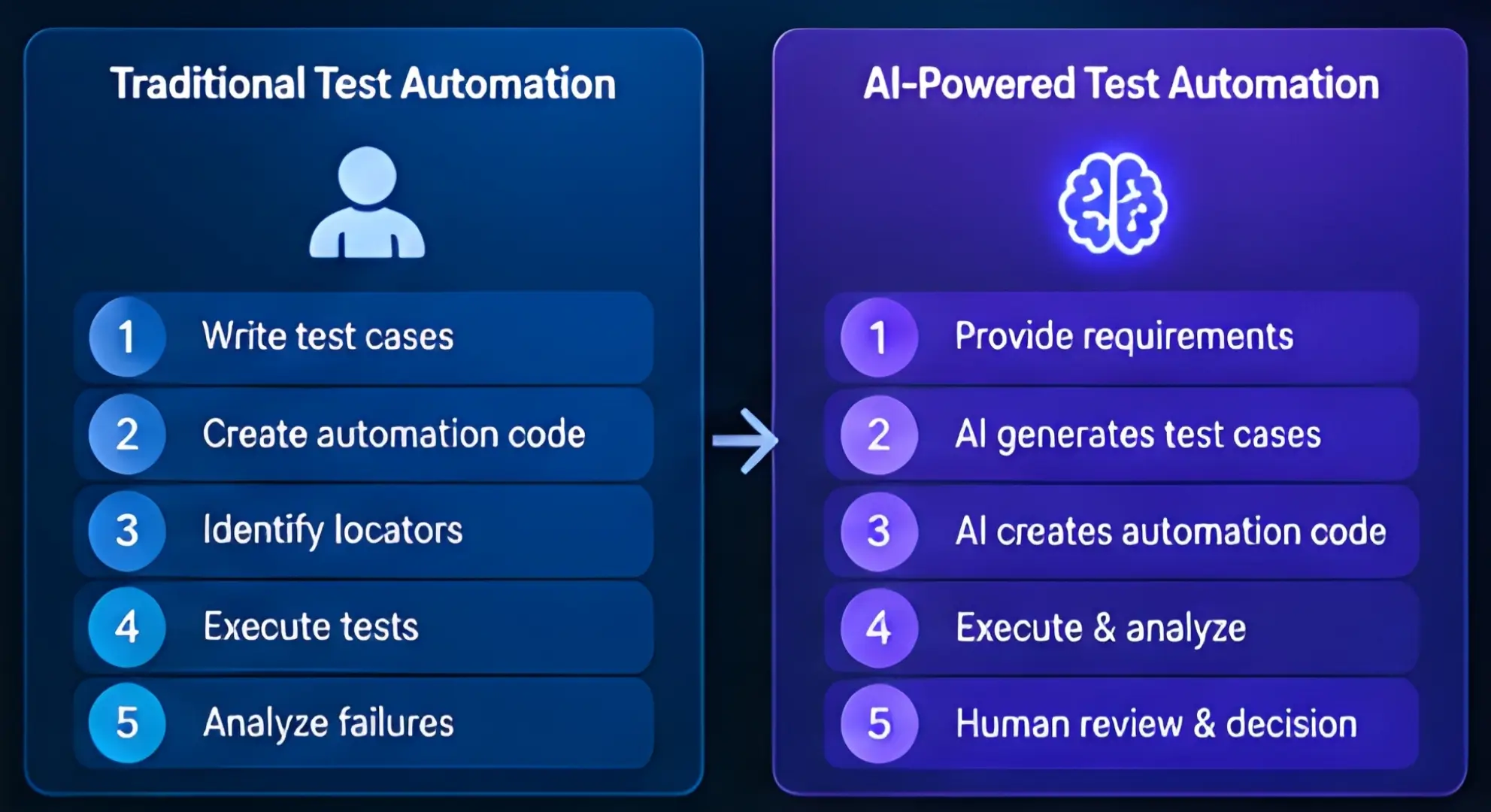
Traditional Test Automation
In traditional automation:
- Tester understands the requirement.
- Tester creates test cases.
- Tester writes automation code.
- Tester identifies locators.
- Test is executed.
- Tester checks failures.
- Tester updates scripts when the application changes.
This approach is reliable when the test flow is well-defined, but maintaining a large automation suite can take considerable time.
AI-Assisted Test Automation
With AI assistance:
- Tester provides requirements or context.
- AI suggests test scenarios.
- AI generates an initial automation script.
- Tester reviews the generated test.
- Automation framework executes the test.
- AI can help analyze failures.
- Tester validates the result and decides what action is required.
The important word here is assisted.
The tester remains responsible for deciding whether the generated test actually makes sense.
What Can AI Do in Software Testing?
AI can support testers at many stages of the software development lifecycle.
1. Generate Test Cases
One of the simplest uses of AI in software testing is test case generation.
Suppose a developer creates a registration page containing:
- Name
- Password
- Confirm Password
- Mobile Number
A tester can ask an AI system to suggest scenarios.
It may generate cases for:
- valid registration
- empty fields
- invalid email
- weak password
- mismatched passwords
- duplicate email
- invalid mobile number
- special characters
- maximum field length
- minimum field length
The tester can then review the suggestions and add missing business-specific cases.
2. Generate Automation Scripts
AI can also generate an initial automation script.
For example, instead of writing an entire Playwright test manually, a tester can describe the expected workflow and ask an AI coding assistant to create a starting point.
The generated code still needs review.
AI may:
- choose the wrong locator
- misunderstand the requirement
- miss an assertion
- use an unstable selector
- create unnecessary waits
- misunderstand application behavior
So generated code should be treated as a starting point, not automatically production-ready code.
3. Analyze Test Failures
A failed test can produce a large amount of information:
- stack traces
- screenshots
- browser logs
- network errors
- application logs
- console errors
- test reports
AI can help summarize this information and suggest possible causes.
For example:
“The login test failed because the expected dashboard element was not available after navigation.”
AI may then help investigate whether the problem is related to:
- application failure
- changed locator
- timing issue
- authentication failure
- network problem
- environment configuration
The tester still needs to confirm the root cause.
4. Generate Test Data
AI can help generate realistic test data for:
- customer information
- addresses
- product records
- usernames
- API payloads
- boundary values
- negative scenarios
This can reduce repetitive preparation work.
However, teams should avoid sending sensitive production information to AI systems unless the organization’s security and privacy requirements allow it.
5. Analyze Requirements
Poor requirements often become poor test cases.
AI can review a requirement and identify potential gaps.
For example:
“Users should be able to reset their password.”
A tester can ask:
What test scenarios are missing from this requirement?
The resulting discussion may include:
- expired reset link
- invalid email
- already-used reset link
- weak new password
- password confirmation mismatch
- multiple reset requests
- account not found
- rate limiting
- security questions
- session invalidation
This makes AI useful before automation even begins.
What Are AI Testing Agents?
An AI testing agent goes a step beyond a normal AI chatbot.
A chatbot generally responds to your instruction.
An agent can be designed to:
- Understand a goal.
- Plan several actions.
- Use available tools.
- Observe the result.
- Decide what to do next.
- Continue until the task is completed or stopped.
For example:
“Explore the checkout process and identify obvious functional problems.”
A traditional automation script would need predefined steps.
An AI agent could potentially:
- open the application
- navigate through pages
- inspect available controls
- enter test information
- observe responses
- try alternative paths
- collect evidence
- report potential issues
This is one reason agentic AI testing is attracting attention in the QA community.
Recent research is also exploring code-driven agentic testing in which an agent writes Playwright code, interacts with a browser, gathers feedback, and explores applications to find defects.
But today’s systems still have important limitations. Research and industry discussion continue to show that AI agents can miss bugs, misunderstand application behavior, or produce unreliable results.
AI Test Automation vs AI Testing Agents
These terms are related, but they are not exactly the same.
| AI Test Automation | AI Testing Agents |
|---|---|
| AI assists testing tasks | AI can perform multi-step tasks |
| Often generates test cases | Can plan and execute workflows |
| May generate automation code | Can use tools during execution |
| Usually needs more human direction | Can operate with a higher level goal |
| Useful for repetitive work | Useful for exploration and complex workflows |
| Human reviews output | Human remains responsible for quality |
The distinction will become increasingly important as AI moves from code generation toward autonomous action.
What Is Playwright MCP?
One of the most interesting developments around AI browser automation is Playwright MCP.
MCP stands for Model Context Protocol.
MCP is an open standard designed to allow AI applications to connect with external systems and tools.
Playwright MCP provides browser automation capabilities through MCP, allowing LLMs to interact with web pages using structured information from the browser.
In simple words:
MCP can act as a bridge that allows an AI system to work with external tools, while Playwright MCP gives the AI access to browser automation capabilities.
This opens interesting possibilities for software testing.
How Playwright MCP Can Help Testers?
Imagine you have a web application.
Instead of writing every browser action manually, an AI system connected to Playwright MCP can potentially interact with the application through browser automation tools.
A simplified workflow could look like this:
Tester
   ↓
Testing requirement
   ↓
AI Agent
   ↓
Playwright MCP
   ↓
Web Browser
   ↓
Application
   ↓
Test Results / Observations
   ↓
AI Analysis
   ↓
Tester Review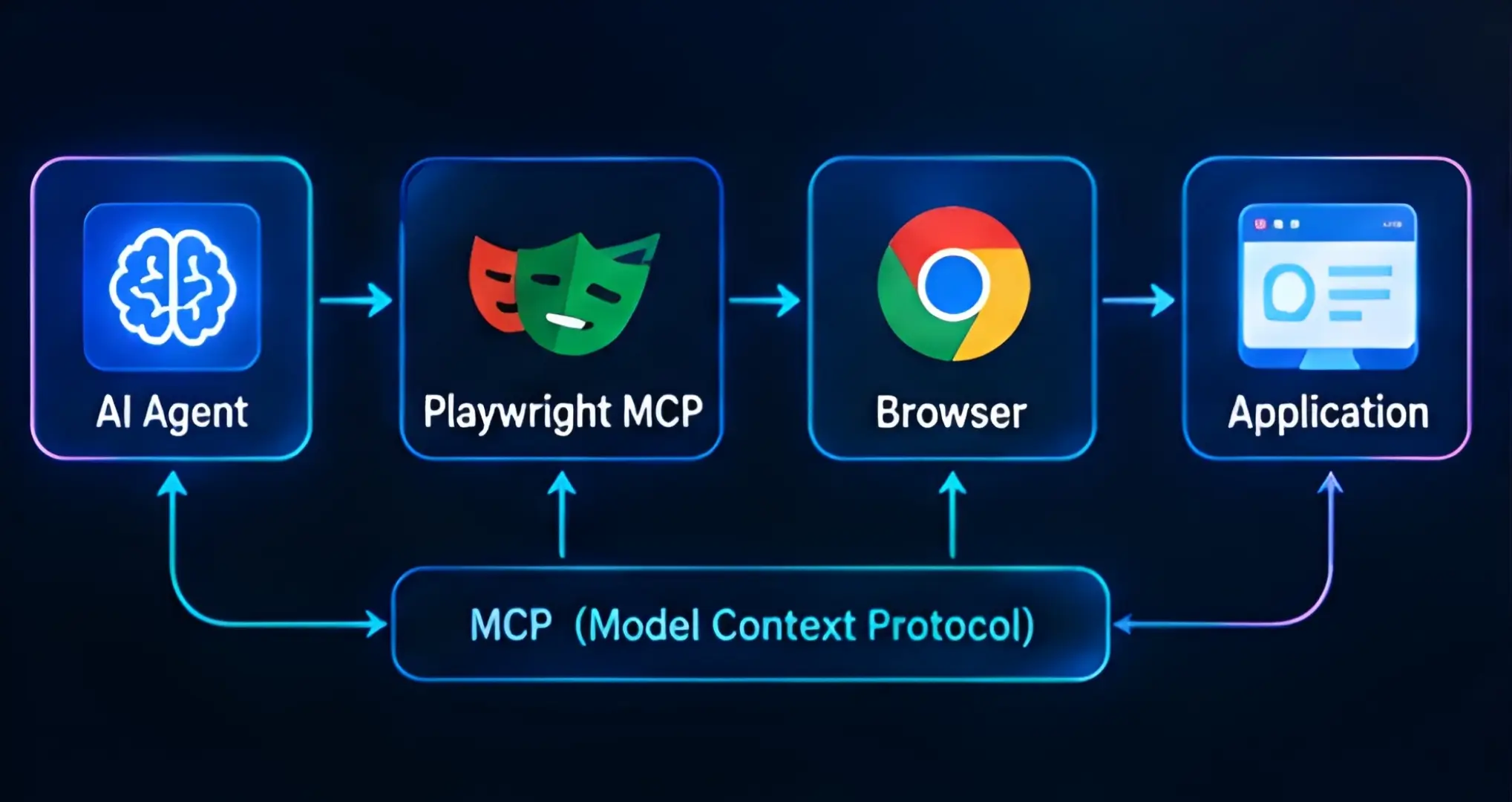
The important point is that MCP itself is not a replacement for a testing framework.
It provides a standardized way for AI applications to access capabilities. Playwright provides browser automation.
Together, they can become part of an AI-assisted testing workflow.
A Practical Example of AI-Powered Testing
Let’s consider a simple e-commerce application.
The requirement is:
“A customer should be able to add a product to the cart and complete checkout using a valid payment method.”
A traditional tester may create:
Test Scenario 1: Add Product
Open product page
Select product
Click Add to Cart
Open cart
Verify product
Test Scenario 2: Checkout
Open cart
Click Checkout
Enter customer information
Select payment method
Place order
Verify confirmation
Now imagine an AI-assisted workflow.
The tester provides the requirement to an AI system.
The AI may suggest:
- successful checkout
- empty address
- invalid postal code
- unavailable product
- expired payment method
- duplicate checkout request
- cart quantity changes
- session timeout
- back-button behavior
- failed payment
- successful payment
- order confirmation
The AI can then help generate automation code for selected scenarios.
This is where AI can save time.
But there is another important question:
Did the AI test what actually matters to the customer?
That is where the human tester remains extremely important.
Can AI Replace Software Testers?
This is probably one of the biggest questions in the QA industry.
Short answer:
No, not completely.
AI can automate many testing activities, but software quality involves more than executing test steps.
A good tester needs to understand:
- business requirements
- user behavior
- risk
- usability
- security
- data
- integrations
- edge cases
- product priorities
An AI system can suggest scenarios, but deciding which failures could seriously affect the business requires context.
Recent industry analysis describes the QA role as moving toward quality orchestration, where engineers increasingly validate AI-generated tests, identify risks, and maintain evidence that testing is meaningful.
What AI Is Good At?
AI is particularly useful for:
- repetitive tasks
- generating initial test cases
- summarizing logs
- creating test data
- generating code
- analyzing large amounts of information
- identifying patterns
- documentation
- regression support
What Humans Are Still Better At?
Humans are still important for:
- business judgment
- exploratory testing
- understanding user expectations
- risk-based testing
- ambiguous requirements
- product decisions
- ethical decisions
- validating AI results
- deciding whether software is actually ready
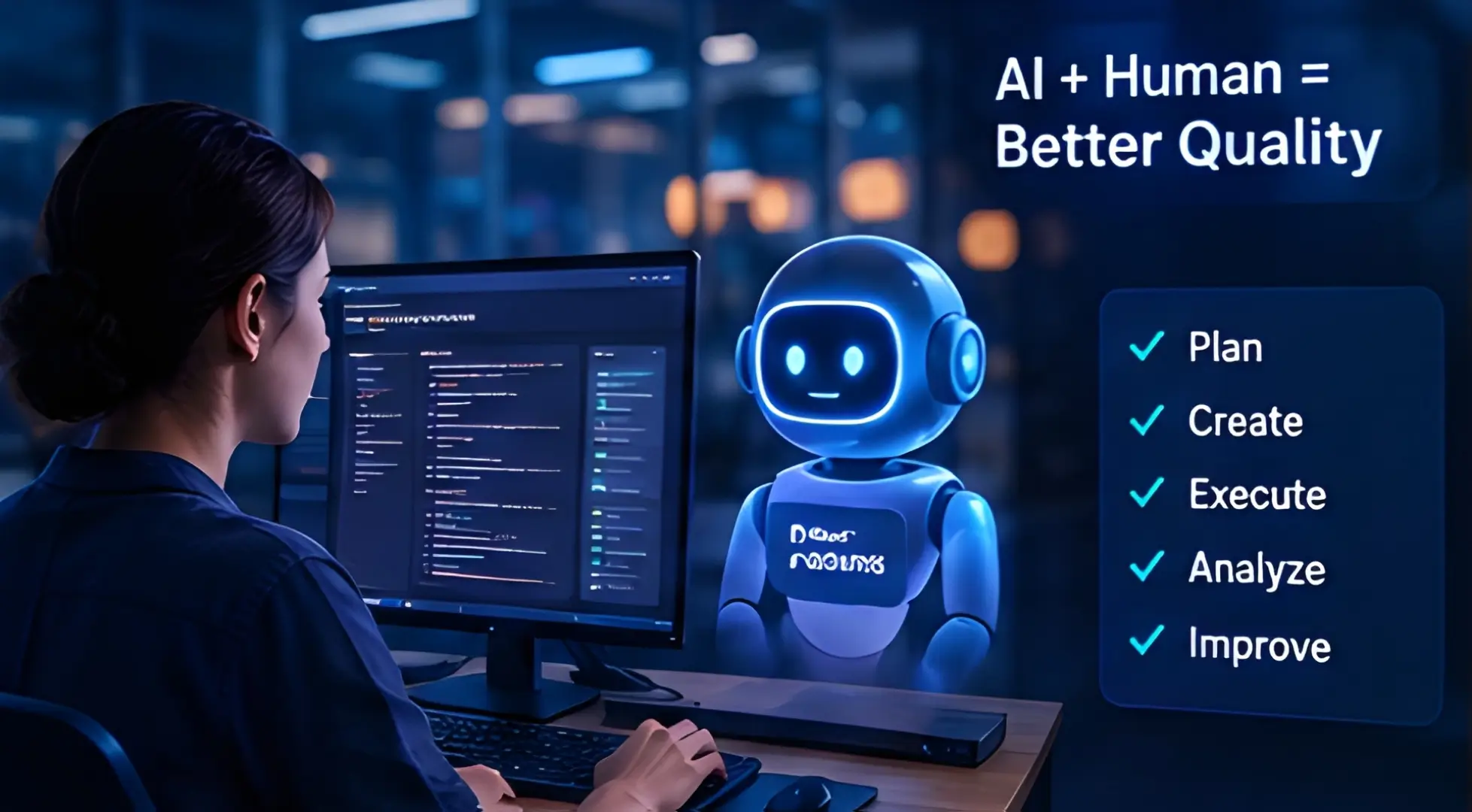
The best approach is therefore not:
AI vs Tester
It is:
AI + Tester
Why AI-Generated Tests Can Still Be Wrong?
This is an area that should not be ignored.
AI-generated tests can look impressive while still providing weak coverage.
For example, an AI may generate 100 test cases for a login page.
That sounds excellent.
But what if all 100 cases focus on:
- valid username
- invalid password
- empty password
while completely missing:
- account lockout
- brute-force protection
- session management
- authorization
- password reset security
- concurrent sessions
More tests do not automatically mean better testing.
Test quality matters more than test count.
Recent research on AI-generated testing also highlights the importance of specifications, test validity, feedback, and independent evaluation rather than simply checking whether generated tests pass.
The Biggest Challenges of AI-Powered Test Automation
AI testing has strong potential, but it also has limitations.
1. Hallucinations
AI can generate information or code that looks correct but isn’t.
A generated Selenium or Playwright script may compile while testing the wrong behavior.
2. Incorrect Test Coverage
AI may miss important business scenarios.
A test suite can become large without becoming useful.
3. Flaky Automation
AI-generated scripts can still contain:
- unstable locators
- unnecessary waits
- timing problems
- incorrect assumptions
AI does not automatically eliminate flaky tests.
4. Security and Privacy
Testing often involves sensitive information.
Teams need to carefully consider what data is sent to AI services.
This becomes even more important when AI agents can access browsers, APIs, repositories, databases, or internal systems.
5. Lack of Human Validation
Perhaps the biggest risk is trusting AI simply because the output looks professional.
A generated test still needs review.
6. AI Can Test the Wrong Thing
This is a subtle but important problem.
Suppose the requirement itself is incomplete.
AI may generate excellent tests based on an incomplete requirement.
The resulting tests can pass while the application still fails the real business need.
How to Use AI Safely in Test Automation
A practical approach is to keep humans involved at important checkpoints.
Recommended workflow:
          Requirement
              ↓
      AI Test Suggestions
              ↓
        Tester Review
              ↓
    AI Automation Generation
              ↓
         Code Review
              ↓
      Automated Execution
              ↓
       AI Failure Analysis
              ↓
       Human Validation
              ↓
       Release Decision
This is much safer than:
         Requirement
              ↓
             AI
              ↓
         Production
AI should accelerate quality engineering, not remove quality controls.
AI Testing Tools and Technologies to Watch in 2026
The AI testing ecosystem is expanding quickly.
Instead of thinking only about one “best AI testing tool,” it is better to understand the different categories.
AI Coding Assistants
Useful for:
- generating automation code
- explaining code
- refactoring
- creating test methods
- debugging
AI Test Generation Tools
Useful for:
- generating test cases
- analyzing requirements
- improving coverage
- creating test scenarios
AI-Powered Test Management
These tools can help with:
- test case organization
- requirement mapping
- defect analysis
- reporting
AI Browser Automation
Tools and frameworks around browser automation can allow AI systems to interact with websites.
Playwright’s official ecosystem now explicitly includes browser automation for testing, scripting and AI agents.
MCP-Based AI Workflows
MCP allows AI applications to interact with external tools and capabilities through a standardized protocol.
This can make MCP an important concept for testers who want to understand agentic testing workflows.
Should Selenium Testers Learn Playwright?
If you already know Selenium, you don’t need to throw it away.
Selenium remains an important browser automation technology.
However, learning Playwright can be valuable because modern AI-assisted browser automation is increasingly being discussed alongside Playwright and MCP.
A tester who knows:
Selenium + Java + TestNG
can expand their skill set with:
Playwright + JavaScript/TypeScript + AI tools + MCP
The goal shouldn’t be to replace everything you already know.
The goal is to understand when each technology makes sense.
Skills Software Testers Should Learn in 2026

The modern QA engineer needs a broader skill set.
Core Testing Skills
Learn:
- Manual testing
- Functional testing
- Regression testing
- Integration testing
- System testing
- Exploratory testing
- Test case design
- Defect management
Automation Skills
Learn at least one strong automation stack.
Examples include:
- Selenium
- Playwright
- Cypress
- Appium
- REST API automation
Programming
A tester should understand at least one programming language well.
Popular choices include:
- Java
- JavaScript
- TypeScript
- Python
API Testing
Learn:
- REST APIs
- HTTP methods
- status codes
- JSON
- authentication
- API automation
- Postman
Database Testing
SQL remains important.
Learn:
- SELECT
- JOIN
- GROUP BY
- subqueries
- filtering
- data validation
CI/CD
Understand:
- Git
- GitHub/GitLab
- Jenkins
- CI pipelines
- test execution
- reports
AI Skills
And now add:
- AI-assisted coding
- AI test generation
- AI agents
- prompt design
- MCP
- AI application testing
- LLM testing
- AI output validation
The future QA engineer does not necessarily need to become an AI researcher.
But understanding how AI systems work and how to test them will become increasingly valuable.
What Will the Future of Software Testing Look Like?
The future probably won’t be completely manual or completely autonomous.
Instead, testing will become more AI-assisted, continuous and risk-focused.
A typical future workflow may look like:
Requirement
      ↓
AI analyzes requirement
      ↓
Test scenarios generated
      ↓
Tester reviews scenarios
      ↓
Automation generated
      ↓
Tests executed continuously
      ↓
AI analyzes failures
      ↓
Tester investigates important risks
      ↓
Quality evidence collected
      ↓
Release decision
The role of the tester gradually moves from:
“I execute these test cases.”
toward:
“I make sure the product is actually safe, reliable and fit for its purpose.”
That is a much bigger responsibility.
Is AI-Powered Test Automation Worth Learning in 2026?
Yes—but learn it alongside testing fundamentals.
Do not make the mistake of learning an AI testing tool without understanding software testing.
A tester who knows only how to ask AI to generate scripts may struggle when the generated script is wrong.
A tester who understands:
- requirements
- test design
- automation
- APIs
- databases
- programming
- CI/CD
- AI
will be in a much stronger position.
Think of AI as a force multiplier.
If your testing knowledge is strong, AI can help you move faster.
If your testing knowledge is weak, AI can help you create more tests—but not necessarily better tests.
Final Thoughts
AI-powered test automation is no longer just a futuristic idea.
AI is already being used to generate test cases, create automation code, analyze failures and support software engineering workflows. At the same time, agentic AI is pushing testing toward a model where systems can interact with applications and perform more complex tasks.
Playwright MCP is one example of this direction: it gives AI applications a structured way to use browser automation capabilities.
But there is an important lesson to remember:
Automation can execute a test. AI can help design a test. But quality still requires judgment.
The strongest QA teams of the future will not be the teams that use the most AI.
They will be the teams that know where AI should be used, where it should not be trusted, and where human expertise is still necessary.
For software testers, this is not the end of automation.
It is the beginning of a new type of automation.
And for QA engineers willing to learn AI, automation, programming and quality engineering together, 2026 could be one of the most interesting periods in the evolution of software testing.
Frequently Asked Questions About AI-Powered Test Automation
What is AI-powered test automation?
AI-powered test automation uses artificial intelligence to assist or automate activities such as test case generation, automation code creation, test data generation, failure analysis and test maintenance.
Will AI replace software testers?
AI can automate many repetitive testing tasks, but it does not completely replace the need for testers. Human judgment is still important for risk analysis, exploratory testing, business requirements and validating AI-generated results.
What are AI testing agents?
AI testing agents are AI systems that can understand testing goals, plan actions, use testing tools and perform multi-step testing workflows with less manual instruction.
What is Playwright MCP?
Playwright MCP is an MCP server that provides browser automation capabilities through Playwright, allowing AI applications to interact with web pages using structured browser information.
Is Selenium still useful in 2026?
Yes. Selenium remains a useful browser automation technology. Testers can learn Playwright and AI-assisted automation without abandoning their existing Selenium knowledge.
What should QA engineers learn in 2026?
QA engineers should strengthen software testing fundamentals, programming, API testing, SQL, automation, CI/CD and increasingly AI-related skills such as AI-assisted testing, AI agents, MCP and testing AI applications.
Can AI automatically create all test cases?
No. AI can generate useful test scenarios, but generated tests may miss business requirements, edge cases or important risks. Human review remains necessary.
Is AI testing the same as test automation?
Not exactly. Traditional test automation executes predefined instructions. AI testing can use AI to generate, analyze, adapt or assist with testing activities. Agentic testing can go further by allowing AI systems to perform multi-step tasks.