
Vector Databases Explained: How Vector Search and AI Databases Work in 2026
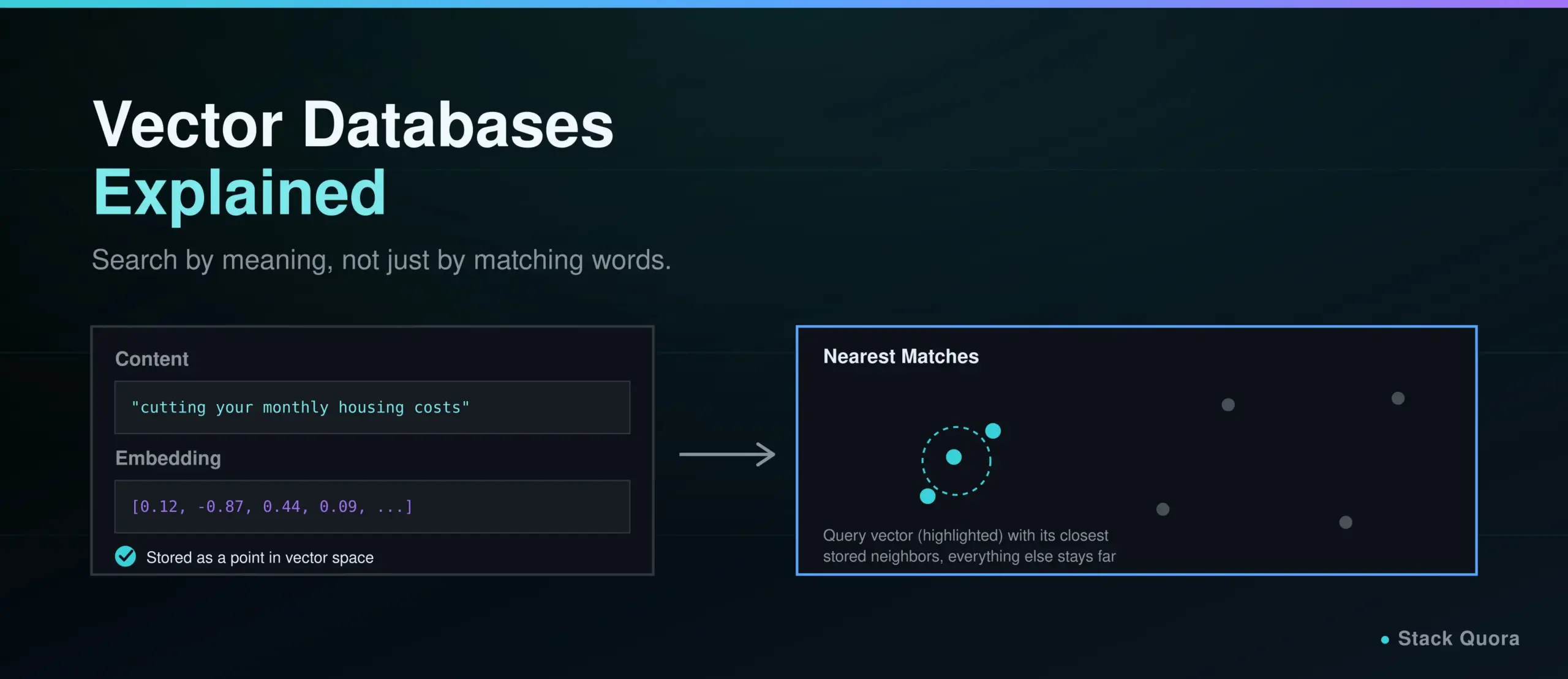
Ask a normal database to find “articles about saving money on rent” and it will only find rows that contain those exact words. It has no idea that an article titled “cutting your monthly housing costs” is the same thing. That gap is exactly what a vector database exists to close.
A vector database is a database built to store and search data by meaning instead of by exact words. It is the piece of infrastructure sitting quietly behind almost every AI chatbot, semantic search bar and recommendation engine you have used this year, and it is the reason a large language model can answer questions about your company’s documents without that information ever having been part of its training.
This guide explains what a vector database actually is, how vector search works under the hood, when a vector database earns its place over a normal SQL database, and which options are actually worth considering in 2026 – including PostgreSQL’s own pgvector extension, which changes the calculation for a lot of teams. No unsupported “best database” claims here, just the factual trade-offs.
What Is a Vector Database?
A vector database is a database designed to store, index and search data represented as vectors – lists of numbers that capture the meaning of a piece of content – so that a search can find the most similar items instead of only exact matches.
What Is a Vector, in Plain Terms?
A vector, in this context, is just a list of numbers, like [0.12, -0.87, 0.44, ...], that represents something – a sentence, an image, a product, a song – as a point in space. Items that mean similar things end up as points that sit close together in that space. Items with unrelated meanings end up far apart. That single idea, “similar meaning equals nearby points,” is the whole foundation vector search is built on.
What Are Vector Embeddings?
A vector embedding is the specific vector produced by an AI model when you feed it a piece of content. An embedding model reads a sentence, an image or a document and outputs a vector, typically somewhere between a few hundred and a few thousand numbers long, positioned so that semantically similar inputs land near each other in that space.
This is what makes semantic search possible. “How do I reset my password” and “I forgot my login credentials” share almost no words in common, but a good embedding model places their vectors close together, because they mean roughly the same thing.
How a Vector Database Stores and Searches Data
Underneath, a vector database stores each vector alongside an ID and usually some metadata (a title, a category, a timestamp). When you search, your query itself gets converted into a vector first, and the database finds the stored vectors positioned closest to it in that high-dimensional space. It then returns whatever content those nearby vectors represent.
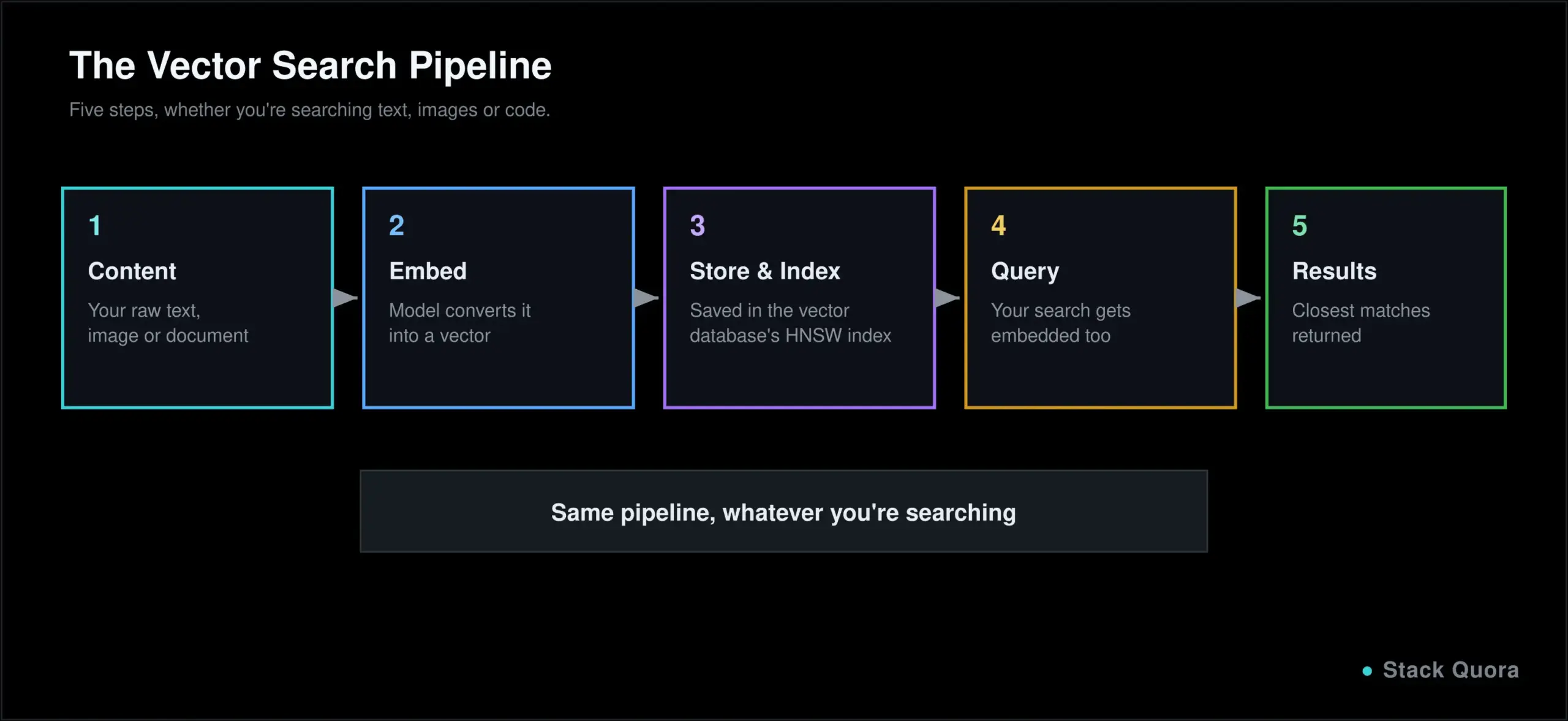
That is the entire loop: convert content to vectors, store them, convert a query to a vector, find the nearest stored vectors, return the matching content.
Why Vector Databases Matter for AI Applications
AI models, especially large language models, do not understand raw text or images the way a database does. They work in terms of embeddings. A vector database is what lets an AI application connect a model’s understanding of meaning to a searchable store of real content, at a scale a model’s own context window could never hold on its own.
Semantic Search vs Keyword Search
Traditional keyword search matches the literal words in a query against the literal words in your data. It is fast and precise when the words match, and it fails completely when they do not, even if the meaning is obviously the same to a human reader. Semantic search, powered by vector embeddings, matches by meaning instead, which is why it can find “affordable laptop for students” results even when a listing only says “budget-friendly notebook for college.”
Most production systems in 2026 do not pick one over the other; they combine both, often called hybrid search, using keyword matching for precision on exact terms like product codes or names, and vector search for everything that needs to understand intent.
Vector Databases and Large Language Models
This is the piece that made vector databases suddenly essential rather than niche: they are the standard way to give a large language model access to information it was never trained on, without retraining the model itself. Your company’s internal documents, last week’s support tickets, a product catalog that changes daily — none of that lives inside a model’s weights, but all of it can live inside a vector database the model queries at answer time.
How Vector Search Works: Similarity Search Explained
Once your data is stored as vectors, “search” becomes a geometry problem: given a query vector, which stored vectors are closest to it? That closeness is measured with a similarity metric, and the metric you choose can genuinely change your results.
Cosine Similarity, Euclidean Distance and Dot Product
- Cosine similarity measures the angle between two vectors, ignoring their length. It is the most common default for text embeddings, because it focuses purely on direction, which tends to correspond to meaning, rather than magnitude.
- Euclidean distance measures the straight-line distance between two points, the same formula you likely learned in school geometry. It is intuitive but more sensitive to vector length than cosine similarity.
- Dot product multiplies corresponding values and sums the result. It is computationally cheap and works well when your embedding model was specifically trained with dot product in mind — many modern embedding models are.
Which one to use is usually dictated by the embedding model you chose, not a free personal preference; most model documentation states the similarity metric it was trained and evaluated against.
Approximate Nearest Neighbor (ANN) Search
Finding the exact closest vectors by comparing your query against every single stored vector — called a brute-force or exact search — works fine for a few thousand items. At millions or billions of vectors, it becomes far too slow for anything real-time.
Approximate nearest neighbor, or ANN, search trades a small amount of accuracy for a dramatic amount of speed. Instead of checking every vector, it uses a clever index structure to check only the most promising candidates, typically landing within a percent or two of the true best matches while running orders of magnitude faster. Virtually every production vector database relies on ANN search rather than exact search once data grows past a small scale.
Vector Indexing and the HNSW Algorithm
An index is what makes ANN search possible. Without one, a database still has to scan everything. HNSW, short for Hierarchical Navigable Small World, is the index structure most vector databases use by default in 2026, and it is worth understanding at least conceptually, since the term shows up constantly in vector database documentation.
How HNSW Works
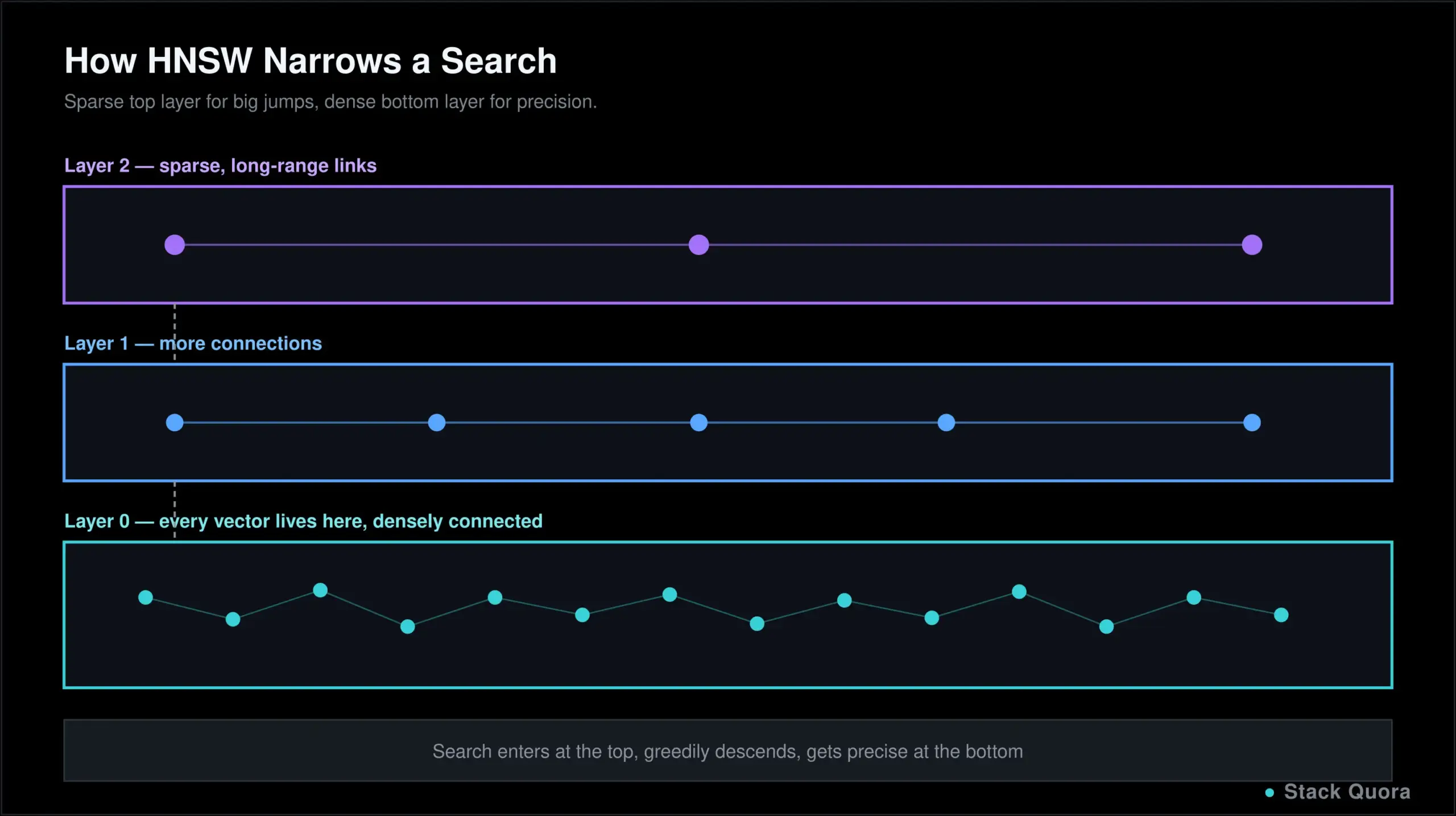
HNSW builds a multi-layer graph connecting vectors to their neighbors. The top layer is sparse, with long-range connections that let a search jump across large distances quickly. Lower layers get progressively denser, with shorter, more local connections. A search starts at the top layer, greedily moves toward the query’s neighborhood, then drops down a layer and repeats, getting more precise at each level until it reaches the bottom layer and returns the closest matches it found.
The effect is similar to how you might navigate a new city: start with a highway to get to the right neighborhood fast, then switch to local streets once you are close. That structure is what gives HNSW its speed at scale — search time grows roughly logarithmically with the number of vectors, not linearly. The original technique was published by Yury Malkov and Dmitry Yashunin, and the full paper is worth a look if you want the underlying math.
HNSW vs Exact Search
Exact search guarantees the true closest matches every time, at the cost of scanning everything. HNSW returns results that are very close to correct, almost always good enough in practice, in a fraction of the time. The trade-off is tunable: most databases let you adjust HNSW’s parameters to lean further toward speed or further toward accuracy, depending on what your application actually needs.
Vector Databases vs Traditional SQL Databases
These solve different problems, and the differences show up in a few concrete places:
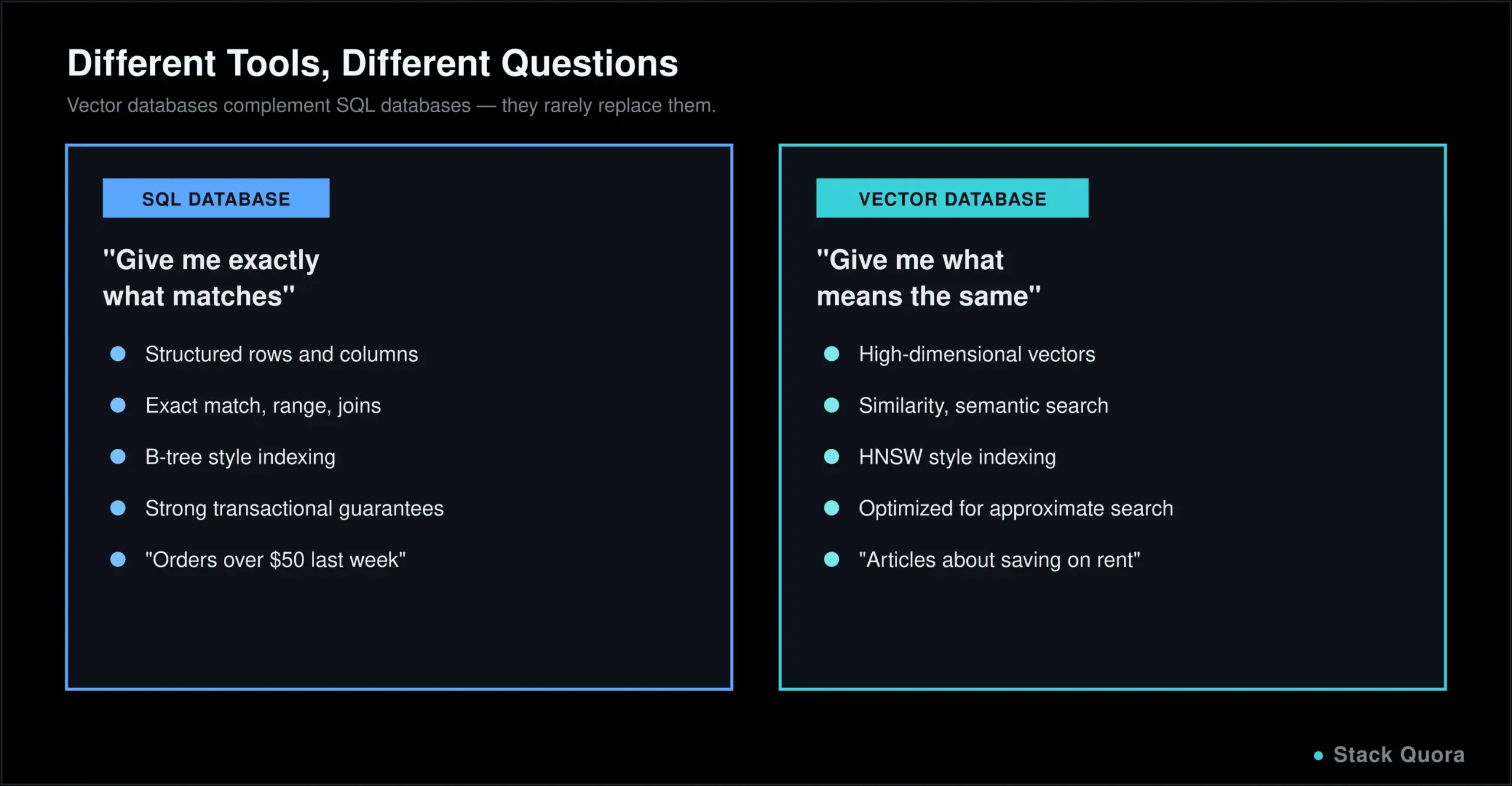
- Data model. SQL databases store structured rows and columns with a defined schema. Vector databases store high-dimensional vectors, usually alongside some metadata, without the same rigid row-and-column structure.
- Search capability. SQL is built for exact matches, ranges and joins — “find every order over $50 placed last week.” Vector search is built for similarity — “find items that mean something like this.”
- Scalability. Both scale well for their intended workload, but the scaling challenges differ: SQL databases optimize for transactional consistency at scale, while vector databases optimize for fast approximate search across huge, high-dimensional datasets.
- Indexing. SQL indexing (B-trees, and similar) speeds up exact lookups and range queries. Vector indexing (HNSW, and similar) speeds up approximate similarity search, a fundamentally different problem.
- Operational complexity. Running a dedicated vector database alongside your existing SQL database means two systems to operate, secure and keep in sync, which is real overhead worth weighing honestly.
- Cost considerations. Managed vector databases typically bill by vector count, storage and query volume, on top of whatever you already pay for your primary database. That is an additional, ongoing cost line, not a one-time decision.
- When to choose each. A traditional SQL database is enough when your search needs are exact-match or structured. A vector database earns its place once you genuinely need semantic or similarity search — and for many teams in 2026, adding vector capability to a database they already run, rather than standing up a new one, is the more practical first move.
PostgreSQL and pgvector
What Is pgvector?
pgvector is an open-source extension that adds vector storage and vector similarity search directly to PostgreSQL. Instead of running a separate, dedicated vector database, you add a vector column type to a normal Postgres table and query it alongside your regular structured data, in the same database, with the same tooling. You can find the extension and its documentation on its official GitHub repository.
pgvector vs Dedicated Vector Databases
A dedicated vector database like Pinecone, Qdrant or Weaviate is purpose-built for vector workloads specifically, and tends to pull ahead at very large scale, with more advanced indexing options and features built exclusively around vector search. pgvector gives up some of that specialization in exchange for a major practical advantage: you are not running, securing, paying for and keeping in sync a second database. For a huge share of real applications, that trade is well worth making.
When Should You Use pgvector?
pgvector is a strong fit when you already run PostgreSQL, your vector workload is moderate rather than massive, and you want your vector data queryable alongside your regular relational data in the same transaction. It becomes a weaker fit once you are dealing with truly enormous vector volumes or need advanced, vector-specific features that a dedicated engine is more likely to offer first.
Popular Vector Databases in 2026
The market has matured a lot. Rather than one universal winner, different tools clearly suit different situations — the honest answer to “which vector database is best” is “it depends on your scale, your budget and what you already run.” Most of these are queried over a REST or gRPC API, which means testing those endpoints with Postman is a sensible habit here too, the same as with any other API-driven service.
Pinecone
Pinecone is a fully managed, serverless vector database, and its main selling point is removing infrastructure work entirely: no servers to provision, no index tuning to babysit. That convenience comes at a price premium compared to self-hosted options, and it is a closed, proprietary platform rather than open source. It is a common choice for teams that would rather pay to not think about database operations at all.
Qdrant
Qdrant is an open-source vector database written in Rust, available self-hosted or through a managed cloud option. It has a strong reputation for price-performance and for handling filtered search well — combining a similarity search with structured filters like “only in this category” efficiently, which is not always trivial for a vector-first engine.
Weaviate
Weaviate is another open-source option, available self-hosted or managed, known particularly for strong built-in hybrid search that combines traditional keyword matching (BM25) with vector similarity in one query. It also supports a richer schema model than some competitors, which appeals to teams with more structured data alongside their vectors.
Milvus
Milvus is an open-source vector database built with very large-scale deployments in mind, commonly cited among the options capable of handling the largest vector counts. It supports several different index types beyond HNSW, including GPU-accelerated options, and is available self-hosted or through Zilliz’s managed cloud offering.
Chroma
Chroma is open source and leans hard into developer experience and simplicity, especially for local development and prototyping. It is a common first choice when you are learning vector search or building a proof of concept, with a straightforward path to a small-scale production deployment and a newer cloud option for teams that outgrow local use.
Elasticsearch and OpenSearch
Elasticsearch and OpenSearch both started as full-text search engines and later added vector search capability alongside their existing keyword search and aggregation features. If your team already runs one of these for logging or search, adding vector capability on top can be more practical than introducing an entirely separate dedicated vector database, especially for hybrid search use cases.
How Vector Databases Power RAG Applications
Retrieval-augmented generation, or RAG, is the technique that lets a large language model answer questions using information it was never trained on, by retrieving relevant content at the moment of the question rather than relying purely on what it learned during training. A vector database is almost always the retrieval half of that pipeline.
The typical flow looks like this:
- Break your source documents into chunks — pages, paragraphs or sections small enough to be meaningfully searchable on their own.
- Generate an embedding for each chunk using an embedding model, turning each chunk into a vector.
- Store those vectors in a vector database, along with the original text and any useful metadata.
- When a user asks a question, embed the question itself into a vector using the same embedding model.
- Run a similarity search to find the stored chunks whose vectors are closest to the question’s vector.
- Send those retrieved chunks to the language model, along with the original question, as context.
- The model generates its final answer, grounded in the specific content it was just handed, rather than guessing from memory alone.
The quality of the whole system depends heavily on step 5 and step 2. A weak embedding model or a bad chunking strategy will quietly produce a RAG system that sounds confident and answers wrong, which is one of the more common failure modes teams run into once they move past a demo.
Real-World Use Cases for Vector Databases
- AI chatbots that answer questions using a company’s own documents, support history or product catalog.
- Document search across large internal knowledge bases, where employees search by intent rather than exact keywords.
- Recommendation systems that suggest products, articles or media similar in meaning or style to something a user already engaged with.
- Semantic website search, letting visitors find what they mean rather than only what they typed.
- Knowledge bases and internal wikis, where a good semantic search bar saves employees real time every single day.
- Code search, finding functions or files based on what code does rather than only matching variable and function names.
- Image and multimedia search, finding visually or conceptually similar images, audio or video using embeddings built for that media type.
Example: Building a Simple Semantic Search System
Here is what building a small semantic search tool actually looks like end to end, using a set of blog posts as the example content.
Step 1: Prepare the documents. Collect your content and split it into reasonably sized chunks — a full blog post is usually too large for one embedding to represent well, so break it into sections or paragraphs.
Step 2: Generate embeddings. Run each chunk through an embedding model, producing a vector for every chunk in your collection.
Step 3: Store and index the vectors. Insert each vector, along with the original text and a reference like a URL, into your chosen vector database, and let it build its similarity index (HNSW, in most cases, by default).
Step 4: Search for similar content. When someone searches, embed their query with the same model you used for your documents, then run a similarity search against your stored vectors. If you are calling this through a REST API rather than a client library, testing those endpoints with Postman before wiring up a frontend will save you a lot of confused debugging later.
Step 5: Return the relevant results. Take the closest matches, map them back to the original content using the metadata you stored, and display them to the user, typically ranked by similarity score.
That five-step shape barely changes whether you are searching blog posts, support tickets or product listings. The content changes; the pipeline does not.
Benefits of Vector Databases
- Semantic search that understands meaning and intent, not just literal keyword matches.
- Fast similarity search at scale, thanks to ANN indexes like HNSW that avoid comparing a query against every stored item.
- Real support for AI applications that need to work with unstructured content — text, images, audio — represented in a form a model actually understands.
- RAG integration that lets a language model answer accurately using your own current data, without retraining the model itself.
- Flexible search across unstructured data that a traditional database was never designed to search meaningfully in the first place.
Limitations of Vector Databases
- Storage requirements. High-dimensional vectors, especially at millions of items, take up meaningfully more storage than an equivalent set of structured rows.
- Indexing and tuning. Getting an ANN index’s parameters right for your specific accuracy and speed needs takes real testing, not just accepting the defaults blindly.
- Accuracy and recall trade-offs. Approximate search is, by definition, not guaranteed to return the absolute best match every time; that gap is usually small, but it is not zero.
- Cost at large scale. Managed vector database costs can climb quickly as your vector count and query volume grow, and that cost is easy to underestimate at prototype stage.
- Embedding model dependency. Your search quality is only as good as the embedding model producing your vectors; a weak or mismatched model quietly caps how good your results can ever be, no matter how good the database is.
- Why vector search is not a replacement for SQL. Exact filters, transactional guarantees, joins and structured reporting are still SQL’s job. Vector databases complement a relational database; for the vast majority of applications, they do not replace one.
How to Choose a Vector Database
- Search performance you actually need, measured against your real query patterns, not a vendor’s best-case benchmark.
- Dataset size, both what you have today and what you realistically expect in a year, since some options handle huge scale more comfortably than others.
- Filtering requirements — how often you need to combine similarity search with structured filters like category, date or permissions.
- Indexing options the database supports, and whether you need control over index parameters or are fine with sensible defaults.
- Cloud vs self-hosted deployment, weighing operational effort you are willing to take on against the premium a managed service charges for taking it off your plate.
- Cost at your actual expected scale, not just the free tier you will prototype with.
- Integration with your existing stack — if you already run PostgreSQL, that alone is a serious reason to seriously evaluate
pgvectorbefore reaching for a new dedicated system.
Vector Database Best Practices
- Choose the right embedding model for your content type and language, and stay consistent — mixing embeddings from different models in one index quietly breaks similarity search.
- Use appropriate chunking strategies. Chunks too large dilute meaning; chunks too small lose context. Most teams land somewhere in the range of a paragraph to a few paragraphs per chunk, then tune from there.
- Configure indexes carefully rather than accepting every default, especially once you have a real sense of your accuracy and latency requirements.
- Combine vector and metadata filtering so users can narrow “similar to this” by category, date or permission, rather than searching your entire dataset every time.
- Monitor search quality on an ongoing basis, not just at launch. As your data grows and changes, it is worth automating that re-embedding step with GitHub Actions so new and updated content gets re-indexed automatically instead of quietly going stale.
- Evaluate retrieval results deliberately, with real test queries and expected results, using the same AI-driven QA approach you would apply to testing any other part of an AI-powered application. “It looked fine when I tried it” is not evaluation.
Are Vector Databases the Future of AI Applications?
The growth of RAG applications shows no sign of slowing. As more teams build tools that need to answer questions using their own current data, vector databases sit right at the center of that pattern, not on the edge of it.
Vector search and AI agents is where a lot of the newest activity is happening. Autonomous agents that plan and execute multi-step tasks, the same category agents like the ones covered in our Playwright MCP guide represent for testing, increasingly rely on a vector database as their memory and retrieval layer, often connected through the Model Context Protocol (MCP), which has quickly become a standard way for agents to query external data sources like vector databases directly. If you are vibe coding an AI application that needs to remember or retrieve information, you are very likely reaching for a vector database whether you call it that or not.
The rise of AI-native databases — systems designed around vector and AI workloads from the ground up, rather than vector search bolted onto an older architecture — is a real trend worth watching, though it is too early to say it has settled the market.
The role of PostgreSQL and traditional databases is not shrinking, despite all of this. If anything, extensions like pgvector are proof that the two worlds are merging rather than one replacing the other: most real applications need both structured, transactional data and semantic search, and increasingly, they can get both from infrastructure they already know how to run.
Final Thoughts
A vector database is not a replacement for the database you already run. It is a different tool for a different kind of question: not “give me exactly what matches,” but “give me what means the same thing.” That single shift is what makes modern semantic search, recommendation systems and RAG-powered AI applications possible at all.
You do not need to memorize every index algorithm or benchmark every vendor before getting started. Understand the core loop — embed your content, store the vectors, embed a query, search for what is close, return the result — and the rest of this space becomes a lot less intimidating, whichever specific database you end up choosing.
The category will keep moving fast through the rest of 2026. The underlying idea — search by meaning, not just by words — is the part that is here to stay.
Found this useful? Explore more AI and development guides on StackQuora, and bookmark this page as the vector database landscape keeps evolving.
Frequently Asked Questions
What is a vector database?
A vector database is a database designed to store, index and search data represented as vectors, so it can find the most semantically similar items to a query instead of only exact keyword matches.
What is a vector database used for?
Common uses include semantic and AI-powered search, recommendation systems, chatbots that answer questions from a company’s own data, image and audio similarity search, and retrieval-augmented generation (RAG) systems that ground a language model’s answers in real, current content.
Is PostgreSQL a vector database?
Not by default, but it can become one. The pgvector extension adds vector storage and similarity search directly to PostgreSQL, letting you run vector queries alongside your normal relational data in the same database.
What is pgvector?
pgvector is an open-source PostgreSQL extension that adds a vector data type and similarity search functions to Postgres, so you can store embeddings and run vector searches without running a separate, dedicated vector database.
What is the difference between SQL and vector databases?
SQL databases are built for structured, exact-match and range queries on rows and columns. Vector databases are built for similarity search over high-dimensional embeddings, finding items that mean something similar rather than items that match exactly.
What is a vector database for RAG?
In a RAG system, a vector database stores embeddings of your source documents and retrieves the most relevant chunks for a given question at answer time, which then get passed to a language model as context so it can generate an accurate, grounded response.
Which databases support vector search?
Dedicated vector databases include Pinecone, Qdrant, Weaviate, Milvus and Chroma. Several established databases and search engines have also added vector search, including PostgreSQL through the pgvector extension, Elasticsearch and OpenSearch.
Are vector databases only used for AI?
Mostly, yes, in practice. Vector search is genuinely useful anywhere similarity matters, but the recent explosion in adoption is almost entirely driven by AI applications, particularly semantic search and retrieval-augmented generation, which is why the two topics are so closely tied together in 2026.