Python Tutorial for Beginners: Complete Guide to Python Programming in 2026
Python has topped the TIOBE Index, the most widely cited measure of programming language popularity, every single month through 2026, sitting more than ten percentage points ahead of its nearest competitor. That is not a trend. That is Python simply being the language most people reach for first, whether they are building a website, automating a boring task, analyzing data, or training an AI model.
This tutorial is built to take you from a completely blank editor to writing real, working Python: variables, data types, loops, functions, object-oriented programming, file handling, working APIs, and where Python fits into automation, web development and AI. Every concept here comes with actual code you can run, not just a definition to memorize.
You do not need any prior programming experience to follow along. You do need to actually type the examples yourself rather than just reading them – that single habit is the biggest difference between people who learn to code and people who read about learning to code.
What Is Python?
Python is a general-purpose programming language known for readable, simple syntax that looks close to plain English. It was created by Guido van Rossum and first released in 1991, and it has grown from a scripting language into one of the most widely used languages in the world, powering everything from small automation scripts to the training of large AI models.
Why Is Python So Popular?
A few things set Python apart from most other languages beginners consider:
- Readable syntax. Python code reads close to plain English, with no curly braces or semicolons cluttering every line, which makes it genuinely easier to learn and to read back later.
- A massive ecosystem. Whatever you are trying to build, there is almost certainly a mature Python library already built for a large piece of it.
- It works everywhere. Web backends, automation scripts, data analysis, AI and machine learning, and general scripting all run comfortably on Python, so the skill transfers rather than locking you into one narrow use case.
- A huge, active community. When you get stuck, and everyone gets stuck, there is an enormous amount of documentation, tutorials and forum answers already written for whatever error message you are staring at.
Who Should Learn Python?
Python works well as a genuine first language for complete beginners, and it works just as well as an additional language for people who already code in something else. It shows up constantly across very different roles: software developers, QA and test automation engineers, data analysts, AI and machine learning practitioners, and people who just want to automate something tedious in their day job. If any of that sounds like where you are headed, Python is a reasonable, low-risk place to start.
What Is Python Used For in 2026?
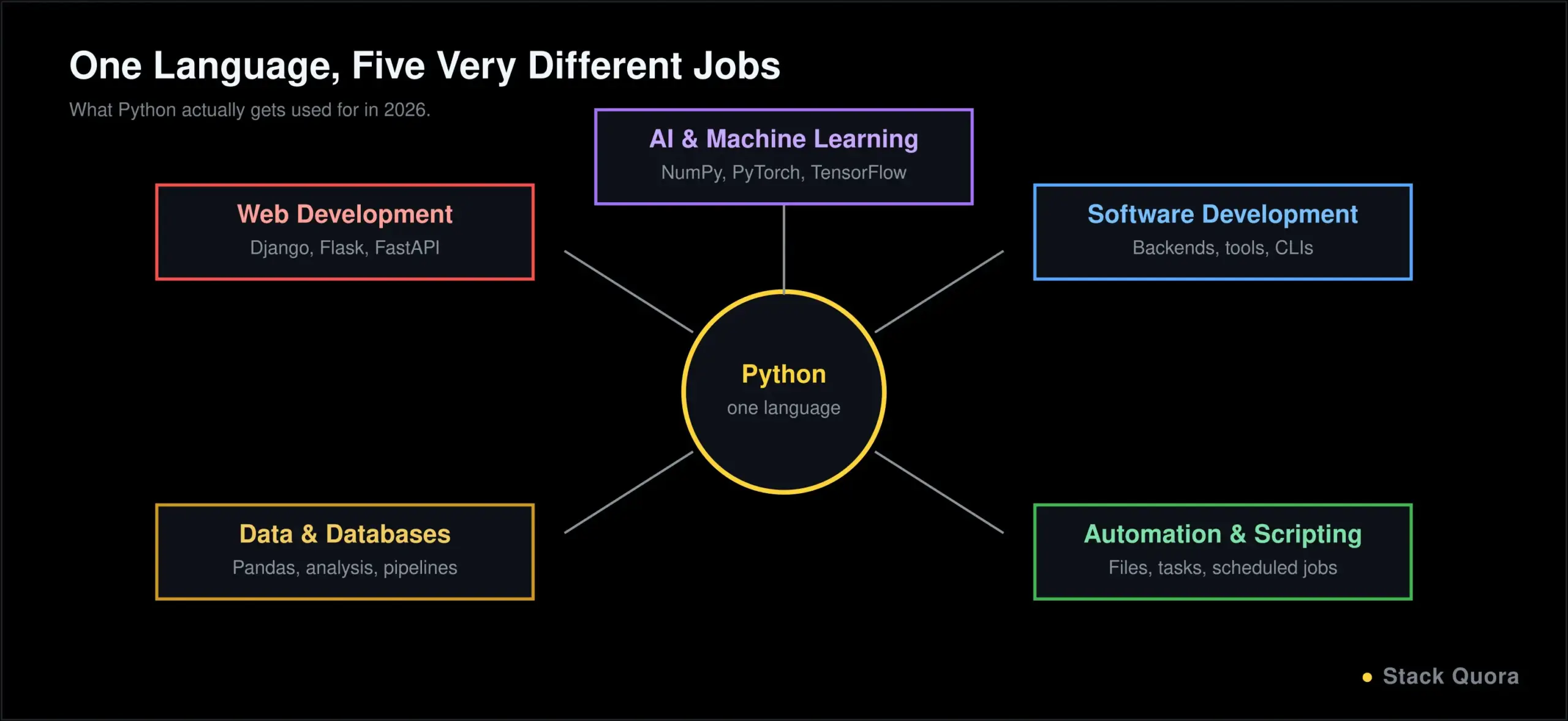
Python’s range is genuinely unusual for one language. In practice, most Python work today falls into five broad areas:
- Artificial intelligence and machine learning – Python is the dominant language for AI development, largely because of libraries like NumPy, Pandas, scikit-learn, PyTorch and TensorFlow, and because most modern AI tooling and frameworks ship Python bindings first.
- Software development – Backend services, internal tools, CLIs and full applications get built in Python daily, particularly where development speed matters more than squeezing out the absolute last bit of raw performance.
- Automation and scripting – Renaming a thousand files, scraping a website, generating a report every Monday morning – Python has quietly become the default language for “make the computer do this instead of me.”
- Data and databases – Reading, cleaning, analyzing and visualizing data is a huge part of what Python gets used for, with a data ecosystem that is hard for other languages to match.
- Web development – Frameworks like Django, Flask and FastAPI power a large share of the backend web services running in production right now.
How to Install Python and Write Your First Program
Install Python and Check It Worked
Head to the official Python downloads page and download the current stable release, Python 3.14 as of 2026 (Python 3.13 is also actively maintained and perfectly fine to use). During installation on Windows, tick the box that says “Add Python to PATH” — skipping that single checkbox is responsible for more beginner setup frustration than almost anything else on this list.
Once it is installed, open a terminal or command prompt and check it worked:
python --versionIf that returns something like Python 3.14.x, you are ready to go. On some systems, particularly macOS and Linux, you may need to type python3 --version instead.
Choose an Editor and Write Your First Program
You do not need anything fancy to start. Visual Studio Code, with the official Python extension installed, is a solid free choice that most beginners land on. Once you have an editor open, create a file named hello.py and type:
print("Hello, world!")Run it from your terminal with:
python hello.pyYou should see Hello, world! printed back at you. That is your first working Python program, and every concept in the rest of this guide builds on exactly this loop: write code, run it, see what happens.
Python Syntax and Basic Concepts
Indentation, Comments and Variables
Python uses indentation, not curly braces, to define blocks of code. This is not just a style choice; it is part of the language’s actual syntax, and getting it wrong causes an error rather than just looking messy.
if True:
    print("This line is indented")
    print("So is this one")
print("This line is not, so it's outside the if block")
Comments start with a # and are ignored when the code runs, used to explain what your code does to your future self and anyone else reading it:
# This calculates the area of a rectangle
length = 10
width = 5
area = length * width
A variable is just a name that points to a value. Python does not require you to declare a type up front; you simply assign a value, and Python figures out the type on its own:
name = "Alex"
age = 28
is_student = False
Naming Rules
Variable names must start with a letter or an underscore, can contain letters, numbers and underscores after that, and are case-sensitive, so age and Age are two different variables. The accepted convention in Python is snake_case for variables and functions, like total_price rather than totalPrice or TotalPrice.
Input and Output
print() sends output to the screen. input() pauses your program and waits for the user to type something, always returning it as a string:
name = input("What's your name? ")
print("Hello, " + name + "!")
Full documentation for everything covered in this section, and every section after it, lives in the official Python documentation, which is worth bookmarking now rather than later.
Python Data Types
Simple Data Types: Numbers, Strings, Booleans and None
# Numbers
age = 28            # int
price = 19.99        # float

# Strings
name = "Alex"
greeting = f"Hello, {name}!"   # f-strings insert variables directly into text

# Booleans
is_active = True
is_banned = False

# None represents "no value"
middle_name = None
Strings in Python come with a lot of built-in behavior worth knowing early: name.upper(), name.lower(), name.strip() to remove surrounding whitespace, and slicing with name[0:3] to grab part of a string.
Collection Data Types: Lists, Tuples, Sets and Dictionaries
# List: ordered, changeable, allows duplicates
fruits = ["apple", "banana", "cherry"]
fruits.append("orange")

# Tuple: ordered, unchangeable
coordinates = (10, 20)

# Set: unordered, no duplicates allowed
unique_ids = {101, 102, 103}

# Dictionary: key-value pairs
person = {"name": "Alex", "age": 28}
print(person["name"])
Each of these fits a different job. Use a list when order matters and the contents will change. Use a tuple when the values should never change, like a fixed coordinate pair. Use a set when you need to guarantee no duplicates and do not care about order. Use a dictionary whenever you are naturally thinking in terms of labeled fields, like a record from a form or an API response.
One more pattern worth learning early because it saves a lot of typing later: list comprehensions, a compact way to build a new list from an existing one.
numbers = [1, 2, 3, 4, 5]
squares = [n * n for n in numbers]
# squares is [1, 4, 9, 16, 25]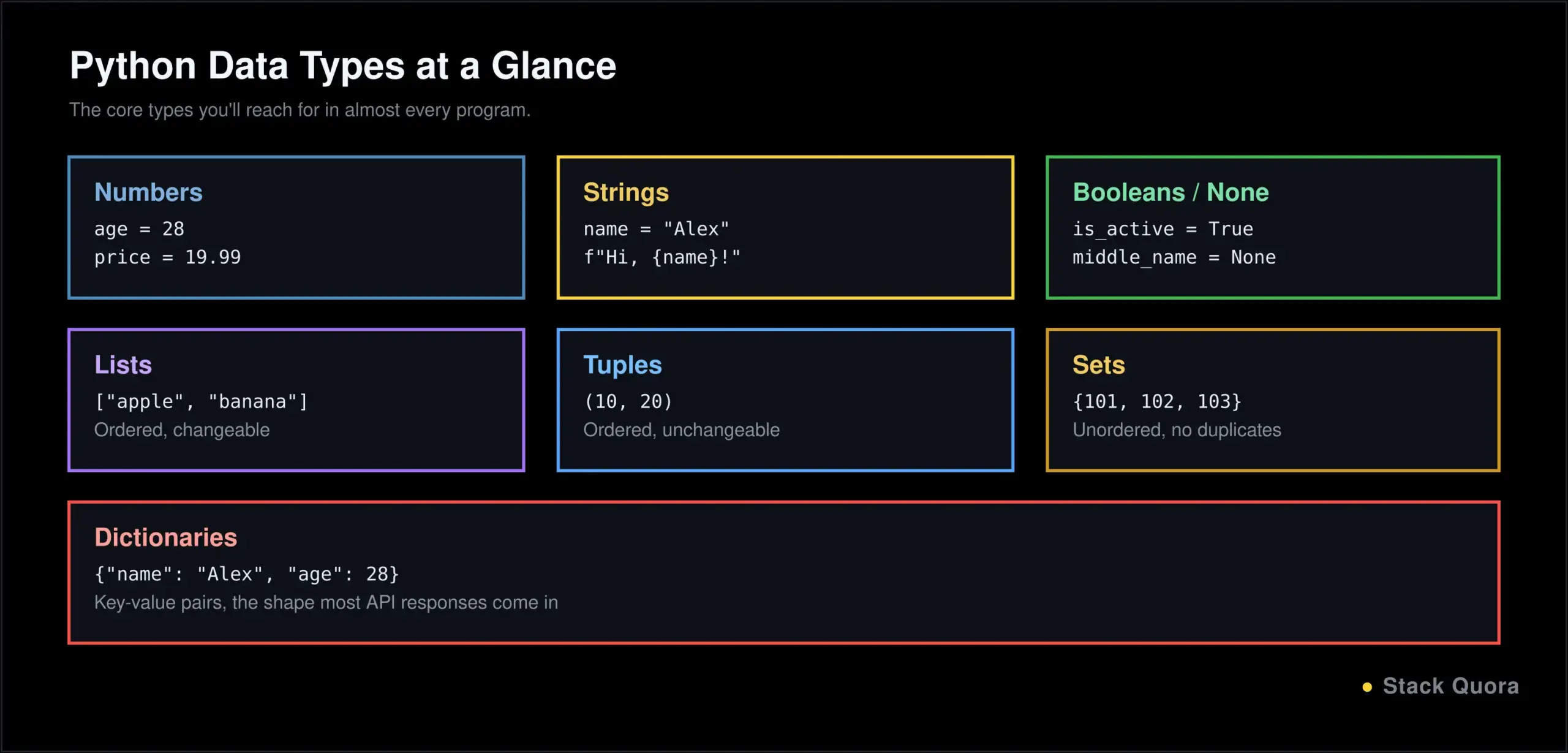
Python Operators
# Arithmetic
10 + 3    # 13
10 - 3    # 7
10 * 3    # 30
10 / 3    # 3.333...
10 // 3   # 3 (floor division)
10 % 3    # 1 (remainder)
10 ** 2   # 100 (exponent)

# Comparison
10 == 10  # True
10 != 5   # True
10 > 5    # True

# Logical
True and False   # False
True or False     # True
not True          # False

# Assignment
x = 5
x += 1    # same as x = x + 1

# Membership
"a" in "apple"          # True
3 in [1, 2, 3]           # True

# Identity
a = [1, 2]
b = [1, 2]
a == b    # True, same values
a is b    # False, different objects in memory
The distinction between == and is trips up a lot of beginners. == checks whether two things have the same value. is checks whether they are literally the same object in memory. You will use == far more often, but is matters specifically when checking against None: the accepted style is if value is None:, not if value == None:.
Conditional Statements in Python
age = 20if age < 13:
print("Child")
elif age < 20:
print("Teenager")
else:
print("Adult")if runs a block only when its condition is true. elif (short for “else if”) checks another condition if the first one was false. else catches everything that did not match any condition above it. You can nest conditions inside each other too, though if you find yourself nesting more than two or three levels deep, that is usually a sign the logic is worth restructuring.
Loops in Python
The for Loop
A for loop runs a block of code once for each item in a sequence:
fruits = ["apple", "banana", "cherry"]
for fruit in fruits:
    print(fruit)

for i in range(5):
    print(i)   # prints 0, 1, 2, 3, 4
The while Loop, break, continue and pass
A while loop keeps running as long as its condition stays true, which makes it the right tool when you don’t know in advance how many times you’ll need to loop:
count = 0
while count < 5:
    print(count)
    count += 1
Three keywords give you finer control inside a loop. break exits the loop immediately. continue skips the rest of the current iteration and moves to the next one. pass does nothing at all, used as a placeholder when Python’s syntax requires a statement but you have not written the logic yet.
for number in range(10):
    if number == 5:
        break        # stop the loop entirely
    if number % 2 == 0:
        continue     # skip even numbers, go to the next iteration
    print(number)
Python Functions
Creating a Function and Returning Values
A function is a named, reusable block of code. You define one with def, and return sends a value back to whoever called it:
def add(a, b):
    return a + b

result = add(3, 4)
print(result)   # 7
Default Arguments, *args and **kwargs
Parameters can have default values, used automatically if the caller doesn’t provide one:
def greet(name, greeting="Hello"):
    return f"{greeting}, {name}!"

print(greet("Alex"))              # "Hello, Alex!"
print(greet("Alex", "Hi"))        # "Hi, Alex!"
*args lets a function accept any number of extra positional arguments, and **kwargs lets it accept any number of extra named arguments:
def total(*args):
    return sum(args)

print(total(1, 2, 3, 4))   # 10

def describe(**kwargs):
    for key, value in kwargs.items():
        print(f"{key}: {value}")

describe(name="Alex", age=28)
Lambda Functions
A lambda is a small, unnamed function written in a single line, typically used where you need a quick throwaway function rather than a fully defined one:
square = lambda x: x * x
print(square(5))   # 25

numbers = [1, 2, 3, 4]
doubled = list(map(lambda n: n * 2, numbers))
Exception Handling in Python
try, except, else and finally
Errors happen. Exception handling is how your program deals with them without crashing outright.
try:
    result = 10 / 0
except ZeroDivisionError:
    print("You can't divide by zero!")
else:
    print("No errors happened")
finally:
    print("This always runs, error or not")
try holds the code that might fail. except catches a specific type of error and handles it. else runs only if no error occurred. finally always runs, whether there was an error or not, which makes it the right place for cleanup work like closing a file or a connection.
Raising and Creating Custom Exceptions
You can trigger your own errors with raise, and define your own exception types by inheriting from Python’s built-in Exception class:
class InsufficientFundsError(Exception):
    pass

def withdraw(balance, amount):
    if amount > balance:
        raise InsufficientFundsError("Not enough funds for this withdrawal")
    return balance - amount
Object-Oriented Programming in Python
Object-oriented programming, or OOP, is a way of structuring code around objects that bundle together data and the behavior that acts on that data. It sounds abstract until you write a few classes, at which point it usually clicks.
Classes, Objects and Constructors
A class is a blueprint. An object is a specific instance built from that blueprint. The __init__ method is the constructor, run automatically whenever a new object is created:
class Dog:
    def __init__(self, name, breed):
        self.name = name
        self.breed = breed

    def bark(self):
        return f"{self.name} says woof!"

my_dog = Dog("Rex", "Labrador")
print(my_dog.bark())   # "Rex says woof!"
Encapsulation, Inheritance and Polymorphism
Encapsulation means bundling data and the methods that operate on it together inside a class, and controlling what outside code can directly access, conventionally marked with a leading underscore like self._balance for something meant to stay internal.
Inheritance lets one class build on another, reusing its behavior and adding or overriding what it needs:
class Animal:
    def __init__(self, name):
        self.name = name

    def speak(self):
        return f"{self.name} makes a sound"

class Cat(Animal):
    def speak(self):
        return f"{self.name} says meow"

my_cat = Cat("Whiskers")
print(my_cat.speak())   # "Whiskers says meow"
Polymorphism is what just happened above: Cat overrides speak() with its own version, so calling the same method name on different objects produces different, appropriate behavior for each one. Abstraction, the fourth core OOP idea, is closely related: it means exposing only what a class’s user actually needs to know, and hiding the messy implementation details behind a clean method like .speak() or .bark().
Python Modules, Packages and Virtual Environments
A module is just a Python file you can import into another file. A package is a folder of related modules. You already used one earlier without naming it: range() and print() come from Python’s built-in functionality, but most real work pulls in external packages too.
# math is a built-in module
import math
print(math.sqrt(16))   # 4.0

# Installing an external package
# (run this in your terminal, not inside a .py file)
# pip install requests
import requests
pip is Python’s package installer, and you will use it constantly. Full details live in the official pip documentation.
A virtual environment is an isolated space for one project’s packages, so different projects can use different, even conflicting, versions of the same library without interfering with each other. Creating one is a single command:
python -m venv myenv

# Activate it (Windows)
myenv\Scripts\activate

# Activate it (macOS/Linux)
source myenv/bin/activate
Get in the habit of using a virtual environment for every real project from day one. It is a small extra step early on that prevents a genuinely annoying class of bugs later.
File Handling in Python
# Writing to a filewith open("notes.txt", "w") as file:
file.write("Hello, file!")
# Reading from a file
with open("notes.txt", "r") as file:
content = file.read()
print(content)The with keyword handles closing the file automatically, even if an error happens partway through, which is why it is the standard way to work with files rather than opening and closing them manually.
CSV and JSON, the two formats you will hit constantly in real projects, each get their own built-in module:
import csv

with open("data.csv", "r") as file:
    reader = csv.reader(file)
    for row in reader:
        print(row)

import json

data = {"name": "Alex", "age": 28}
with open("data.json", "w") as file:
    json.dump(data, file)
Python and APIs
An API, short for application programming interface, is how two pieces of software talk to each other, usually by sending a request over the internet and getting a response back. Python’s requests library makes this genuinely simple.
import requests

response = requests.get("https://api.github.com/users/octocat")

if response.status_code == 200:
    data = response.json()
    print(data["name"])
else:
    print(f"Something went wrong: {response.status_code}")
That short script is a complete API client: it sends a request, checks the status code, and reads the JSON response. Once you have something like this actually talking to a real API, testing that API with Postman separately from your Python code is a genuinely useful habit — it tells you clearly whether a problem is in the API itself or in your script, instead of guessing.
Python for Automation
This is where Python earns its reputation as the language people reach for to stop doing something by hand. Common patterns include:
- Automating repetitive tasks – renaming batches of files, reformatting spreadsheets, generating the same report every week.
- Working with files and folders – moving, organizing and cleaning up directories automatically based on rules you define once.
- Automating web tasks – filling in forms, downloading data, checking a site for changes, using libraries built specifically for browser automation.
- Test automation – writing scripts that check whether an application still behaves correctly after a change, instead of a person clicking through it by hand every time.
That last one deserves its own callout, because it has evolved fast. Traditional Python test scripts are still extremely common, but Playwright MCP for AI-driven testing and how AI agents are changing QA both cover where test automation is headed next: agents that can plan and execute a test session, not just run a fixed script.
Python for Web Development
Three frameworks dominate Python web development, each suited to a different situation:
- Flask is lightweight and unopinionated, giving you the pieces to assemble a web app your own way. It is a common choice for smaller apps and APIs, and for learning how web frameworks work under the hood before reaching for something heavier.
- Django is a full-featured, batteries-included framework with an admin panel, an ORM for talking to a database, and authentication built in from the start. It suits larger applications where you want a lot of the foundational decisions already made for you.
- FastAPI is a newer framework built specifically for fast, modern API development, with automatic interactive documentation and strong support for validating request data using Python’s type hints.
Choosing between them mostly comes down to project size and how much structure you want handed to you versus how much you want to decide yourself. Flask for small and flexible, Django for large and structured, FastAPI when the project is primarily an API.
Python for AI and Machine Learning
Python’s dominance in AI is not an accident. NumPy and Pandas handle the numerical and tabular data work that AI depends on. scikit-learn covers classical machine learning. PyTorch and TensorFlow handle deep learning. Hugging Face’s ecosystem and libraries like LangChain make it far easier to work with large language models without building everything from raw model calls.
This connects directly to two of the biggest shifts in how software gets built right now. If you are vibe coding an app — describing what you want in plain language and letting an AI tool generate the implementation — the code it hands back is very often Python, because so much AI tooling was built Python-first. And if that application needs to answer questions using your own data, you are likely storing those embeddings in a vector database, almost always through a Python client library, since that is how most retrieval-augmented generation systems get built in practice.
Knowing Python well does not just prepare you to use AI tools. It prepares you to actually understand and build the systems underneath them.
Beginner Python Projects to Practice
Reading code teaches you far less than writing it. These five, roughly in order of difficulty, are worth building for real:
- Calculator – practice functions, operators and handling basic user input.
- Number guessing game – practice loops, conditionals and randomness.
- To-do list – practice lists, dictionaries and a simple menu-driven program structure.
- File organizer – practice file handling by writing a script that sorts files in a folder by type or date.
- API data fetcher – practice
requestsand JSON by pulling live data from a free public API and displaying it.
Build each one without copying a finished solution first. Get stuck, fix your own bugs, and only look up an approach once you have genuinely tried. That struggle is where the actual learning happens.
Common Python Mistakes Beginners Make
- Ignoring indentation. Since indentation is part of Python’s syntax, a stray space or tab causes a real error, not just messy formatting.
- Using the wrong data type. Trying to concatenate a string and a number directly,
"Age: " + 25, throws an error; you needstr(25)or an f-string instead. - Not understanding exceptions. Wrapping code in a bare
try/exceptthat silently swallows every error hides real bugs instead of fixing them. - Writing repetitive code. If you are copying and pasting the same few lines with small tweaks, that is almost always a sign you need a function or a loop instead.
- Copying code without understanding it. Code you copied from a tutorial and don’t understand is code you cannot debug when it breaks, and it will break.
- Not practicing with real projects. Watching tutorials without writing your own code is one of the most common reasons people feel like they “know Python” but can’t actually build anything.
Python Best Practices for Beginners
- Write readable code. Code is read far more often than it is written; optimize for the next person reading it, including future you.
- Use meaningful names.
customer_totaltells you something.xdoes not. - Follow PEP 8, Python’s official style guide, so your code looks like idiomatic Python rather than another language wearing Python’s syntax.
- Use virtual environments for every real project, without exception, from the very first line of code.
- Handle errors properly, catching specific exceptions rather than every possible error with one broad, silent
except:. - Test your code, deliberately, not just by running it once and assuming it works. As your projects grow, wiring those tests into an automated CI/CD pipeline means they run on every single change automatically, instead of only when you remember.
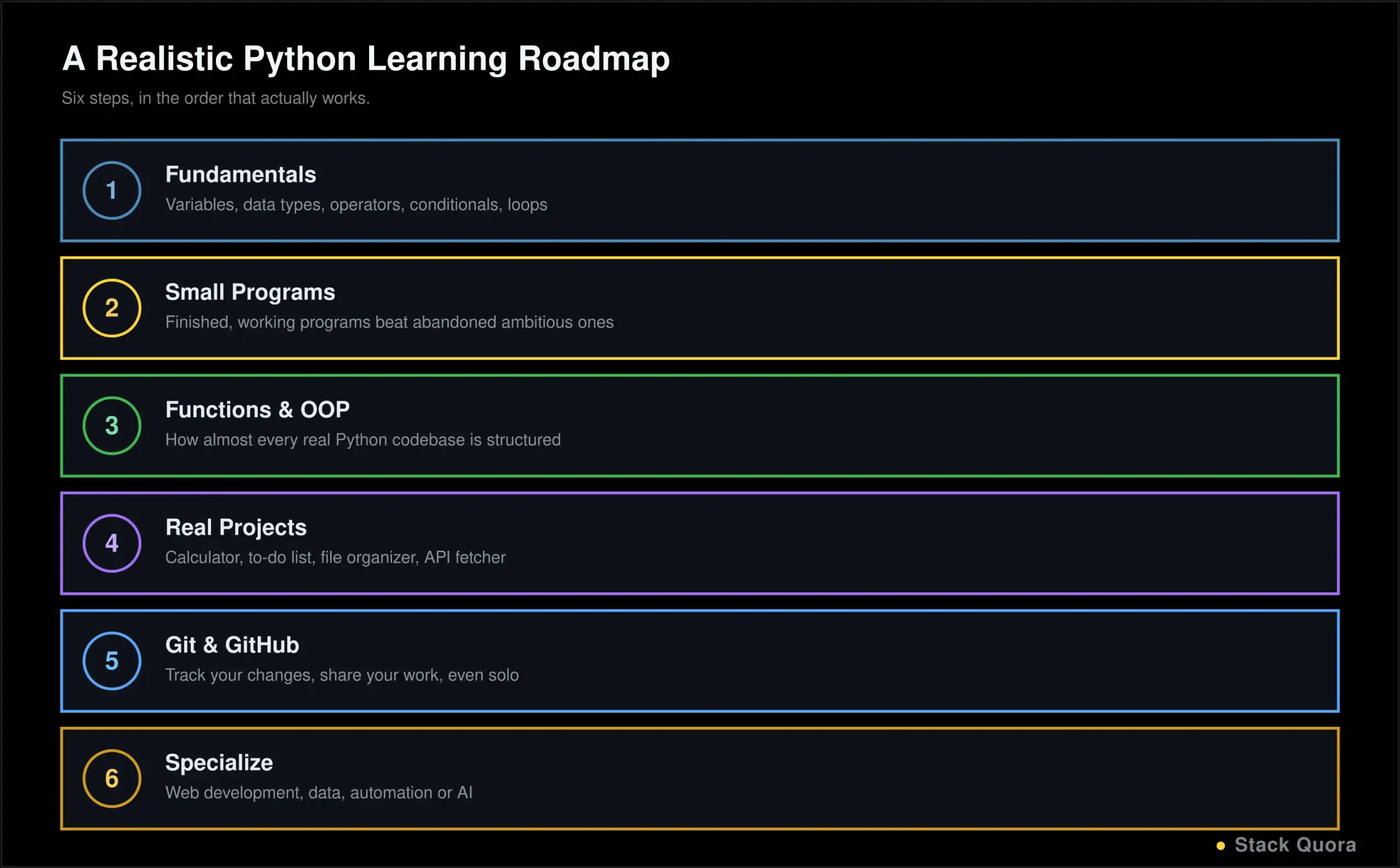
How to Learn Python Step by Step
- Start with the fundamentals – variables, data types, operators, conditionals and loops, exactly as covered in this guide.
- Practice with small programs before attempting anything ambitious. Small, finished programs teach you more than large, abandoned ones.
- Learn functions and OOP once the fundamentals feel comfortable, since almost every real Python codebase is built around both.
- Build real projects, starting with the beginner list above and growing from there as your confidence builds.
- Learn Git and GitHub so you can track your changes and share your work, even on solo projects – it is a habit worth building early rather than bolting on later.
- Go deeper into a specialization that matches where you want to go: web development, data analysis, automation, or AI.
Python vs Other Programming Languages
- Python vs Java
Java is statically typed, generally faster in raw execution, and heavily used in large enterprise systems and Android development. Python trades some of that raw speed for dramatically faster development time and a gentler learning curve. - Python vs JavaScript
JavaScript runs natively in every browser and dominates frontend web development; Python has no native browser role at all. On the backend, both are strong general-purpose choices, and the decision often comes down to team preference and existing stack more than any hard technical requirement. - Python vs C++
C++ gives you far more direct control over memory and hardware, and wins decisively wherever raw performance is the deciding factor: game engines, real-time systems, embedded devices. Python trades that control for speed of writing and reading code. - When should you choose Python?
When development speed, readability and a large ecosystem matter more than squeezing out maximum raw performance — which describes the large majority of real-world software, automation and AI projects being built today.
Final Thoughts
Python’s biggest strength is not any single feature; it is how much ground one reasonably learnable language actually covers. The same fundamentals in this guide — variables, functions, loops, classes, exception handling — show up whether you end up automating spreadsheets, building a web backend, or training a machine learning model.
Do not try to absorb everything in this guide in one sitting. Work through the fundamentals, actually type the code examples, build something small and real, and let the more advanced sections pull you back in once you have a genuine reason to need them. That is how Python is actually learned, by nearly everyone who has ever learned it.
The syntax will start feeling natural faster than you expect. What takes longer, and matters more, is building the habit of writing real code regularly. Start today, with something small.
Frequently Asked Questions
Is Python easy to learn?
Yes, relative to most other programming languages. Its syntax is close to plain English, and there is no need to manage memory manually or learn a complex type system just to write your first working program.
Is Python good for beginners?
Yes. Readable syntax, a huge amount of learning material, and a massive ecosystem of libraries make it one of the most commonly recommended first languages, and it stays useful well past the beginner stage into real professional work.
How long does it take to learn Python?
Basic syntax and fundamentals typically take a few weeks of consistent practice. Genuine comfort building real projects usually takes a few months. Deeper specialization, in an area like AI or backend development, is an ongoing process that continues well past your first year.
What is Python mainly used for?
Python is used across AI and machine learning, software development, automation and scripting, data analysis, and web development. Its range across such different domains is part of why it stays so widely used.
Is Python still worth learning in 2026?
Yes. Python has held the top spot on the TIOBE Index, the most widely cited measure of language popularity, throughout 2026, and it remains the dominant language across AI development specifically, which shows no sign of slowing down.
Can Python be used for software development?
Yes, extensively. Backend services, internal tools, command-line applications and full production systems all get built in Python, particularly where development speed matters as much as raw execution speed.
Can Python be used for automation testing?
Yes. Python is one of the most common languages for test automation, both through traditional scripted tests and, increasingly, through AI-driven testing tools and agents built on top of Python foundations.
Can Python be used for AI development?
Yes, it is the dominant language for it. Libraries like NumPy, Pandas, scikit-learn, PyTorch and TensorFlow, along with most modern large language model tooling, are built Python-first.
What should I learn after Python basics?
Object-oriented programming and working with real data (files, APIs, databases) first, followed by a specialization that matches your goals: a web framework for backend development, data libraries for analysis, or the AI and machine learning ecosystem if that is the direction you want to go.