
SQL Tutorial for Beginners: Complete Guide to SQL in 2026
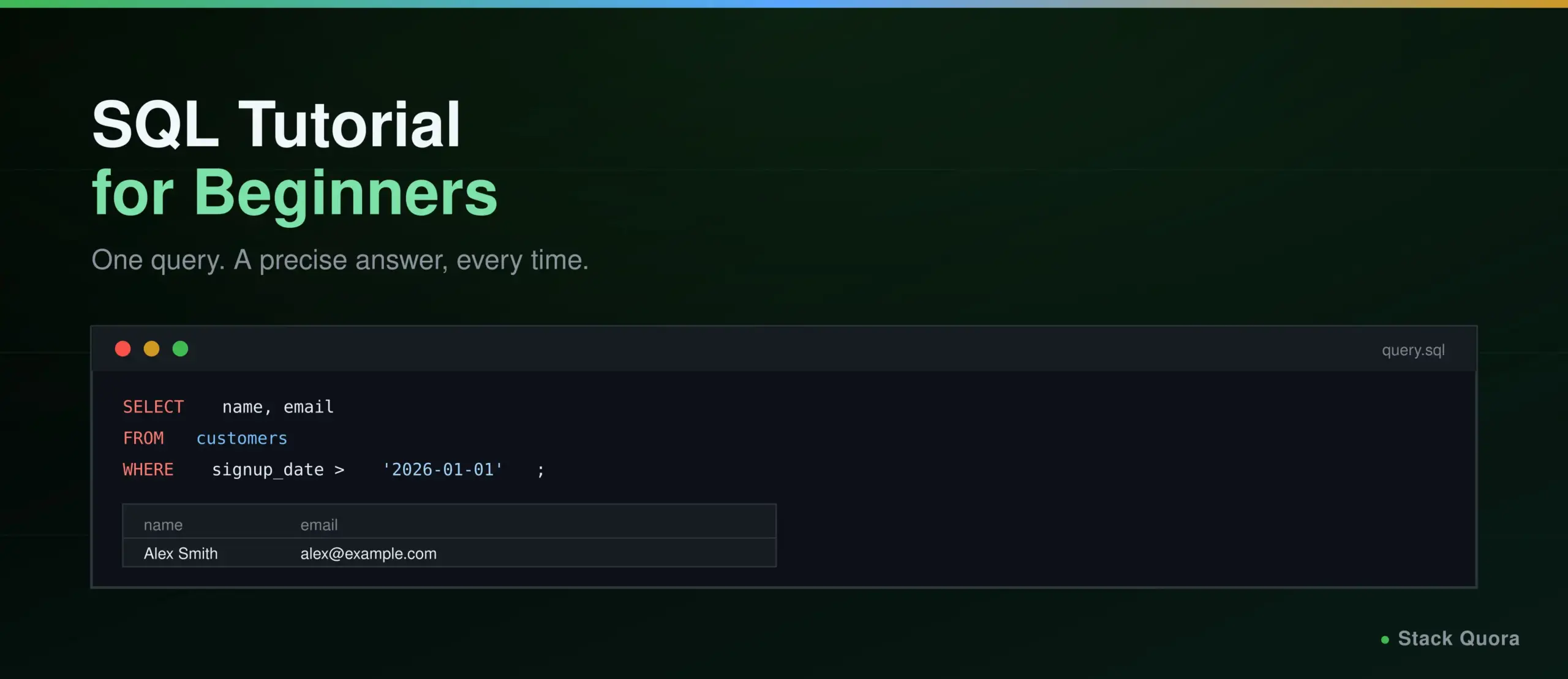
Every time you check a bank balance, search a product catalog, or pull up a QA test report, something behind the scenes is almost certainly asking a database a question in SQL. It is one of the oldest languages still in daily, mainstream use, dating back to the 1970s, and it has outlasted trend after trend for one simple reason: structured data still needs a structured way to ask questions of it, and nothing has replaced SQL at that specific job.
This guide takes you from a completely blank query window to genuinely comfortable with SQL: every core statement, filtering and sorting, all six join types explained properly, subqueries, window functions, transactions, and where SQL fits into testing, backend development and data analysis. Every example here is real, runnable SQL, not pseudocode.
Whether you’re a QA tester who needs to verify data directly instead of trusting a UI, a developer building the backend behind an API, or someone analyzing data for the first time, this is the single skill that shows up in all three jobs equally.
What Is SQL?
SQL is a language for storing, retrieving, modifying and managing data in a relational database. You use it to ask a database precise questions, “show me every order placed last week,” and to change what’s stored there, “update this customer’s email address.”
What Does SQL Stand For?
SQL stands for Structured Query Language. It was developed at IBM in the early 1970s, standardized shortly after, and remains the dominant language for working with relational databases to this day, across virtually every major database system.
Why Is SQL Important?
SQL sits underneath an enormous share of the software you use daily, whether you ever see it directly or not. It is also, genuinely, one of the most durable, most transferable skills in all of software: a SQL query you write today will read almost identically ten years from now, which is far from guaranteed for most other technical skills.
Why Learn SQL in 2026?
- Software development. Most applications, regardless of language or framework, talk to a relational database constantly, and understanding that layer directly makes you a meaningfully better developer, not just a database user.
- Data analysis. SQL remains the primary language for pulling, filtering and aggregating data before it ever reaches a dashboard or a report.
- Software testing. Verifying what’s actually stored in a database, rather than trusting only what a UI displays, is a core QA skill, covered in real depth further down.
- Backend development. Every backend eventually reads from or writes to a database; SQL is how that conversation actually happens.
- Business intelligence. Reporting tools and dashboards are built on SQL queries underneath, even when the person building the dashboard never writes SQL by hand themselves.
- Artificial intelligence. AI tools increasingly generate SQL directly from a plain-English question, and knowing SQL yourself is exactly what lets you verify that AI-generated backend code is actually querying the right thing, correctly, rather than just trusting it blindly.
What Is a Database?
A database is an organized collection of data, stored so it can be efficiently accessed, managed and updated.
Relational Databases, Tables, Rows and Columns
A relational database organizes data into tables, each one representing one kind of thing: a customers table, an orders table, a products table. Each table is made up of rows (one record, like one specific customer) and columns (one attribute of that record, like email or signup_date). Relationships between tables, an order belonging to a specific customer, are what give relational databases their name and their real power.
Primary Keys and Foreign Keys
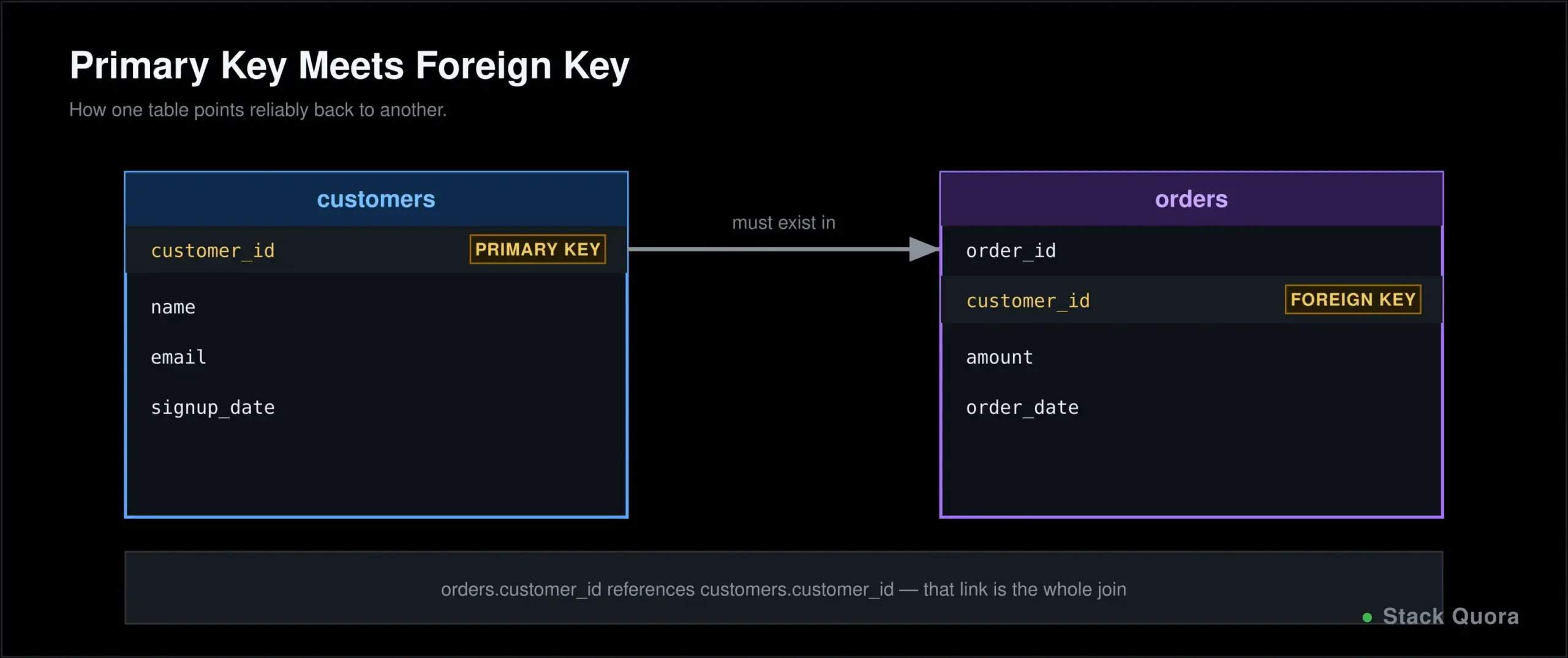
A primary key uniquely identifies each row in a table, no duplicates, ever: a customer_id column, for example. A foreign key is a column in one table that references a primary key in another, which is exactly how an orders table knows which customer each order actually belongs to. These two concepts are the glue holding a relational database together, and they come up constantly throughout the rest of this guide.
SQL vs Database Management Systems
This trips up a lot of beginners, worth untangling clearly up front: SQL is the language. A DBMS (Database Management System) is the actual software that stores your data and understands SQL commands. An RDBMS (Relational Database Management System) is specifically a DBMS built around the relational model, tables with rows and columns.
SQL vs MySQL, SQL vs PostgreSQL, and SQL Server vs SQL are all really the same confusion wearing different names: SQL is the language you write. MySQL, PostgreSQL and SQL Server are all specific RDBMS products, each one implementing SQL with its own particular extensions and dialect. Learning “SQL” means learning the language itself, which then transfers, with small adjustments, across virtually any of these specific products.
How to Start Learning SQL
What do you actually need? A database to practice against, and something to write queries in. That’s genuinely the whole list.
Installing a database. PostgreSQL, MySQL and SQLite are all free, and running one in Docker is the fastest way to get a real database up and running locally in minutes, without a messy manual install.
Using an online SQL editor is an even lighter way to start: no installation at all, a database and an editor both sitting right in your browser, genuinely enough to work through every example in this guide.
CREATE DATABASE practice_db;

USE practice_db;

CREATE TABLE customers (
    customer_id INT PRIMARY KEY,
    name VARCHAR(100),
    email VARCHAR(100),
    signup_date DATE
);
That’s a real, complete first database with one table, ready for the rest of this guide.
SQL Syntax and Basic Concepts
A SQL statement is one complete instruction, like SELECT * FROM customers;, conventionally ending in a semicolon. SQL keywords, SELECT, FROM, WHERE, are traditionally written in uppercase by convention, purely for readability; SQL itself doesn’t actually care about case for keywords.
-- This is a comment, ignored when the query runs
SELECT name, email
FROM customers
WHERE signup_date > '2026-01-01';
Table and column names conventionally use snake_case, like customer_id rather than customerId, matching most SQL style guides. For hands-on practice as you work through each section here, W3Schools’ interactive SQL editor lets you run real queries directly in your browser.
SQL Data Types
CREATE TABLE products ( product_id INT, -- numeric
price DECIMAL(10, 2), -- numeric, with precision
name VARCHAR(100), -- variable-length string
description TEXT, -- long-form string
in_stock BOOLEAN, -- true or false
created_at DATE, -- date only
updated_at TIMESTAMP, -- date and time
discontinued_reason VARCHAR(100) -- can be NULL
);Numeric types cover whole numbers (INT) and precise decimals (DECIMAL), the right choice for anything involving money, where floating-point rounding errors are genuinely unacceptable. String types include fixed and variable-length text (VARCHAR) and longer free text (TEXT). Date and time types store dates, times, or both together. NULL represents a genuinely missing or unknown value, covered in its own full section further down, since it trips up more beginners than almost anything else in SQL.
The SELECT Statement
SELECT * FROM customers; -- every columnSELECT name, email FROM customers; -- specific columnsSELECT name AS customer_name FROM customers; -- column aliasSELECT DISTINCT signup_date FROM customers; -- unique values onlySELECT price, price * 0.9 AS discounted_price FROM products; -- calculated valueSELECT is how you ask a database for data, and it’s the statement you’ll write more than any other, by a wide margin. An alias (AS) renames a column in your results without touching the actual underlying column name, useful for readability or for naming a calculated value that doesn’t have a column of its own. SELECT DISTINCT removes duplicate rows from your results, keeping only unique values.
Filtering With WHERE
SELECT * FROM products WHERE price > 50;
SELECT * FROM products WHERE price > 50 AND in_stock = true;
SELECT * FROM products WHERE category = 'Books' OR category = 'Games';
SELECT * FROM products WHERE NOT in_stock;
SELECT * FROM products WHERE price BETWEEN 10 AND 50;
SELECT * FROM products WHERE category IN ('Books', 'Games', 'Toys');
SELECT * FROM customers WHERE name LIKE 'A%';        -- starts with A
SELECT * FROM customers WHERE email IS NULL;
WHERE filters which rows come back, evaluated against comparison operators (>, <, =, !=) and logical operators (AND, OR, NOT). BETWEEN checks an inclusive range. IN checks against a list of possible values, cleaner than stacking several OR conditions. LIKE does pattern matching on text, with % matching any number of characters. IS NULL deserves special mention: WHERE email = NULL silently returns nothing at all, ever, because NULL can never equal anything, including itself – IS NULL is the only correct way to check for it.
Sorting and Limiting Results: ORDER BY and LIMIT
SELECT * FROM products ORDER BY price ASC;              -- low to high
SELECT * FROM products ORDER BY price DESC;               -- high to low
SELECT * FROM products ORDER BY category ASC, price DESC;   -- multiple columns
SELECT * FROM products ORDER BY price DESC LIMIT 10;          -- top 10
SELECT * FROM products ORDER BY price DESC LIMIT 10 OFFSET 10; -- the next 10
ORDER BY sorts your results, ASC (ascending, the default) or DESC (descending). Sorting by multiple columns resolves ties in the first column using the second. LIMIT caps how many rows come back, essential for anything resembling pagination, and OFFSET skips a number of rows before starting to return results, letting you page through a large result set a chunk at a time.
Modifying Data: INSERT, UPDATE and DELETE
INSERT
INSERT INTO customers (customer_id, name, email, signup_date)
VALUES (1, 'Alex Smith', 'alex@example.com', '2026-01-15');

INSERT INTO customers (customer_id, name, email, signup_date)
VALUES
    (2, 'Sam Lee', 'sam@example.com', '2026-01-16'),
    (3, 'Jo Patel', 'jo@example.com', '2026-01-17');

INSERT INTO archived_customers
SELECT * FROM customers WHERE signup_date < '2024-01-01';
A single VALUES clause inserts one row; a comma-separated list inserts several at once. INSERT INTO ... SELECT copies rows directly from one table into another, without ever pulling the data out into your application first. The most common beginner INSERT error is a column count mismatch, the number of values not matching the number of listed columns.
UPDATE
UPDATE customers
SET email = 'newemail@example.com'
WHERE customer_id = 1;

UPDATE products
SET price = price * 1.1
WHERE category = 'Books';
UPDATE changes existing rows, and the mistake that genuinely matters here: running UPDATE without a WHERE clause updates every single row in the table. Always write and double-check your WHERE clause before running an UPDATE, every time, no exceptions.
DELETE and TRUNCATE
DELETE FROM customers WHERE customer_id = 3;

TRUNCATE TABLE archived_customers;   -- removes ALL rows, instantly, no WHERE allowed
DELETE removes specific rows and respects a WHERE clause exactly like UPDATE does, with the exact same danger: no WHERE means every row goes. TRUNCATE removes every row in a table at once, faster than DELETE, but it cannot be filtered with WHERE at all – it’s all or nothing, by design.
SQL Aggregate Functions
SELECT COUNT(*) FROM orders;
SELECT SUM(price) FROM products;
SELECT AVG(price) FROM products;
SELECT MIN(price) FROM products;
SELECT MAX(price) FROM products;
COUNT() counts rows. SUM() adds up a numeric column. AVG() calculates the average. MIN() and MAX() return the smallest and largest values. These five are the foundation nearly every real report and dashboard query gets built on top of.
GROUP BY and HAVING
SELECT category, COUNT(*) AS total_products
FROM products
GROUP BY category;

SELECT category, AVG(price) AS avg_price
FROM products
GROUP BY category
HAVING AVG(price) > 50;

SELECT category, in_stock, COUNT(*)
FROM products
GROUP BY category, in_stock;
GROUP BY collapses rows sharing the same value in a column into one summary row per group, which is exactly what makes aggregate functions genuinely useful beyond a single whole-table total: “average price per category,” not just “average price overall.” HAVING filters groups after they’ve already been aggregated, the critical difference from WHERE, which filters individual rows before any grouping happens at all. A very common beginner mistake is trying to filter an aggregate with WHERE (WHERE AVG(price) > 50), which is simply invalid SQL – that’s exactly the job HAVING exists to do instead. GROUP BY can also group by more than one column at once, producing one row per unique combination.
SQL Joins Explained
A join combines rows from two or more tables based on a related column between them, almost always a foreign key pointing at a primary key. This is arguably the single most important concept in all of SQL, and genuinely the one that trips up beginners longest, so it earns real depth here.
-- Example tables for every join below
-- customers: customer_id, name
-- orders: order_id, customer_id, amount
INNER JOIN
SELECT customers.name, orders.amount
FROM customers
INNER JOIN orders ON customers.customer_id = orders.customer_id;
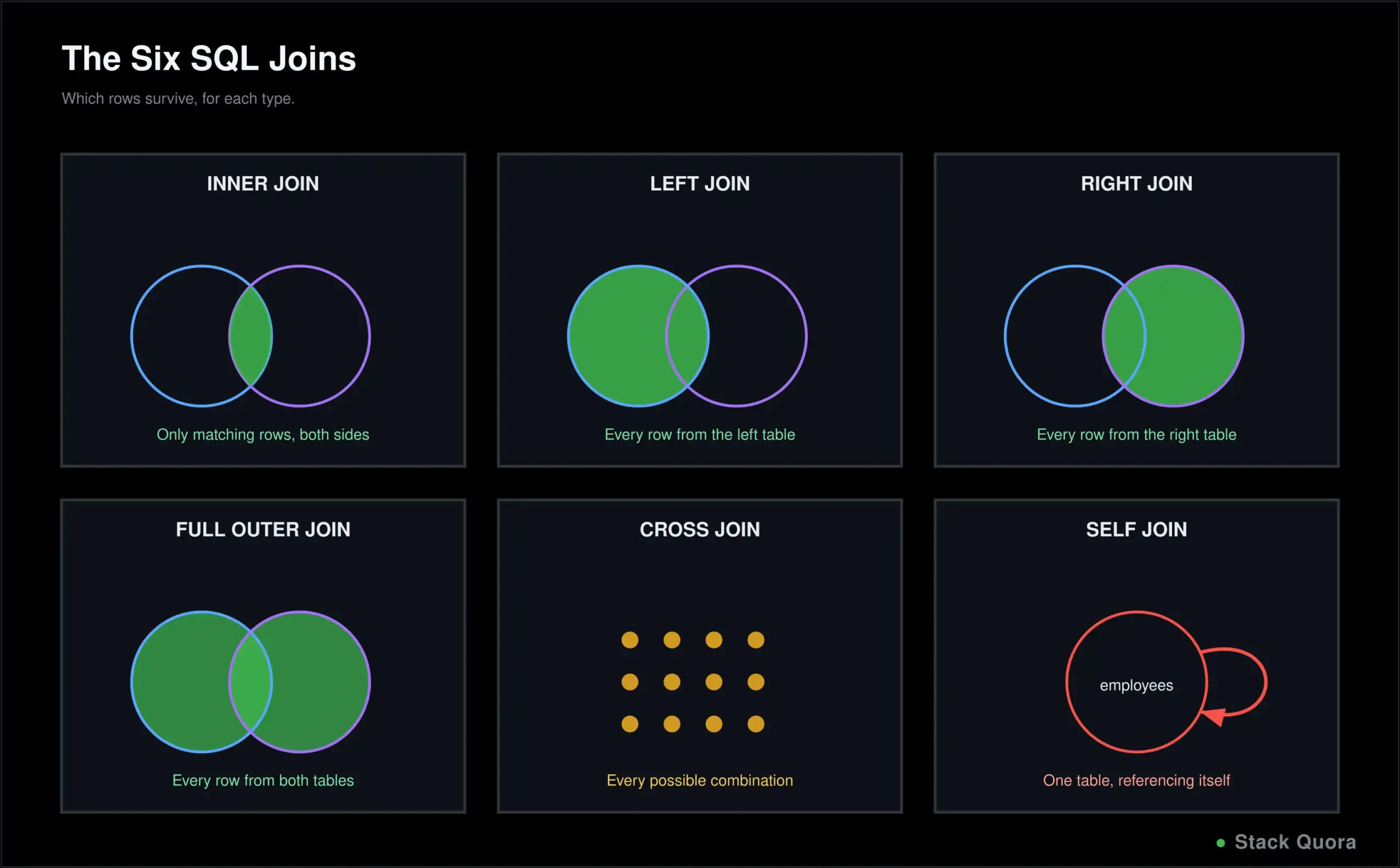
Returns only rows with a match in both tables. A customer with zero orders won’t appear at all; an order somehow pointing at a nonexistent customer won’t appear either. This is the default, most common join, and when people just say “join” with no qualifier, they usually mean this one.
LEFT JOIN and RIGHT JOIN
-- Every customer, with their orders where they exist, NULL where they don't
SELECT customers.name, orders.amount
FROM customers
LEFT JOIN orders ON customers.customer_id = orders.customer_id;

-- Every order, with customer info where it exists
SELECT customers.name, orders.amount
FROM customers
RIGHT JOIN orders ON customers.customer_id = orders.customer_id;
LEFT JOIN returns every row from the left table, matched with the right table’s data where it exists, and NULL in the right table’s columns where it doesn’t – this is how you’d find “every customer, including the ones who have never placed an order.” RIGHT JOIN is the exact mirror image, keeping every row from the right table instead. In practice, most people write every query as a LEFT JOIN and simply reorder their tables rather than ever reaching for RIGHT JOIN, since the two are functionally interchangeable that way.
FULL OUTER JOIN and CROSS JOIN
-- Every row from both tables, matched where possible, NULL where not
SELECT customers.name, orders.amount
FROM customers
FULL OUTER JOIN orders ON customers.customer_id = orders.customer_id;

-- Every possible combination of rows from both tables
SELECT sizes.size, colors.color
FROM sizes
CROSS JOIN colors;
FULL OUTER JOIN keeps every row from both tables, matched where a relationship exists, NULL on whichever side doesn’t have a match. CROSS JOIN doesn’t match on any condition at all, it returns every possible combination of rows from both tables, genuinely useful for generating combinations, like every size paired with every color, but something you’ll reach for rarely.
SELF JOIN
-- Find employees and their managers, both stored in the same table
SELECT e.name AS employee, m.name AS manager
FROM employees e
JOIN employees m ON e.manager_id = m.employee_id;
A self join joins a table to itself, used when rows in one table reference other rows in that exact same table, an employee referencing their own manager being the textbook example. The aliases (e and m here) are what make this possible at all – without them, SQL would have no way to tell which “copy” of the table a given column reference belongs to.
SQL Subqueries
-- Subquery in WHERE
SELECT name FROM customers
WHERE customer_id IN (SELECT customer_id FROM orders WHERE amount > 100);

-- Subquery in SELECT
SELECT name, (SELECT COUNT(*) FROM orders WHERE orders.customer_id = customers.customer_id) AS order_count
FROM customers;

-- Subquery in FROM
SELECT category, avg_price FROM (
    SELECT category, AVG(price) AS avg_price FROM products GROUP BY category
) AS category_averages
WHERE avg_price > 50;

-- Correlated subquery: references the outer query, runs once per outer row
SELECT name FROM customers c
WHERE EXISTS (SELECT 1 FROM orders o WHERE o.customer_id = c.customer_id);
A subquery is a query nested inside another query, usable almost anywhere a value or a table could appear: inside WHERE, inside SELECT as a calculated column, or inside FROM as a temporary, on-the-fly table. A correlated subquery references a column from the outer query, meaning it effectively runs once per row of the outer query, rather than once total. Subquery vs join: a join is usually faster and more readable for combining related data side by side; a subquery often reads more naturally for filtering based on another table’s data, or checking existence, without actually needing that other table’s columns in your final result.
SQL UNION and UNION ALL
SELECT name FROM customers
UNION
SELECT name FROM newsletter_subscribers;

SELECT name FROM customers
UNION ALL
SELECT name FROM newsletter_subscribers;
UNION combines the results of two queries into one result set, automatically removing duplicate rows in the process. UNION ALL does the exact same thing but keeps every row, duplicates included, which also makes it meaningfully faster, since it skips the extra work of checking for and removing duplicates. Use UNION ALL by default unless you specifically need duplicates removed.
SQL Constraints and Keys
CREATE TABLE orders (
    order_id INT PRIMARY KEY,
    customer_id INT NOT NULL,
    amount DECIMAL(10, 2) CHECK (amount > 0),
    status VARCHAR(20) DEFAULT 'pending',
    tracking_number VARCHAR(50) UNIQUE,
    FOREIGN KEY (customer_id) REFERENCES customers(customer_id)
);
Constraints enforce rules directly at the database level, so bad data simply can’t get in, regardless of which application or script is writing to the table. NOT NULL requires a value. UNIQUE disallows duplicates in that column. PRIMARY KEY uniquely identifies each row (and implies both NOT NULL and UNIQUE together). FOREIGN KEY enforces that a value must actually exist in the table it references. CHECK enforces a custom condition. DEFAULT supplies a value automatically when none is given.
A candidate key is any column (or set of columns) that could serve as the primary key. A composite key is a primary key made of more than one column together, common in tables that link two others, like an order_items table referencing both an order and a product. A unique key is identical to a UNIQUE constraint, enforcing no duplicates, without being the table’s chosen primary key.
SQL Functions and CASE Statements
-- String functions
SELECT UPPER(name), LOWER(email), LENGTH(name), CONCAT(name, ' - ', email) FROM customers;

-- Numeric functions
SELECT ROUND(price, 0), ABS(-5), CEILING(4.2), FLOOR(4.8) FROM products;

-- Date functions
SELECT NOW(), DATEDIFF(NOW(), signup_date) AS days_since_signup FROM customers;

-- CASE: SQL's if/else
SELECT
    name,
    price,
    CASE
        WHEN price < 20 THEN 'Budget'
        WHEN price BETWEEN 20 AND 100 THEN 'Mid-range'
        ELSE 'Premium'
    END AS price_tier
FROM products;
Built-in functions handle string manipulation, number formatting and date arithmetic directly inside a query, so you don’t need to pull data out into your application just to transform it. CASE is SQL’s conditional logic, evaluating a list of WHEN conditions in order and returning the first match’s result, falling back to ELSE when nothing matches – genuinely useful for turning raw numbers into readable categories directly in your query output.
Understanding NULL in SQL
NULL represents a missing or unknown value, not zero, and not an empty string, three genuinely different things that beginners mix up constantly.
SELECT * FROM customers WHERE phone IS NULL;
SELECT * FROM customers WHERE phone IS NOT NULL;
SELECT name, COALESCE(phone, 'No phone on file') AS phone FROM customers;
0 is a known, specific numeric value. '' (empty string) is a known, specific, empty piece of text. NULL means the value is simply unknown or doesn’t exist at all – and because of that, NULL can never be compared with = or !=; IS NULL and IS NOT NULL are the only valid checks. COALESCE() returns the first non-NULL value from a list, extremely useful for supplying a sensible fallback display value instead of showing a blank.
SQL Common Table Expressions (CTEs)
WITH high_value_customers AS (
    SELECT customer_id, SUM(amount) AS total_spent
    FROM orders
    GROUP BY customer_id
    HAVING SUM(amount) > 1000
)
SELECT customers.name, high_value_customers.total_spent
FROM customers
JOIN high_value_customers ON customers.customer_id = high_value_customers.customer_id;

-- A recursive CTE, walking up a management chain
WITH RECURSIVE management_chain AS (
    SELECT employee_id, manager_id, name FROM employees WHERE employee_id = 5
    UNION ALL
    SELECT e.employee_id, e.manager_id, e.name
    FROM employees e
    JOIN management_chain mc ON e.employee_id = mc.manager_id
)
SELECT * FROM management_chain;
A CTE, defined with WITH, is a named, temporary result set you can reference later in the same query, exactly like giving a subquery a readable name and reusing it. You can define several CTEs in one query, even chain them together. A recursive CTE references itself, repeating until a stopping condition is met, perfect for genuinely hierarchical data like an org chart or a category tree. CTE vs subquery: functionally similar, but a CTE is almost always more readable, especially once you’re nesting more than one level deep, and it’s the only option of the two that supports recursion at all.
SQL Window Functions
SELECT
    name,
    amount,
    ROW_NUMBER() OVER (ORDER BY amount DESC) AS row_num,
    RANK() OVER (ORDER BY amount DESC) AS rank,
    DENSE_RANK() OVER (ORDER BY amount DESC) AS dense_rank
FROM orders;

-- Partitioned: ranked separately within each category
SELECT
    name,
    category,
    price,
    RANK() OVER (PARTITION BY category ORDER BY price DESC) AS rank_in_category
FROM products;

-- Compare each row to the one before and after it
SELECT
    name,
    amount,
    LAG(amount) OVER (ORDER BY order_date) AS previous_order,
    LEAD(amount) OVER (ORDER BY order_date) AS next_order
FROM orders;
Window functions calculate across a set of rows related to the current one, without collapsing those rows into a single summary row the way GROUP BY does – you keep every original row, with the calculation added alongside it. The OVER() clause is what marks a function as a window function. PARTITION BY divides rows into groups the calculation resets within, “rank within each category” rather than “rank overall.” ROW_NUMBER() assigns a unique sequential number; RANK() assigns the same rank to ties but leaves a gap afterward; DENSE_RANK() assigns the same rank to ties with no gap. LAG() and LEAD() look at a previous or following row, genuinely useful for comparing a value against whatever came right before or after it, like month-over-month change.
SQL Views
CREATE VIEW high_value_orders AS
SELECT * FROM orders WHERE amount > 500;

SELECT * FROM high_value_orders;

DROP VIEW high_value_orders;
A view is a saved query that behaves like a virtual table: you query it exactly like a real table, but it’s actually running the underlying query fresh, live, every single time. Views are genuinely useful for simplifying a complex, frequently-reused query, and for controlling exactly what a given user or application is allowed to see. Views vs tables: a table stores actual data on disk. A view stores no data of its own at all, just the query definition, computed fresh on every use.
SQL Indexes
CREATE INDEX idx_customer_email ON customers(email);
CREATE UNIQUE INDEX idx_customer_id ON customers(customer_id);
CREATE INDEX idx_category_price ON products(category, price);
An index is a separate data structure that dramatically speeds up lookups on a column, working much like a book’s index: instead of scanning every single page (every row), the database jumps straight to what it needs. A unique index also enforces no duplicate values, exactly like a UNIQUE constraint. A composite index covers multiple columns together, most effective when your queries consistently filter or sort by that same combination.
The real trade-off: indexes make reads (SELECT) significantly faster, but they add real overhead to writes (INSERT, UPDATE, DELETE), since every index on a table needs updating too, every time the underlying data changes. Index the columns you filter, join and sort on constantly; avoid indexing everything by default, or writes will quietly start to suffer.
SQL Transactions and ACID Properties
BEGIN TRANSACTION;

UPDATE accounts SET balance = balance - 100 WHERE account_id = 1;
UPDATE accounts SET balance = balance + 100 WHERE account_id = 2;

COMMIT;
-- or, if something went wrong instead:
-- ROLLBACK;
A transaction groups several statements into a single all-or-nothing unit: either every statement inside it succeeds together, or none of them take effect at all. COMMIT saves every change in the transaction permanently. ROLLBACK undoes everything in it, as if none of it ever happened. SAVEPOINT marks a point inside a larger transaction you can roll back to specifically, without undoing the entire thing.
This matters enormously for anything moving money or otherwise touching more than one related piece of data at once, the bank transfer above being the textbook case: you genuinely never want one account debited without the other one credited, even if something fails in between. This guarantee is formalized as the ACID properties: Atomicity (all or nothing), Consistency (the database moves from one valid state to another, never a broken in-between), Isolation (concurrent transactions don’t interfere with each other), and Durability (once committed, a change survives even a crash immediately after).
Stored Procedures, Functions and Triggers
-- A stored procedure: reusable, callable logic stored in the database
CREATE PROCEDURE GetCustomerOrders(IN cust_id INT)
BEGIN
    SELECT * FROM orders WHERE customer_id = cust_id;
END;

CALL GetCustomerOrders(1);

-- A trigger: runs automatically in response to an event
CREATE TRIGGER before_order_insert
BEFORE INSERT ON orders
FOR EACH ROW
SET NEW.created_at = NOW();
A stored procedure is a saved, reusable block of SQL logic living inside the database itself, called by name instead of rewritten every time. Stored procedure vs function: a function must return a single value and can be used directly inside a query (SELECT my_function(x)); a procedure can perform broader actions, including multiple statements and side effects, and is called on its own rather than embedded inside a query. When should you use stored procedures? When logic is reused constantly across an application, or when you want that logic enforced consistently at the database level regardless of which application or script is connecting.
A trigger runs automatically in response to a specific event, BEFORE or AFTER an INSERT, UPDATE or DELETE. Common uses include automatically stamping a timestamp, maintaining an audit log, or enforcing a business rule no application code could accidentally bypass. The trade-off: triggers run invisibly, which makes genuinely unexpected behavior harder to trace later if they’re overused or poorly documented.
How SQL Processes a Query: Execution Order
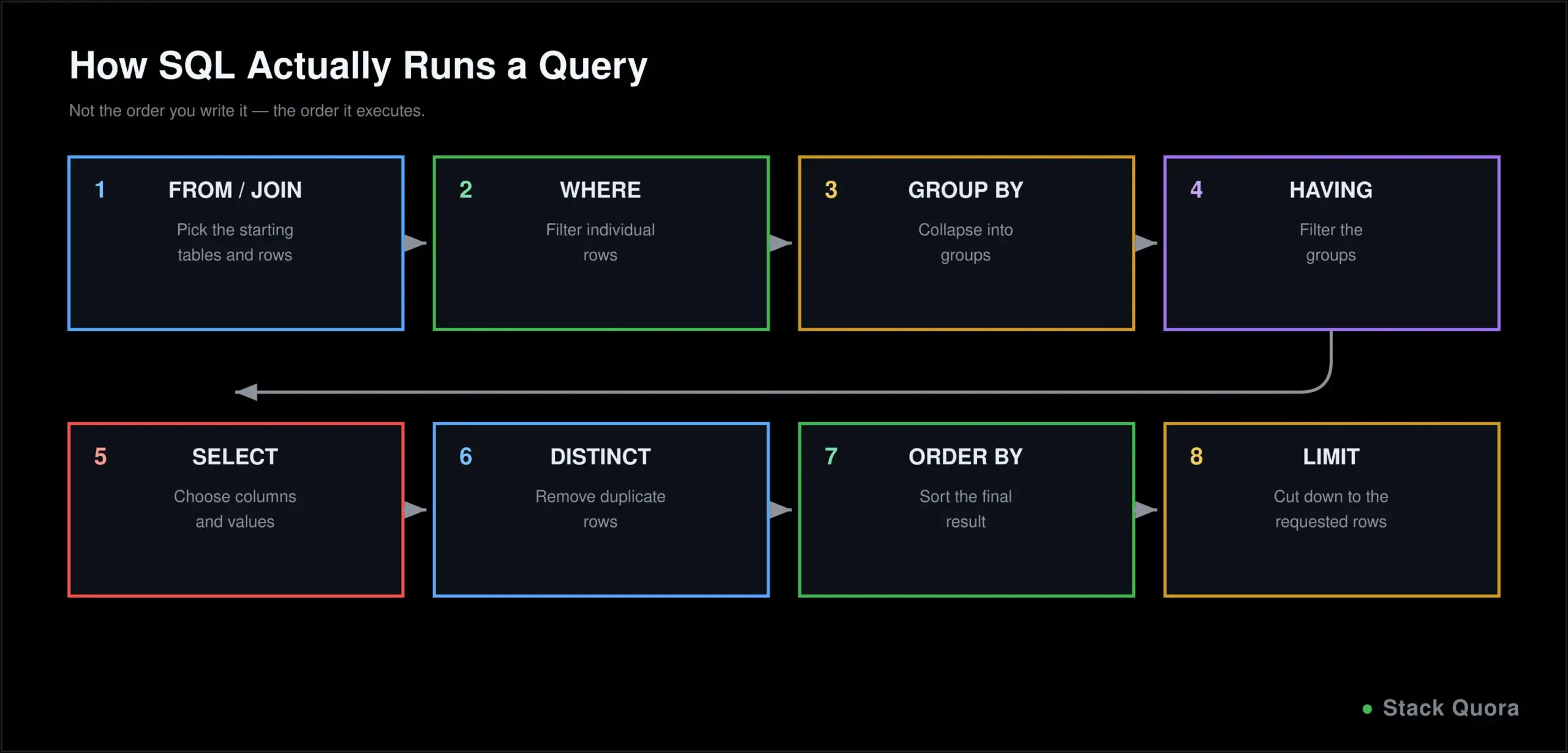
This single concept resolves a surprising number of beginner confusions, including exactly why WHERE can’t filter an aggregate but HAVING can. SQL does not execute in the order you write it. The actual logical order is:
- FROM and JOIN – figure out which tables and rows we’re starting with.
- WHERE – filter individual rows, before any grouping happens.
- GROUP BY – collapse the remaining rows into groups.
- HAVING – filter those groups.
- SELECT – pick which columns and calculated values actually appear.
- DISTINCT – remove duplicate rows from that result.
- ORDER BY – sort the final result.
- LIMIT – cut it down to the requested number of rows.
That’s exactly why WHERE can’t reference an aggregate function (aggregates don’t exist yet at that stage) and why HAVING can (it runs after grouping has already happened). It’s also why you can ORDER BY a column alias defined in SELECT, since SELECT has already run by the time ORDER BY executes.
SQL vs NoSQL
NoSQL databases (MongoDB, Cassandra, Redis, and others) store data in formats other than rigid tables, commonly documents, key-value pairs, or graphs, usually trading some of SQL’s strict structure for more flexibility and, often, easier horizontal scaling.
Relational vs non-relational. SQL enforces a defined schema and strong relationships between tables ahead of time. NoSQL generally allows a far more flexible, often schema-less structure that can evolve more freely as an application changes.
When should you use SQL? When your data is genuinely structured and relational, when you need strong consistency guarantees, and when complex queries joining multiple pieces of related data together are a core, everyday part of the job. When should you use NoSQL? When your data is unstructured or rapidly evolving, when you need to scale horizontally across many servers with ease, or when your access pattern is simple and doesn’t need SQL’s relational query power at all.
This isn’t really a strict either-or choice in most real systems today; plenty of applications use both side by side, each for the specific job it’s genuinely best at.
Popular SQL Databases in 2026
According to DB-Engines’ popularity ranking, the broader relational database landscape has shifted meaningfully through 2026, with PostgreSQL the clear standout: it’s been the fastest-growing database on the entire ranking for much of the year, and recent industry developer surveys now place it ahead of MySQL as developers’ single most-used and most-wanted relational database, even though MySQL still holds a larger installed base overall by raw ranking score.
- MySQL remains the backbone of the traditional LAMP stack and a huge share of existing web applications, with a massive, well-established global install base.
- PostgreSQL has become the clear default recommendation for new projects in 2026, with particularly strong support for complex queries, JSON data, and, notably, AI and vector search workloads through its
pgvectorextension – the same connective layer covered in more depth in our guide to vector databases. - Microsoft SQL Server remains dominant in enterprise environments already built on the Microsoft stack.
- Oracle Database is the long-standing choice for large, often older, enterprise and government systems with deep existing investment in Oracle’s ecosystem.
- SQLite is a lightweight, file-based database with no separate server process at all, extremely common inside mobile apps, embedded systems and small local tools.
- MariaDB is a community-driven fork of MySQL, largely compatible with it, popular as a fully open-source alternative.
Full official documentation for the two most common open-source options lives at MySQL’s documentation and PostgreSQL’s documentation.
SQL for Software Testing and QA
SQL is one of the most underrated skills a QA tester can have, and it’s worth real emphasis here.
- Why testers should learn SQL. A UI can display the wrong thing while the underlying data is actually correct, or display the right thing while the data underneath is quietly wrong. SQL lets you check the real, ground-truth source directly, instead of only trusting what a screen shows you.
- Database testing means verifying data integrity directly: confirming a record was actually created, updated, or deleted correctly after an action, independent of whatever the UI claims happened.
- Validating API data with SQL. After calling an API, a direct query confirms the data genuinely landed in the database correctly, a natural complement to our Postman guide for testing the API layer itself.
- SQL with UI testing. Automated UI tests, including ones built with Playwright MCP, often need a direct database check to confirm a UI action genuinely produced the correct underlying result, not just the correct-looking screen. This same shift toward verification beyond the UI is exactly what how AI agents are changing QA covers from the agent-driven side.
- SQL queries for QA testers, a few genuinely common patterns:
-- Confirm a specific record exists after a test action
SELECT * FROM orders WHERE order_id = 12345;

-- Find orphaned records that shouldn't exist (a classic data-integrity test)
SELECT * FROM orders WHERE customer_id NOT IN (SELECT customer_id FROM customers);

-- Confirm no unexpected duplicates after a bulk operation
SELECT email, COUNT(*) FROM customers GROUP BY email HAVING COUNT(*) > 1;
SQL for Software Developers
- SQL in backend development. Nearly every backend, in any language, eventually reads from and writes to a relational database; understanding SQL directly makes you less dependent on an ORM hiding what’s actually happening underneath.
- SQL and REST APIs. An API endpoint very commonly translates almost directly into a SQL query underneath,
GET /orders/123becoming something close toSELECT * FROM orders WHERE order_id = 123. - SQL with Python, JavaScript and TypeScript. Each connects to a database through a library or an ORM, but understanding the raw SQL underneath remains essential for debugging slow queries, writing anything an ORM can’t express cleanly, and simply understanding what your own application is actually doing to your data. If you’re building the application layer itself, our Python tutorial, our JavaScript tutorial, and our TypeScript tutorial all cover that side in full depth.
- SQL with Java follows the same pattern through JDBC or an ORM like Hibernate, with raw SQL knowledge remaining just as essential underneath either one.
SQL for Data Analysis
Much of what makes SQL genuinely essential for data analysis has already been covered in depth above, just applied through a slightly different lens:
- Filtering and aggregating data with
WHERE,GROUP BYand aggregate functions is the daily bread and butter of answering real business questions directly from raw data. GROUP BYfor analysis turns a huge, undifferentiated pile of raw rows into genuinely meaningful summaries: revenue by month, signups by region, orders by category.- Window functions for analysis add running totals, period-over-period comparisons and rankings without collapsing your detail rows away in the process, exactly the shape most real analytical reporting actually needs.
- Reporting queries typically combine several of these pieces together: a join to pull in related context, a
GROUP BYto summarize it, and anORDER BYto present it in a genuinely useful order.
Common SQL Errors and How to Fix Them
Syntax error Almost always a missing comma, a misplaced keyword, or an unclosed quote or parenthesis. Read the error message carefully; most databases point to roughly the right location.
Unknown column A typo in a column name, or you’re referencing a column that genuinely doesn’t exist in that table. Double-check the exact table schema rather than assuming.
Ambiguous column Two joined tables both have a column with the same name (id, for instance), and SQL genuinely can’t tell which one you mean. Qualify the column explicitly: customers.id instead of a bare id.
Duplicate column You’re trying to SELECT the same column name twice without distinct aliases, or trying to create a column that already exists in the table.
Incorrect JOIN Often a mismatched or missing join condition, producing far more rows than expected, sometimes dramatically more, because rows are matching far more broadly than intended.
NULL-related errors Forgetting that NULL propagates through calculations: NULL + 5 is NULL, not 5, and comparing anything to NULL with = returns neither true nor false, but unknown, which WHERE treats as false.
GROUP BY errors Selecting a column that’s neither in your GROUP BY clause nor wrapped in an aggregate function. Every selected column needs to be one or the other.
Common SQL Mistakes Beginners Make
- Forgetting the
WHEREclause on anUPDATEorDELETE, silently affecting every single row in the table instead of the one you meant. - Using
SELECT *out of habit, even in production code, pulling columns you don’t actually need and making a query noticeably harder to optimize later. - Incorrect JOIN conditions, producing a result set that’s far larger, and far more wrong, than intended.
- Misunderstanding
NULL, especially trying to use=to check for it instead ofIS NULL. - Confusing
WHEREandHAVING, trying to filter an aggregate with the wrong one of the two. - Ignoring indexes entirely on a table that’s grown large, then being confused later about why queries have gradually gotten slow.
- Writing unnecessary subqueries for something a plain join would express more simply and run more efficiently.
SQL Best Practices
- Write readable queries. Consistent indentation and uppercase keywords cost nothing and save real time for the next person reading your query, including future you.
- Use meaningful aliases, not single, meaningless letters, for anything beyond the most trivial, throwaway query.
- Avoid
SELECT *when unnecessary. Name the specific columns you actually need. - Use proper JOIN conditions, always, and double-check them specifically whenever a result set looks unexpectedly large.
- Use indexes carefully, on columns you genuinely filter, join and sort by often, not reflexively on every single column in a table.
- Validate queries before production, on a copy of real-shaped data, ideally as part of an automated CI/CD pipeline rather than only by eye.
- Protect against SQL injection, covered in full in the next section, since it’s genuinely one of the most damaging, and most avoidable, mistakes in all of software.
- Version-control your schema changes with the same discipline covered in our Git tutorial – a tracked migration history is just as valuable as tracked application code, and for largely the same reasons.
SQL Injection and Database Security
What is SQL injection? An attack where untrusted input gets inserted directly into a SQL query, letting an attacker manipulate the query itself rather than just supplying a normal value.
-- Vulnerable: string concatenation, directly from user input
"SELECT * FROM users WHERE username = '" + userInput + "'"

-- If userInput is:  ' OR '1'='1
-- the final query becomes:
SELECT * FROM users WHERE username = '' OR '1'='1'
-- which returns every single row in the table
Why it’s dangerous. A successful injection can expose, modify, or delete data far beyond what the application ever intended to allow, including, in the worst cases, an entire database.
Parameterized queries and prepared statements are the actual fix, not a nice-to-have: user input is passed as a separate, clearly-marked parameter rather than ever concatenated directly into the query string itself, so the database can never mistake it for part of the actual SQL command.
-- Safe: a parameterized query
SELECT * FROM users WHERE username = ?
-- the input is bound separately, and can never alter the query's actual structure
SQL security best practices: always use parameterized queries, never build a query through raw string concatenation with user input, grant each database user only the minimum permissions they genuinely need, and keep your database software patched and current. The OWASP SQL Injection Prevention Cheat Sheet is the authoritative, actively maintained reference on this specific topic, worth bookmarking regardless of which language or framework you’re building in.
SQL Practice and Interview Questions
A few genuinely good categories to practice against a sample database of your own: basic SELECT and WHERE questions, GROUP BY and aggregate questions (“find the top 5 customers by total spend”), every join type, a correlated subquery, and at least one window function query. Building your own small sample database, a handful of related tables with realistic fake data, and writing ten to fifteen of your own questions against it is genuinely one of the most effective ways to actually learn this material, more effective than reading alone.
Common SQL interview questions, with the shape of a strong answer:
What is a primary key? A column, or set of columns, that uniquely identifies every row in a table, with no duplicates and no NULL values allowed.
What is a foreign key? A column referencing a primary key in another table, enforcing that any value it holds genuinely exists there.
What is an INNER JOIN? A join that returns only rows with a match in both joined tables.
WHERE vs HAVING? WHERE filters individual rows before any grouping happens. HAVING filters groups, after GROUP BY has already run.
DELETE vs TRUNCATE? DELETE removes specific rows and respects a WHERE clause. TRUNCATE removes every row in a table at once and cannot be filtered at all.
UNION vs UNION ALL? UNION removes duplicate rows from the combined result. UNION ALL keeps every row, duplicates included, and runs faster as a result.
Primary key vs unique key? A table can have only one primary key, and it cannot contain NULL. A table can have several unique keys, and depending on the database, a unique key may allow one NULL value.
JOIN vs subquery? A join combines related data from multiple tables directly, in one result. A subquery nests one query inside another, often used for filtering or checking existence rather than pulling in extra columns.
What is a window function? A function that calculates across a related set of rows without collapsing them into a single summary row, unlike GROUP BY.
Final Thoughts
SQL has survived decades of changing trends for one simple reason: structured data isn’t going anywhere, and nothing has genuinely replaced SQL as the way to ask precise, powerful questions of it. The syntax you learn today will still work, nearly unchanged, years from now, across nearly every relational database you’ll ever touch.
Start with SELECT, WHERE and the aggregate functions, and get those genuinely comfortable before chasing joins and subqueries. Once joins click, and they will click, the rest of this guide starts falling into place far faster than the first half did.
Whether you end up writing SQL to test an application, build one, or analyze the data flowing through it, it’s the same language underneath all three jobs, and genuinely one of the better returns on learning time in all of software.
Found this useful? Explore more development, testing and data guides on StackQuora, and bookmark this page as a reference to come back to.
Frequently Asked Questions
What is SQL?
SQL (Structured Query Language) is a language for storing, retrieving, modifying and managing data stored in a relational database.
Is SQL easy to learn?
The core statements, SELECT, WHERE, INSERT, UPDATE, DELETE, are genuinely approachable within your first week of consistent practice. Joins, subqueries and window functions take longer to feel fully natural, which is completely normal.
Is SQL good for beginners?
Yes. SQL’s syntax reads close to plain English, you can see real results from your very first query, and the skill transfers directly across virtually every relational database system you’ll ever encounter.
How long does it take to learn SQL?
Core query writing typically takes two to four weeks of regular practice. Genuine comfort with joins, subqueries and aggregation usually takes a couple of months. Advanced topics like window functions and query optimization continue developing well beyond that.
What is SQL mainly used for?
Storing, retrieving and analyzing structured data across software development, data analysis, business intelligence, backend systems and software testing.
Is SQL still worth learning in 2026?
Yes. Relational databases remain the backbone of most software systems, and SQL knowledge directly transfers to verifying and understanding AI-generated queries, not being replaced by them.
What are the most important SQL commands?
SELECT, WHERE, JOIN, GROUP BY, INSERT, UPDATE and DELETE cover the large majority of real, everyday SQL work.
What is the difference between SQL and MySQL?
SQL is the language. MySQL is one specific database management system that implements and runs SQL, alongside its own particular extensions and conventions.
What is the difference between SQL and NoSQL?
SQL databases store structured data in related tables with a defined schema. NoSQL databases store data in more flexible formats, like documents or key-value pairs, often trading some of SQL’s structure for easier horizontal scaling.
Which SQL database should beginners learn?
PostgreSQL or MySQL are both excellent starting points, free, well-documented, and reflecting the SQL you’ll genuinely encounter in most real jobs.
Can SQL be used for software testing?
Yes, extensively. Testers use SQL to verify data directly in the database, confirming an action genuinely produced the correct result rather than trusting only what a user interface displays.
Can SQL be used for data analysis?
Yes. SQL remains the primary language for filtering, aggregating and summarizing data before it ever reaches a report or a dashboard.
Can SQL be used with Python?
Yes, through libraries and ORMs that let Python applications connect to and query a database directly, while still ultimately sending real SQL underneath.
Can SQL be used with Java?
Yes, commonly through JDBC or an ORM like Hibernate, following the same underlying pattern as any other language connecting to a relational database.
Is SQL a programming language?
It’s a domain-specific query language rather than a general-purpose programming language like Python or Java – it’s built specifically for querying and managing data, not for building a complete standalone application on its own.