
Agentic Resource Discovery (ARD): How AI Agents Find Tools
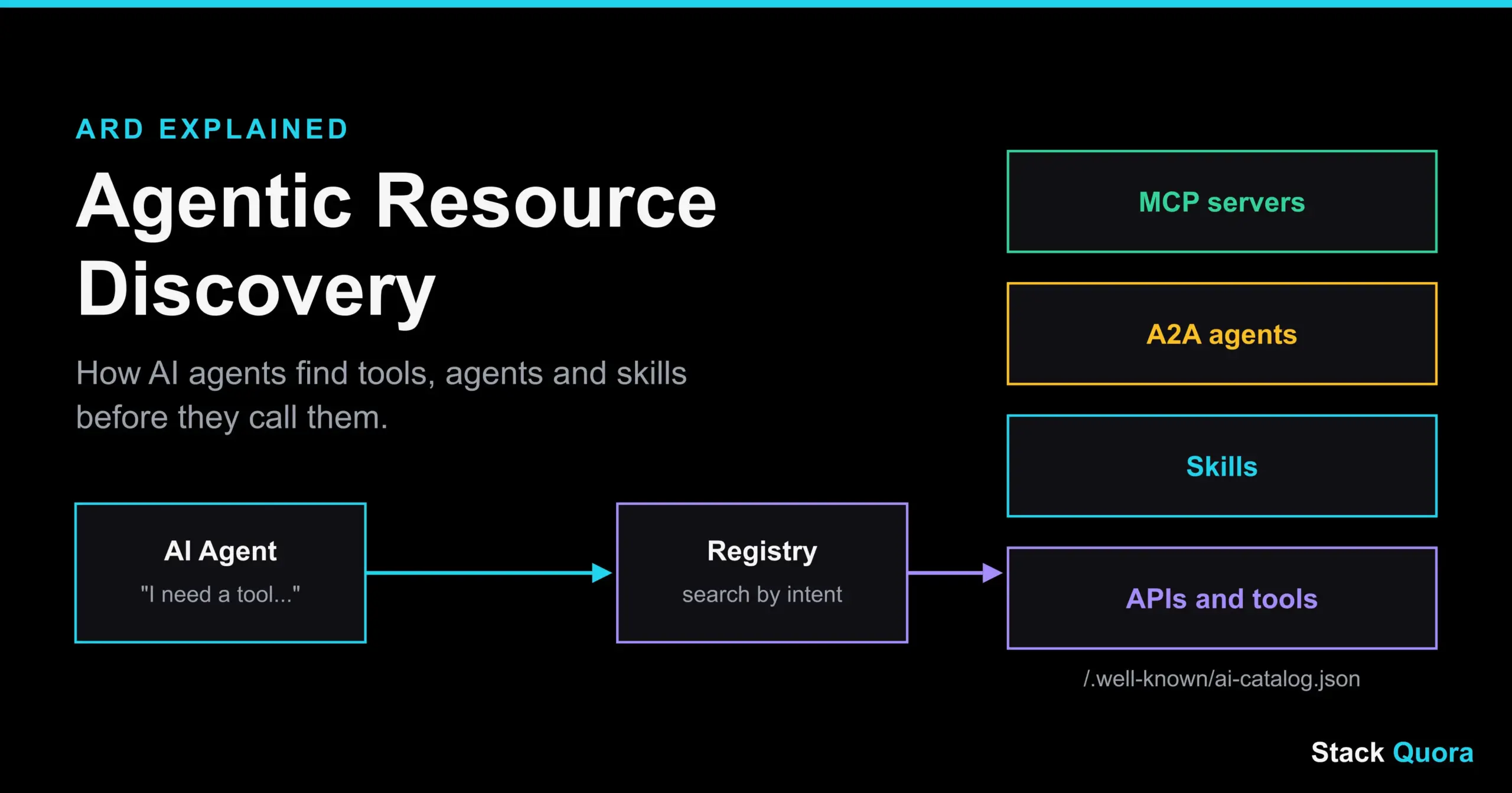
Right now, most AI agents only use the tools a human gave them. Someone writes a list of servers and APIs, pastes it into a config file, and the agent works inside that small box. It cannot go and find a better tool on its own. That is the gap Agentic Resource Discovery is trying to close.
Agentic Resource Discovery, or ARD, is an open specification that lets AI agents find tools, other agents and skills across the internet, check who published them, and then connect. A company puts one file on its own domain. A registry reads that file. An agent searches by what it needs to do, not by a name it already knows.
This guide explains ARD in plain English. You will learn what it is, how it works, what ai-catalog.json contains, how it fits with MCP and A2A, where it is still weak, and how to publish your own catalog. If you have been vibe coding apps that call outside tools, ARD is the layer that may decide how those tools get found in the future.
- ARD is an open, draft specification for AI agent resource discovery.
- Publishers host a file called
ai-catalog.jsonat/.well-known/ai-catalog.json. - Registries crawl those files and let agents search by intent.
- ARD only handles finding and verifying. The agent still connects using MCP, A2A or a normal API.
- It is early. Trust features are optional, so treat it as a promising standard to watch, not a finished one.
What Is Agentic Resource Discovery?
Agentic Resource Discovery is a specification for how AI agents discover external tools, APIs, skills and other agents. The ARD specification was published as a v0.9 draft in late May 2026. Google announced it together with industry partners, and the listed contributors include Microsoft, GitHub, Hugging Face, Cisco, Databricks, Nvidia, Salesforce, ServiceNow and Snowflake. It is released under the Apache 2.0 license, and it builds on the AI Catalog data model from a Linux Foundation working group.
The word “resource” is the key. In ARD, a resource is anything an agent might want to use: an MCP server, an A2A agent, a skill, an API, or a knowledge file.
What Is Agentic Resource Discovery?
Think of the early web. Before search engines, you had to know a website’s address to visit it. Search engines changed that. You type what you need, and you get a ranked list of places that can help.
ARD tries to do the same for AI agents. Instead of a human handing the agent a fixed list, the agent asks, “What can help me book a flight?” or “Which tool can read this database?” and gets back real options.
Here is the simplest way to remember it:
- Publishers list what they offer in a catalog file.
- Registries collect those files and make them searchable.
- Agents search, check trust, and connect.
Why AI Agents Need Resource Discovery
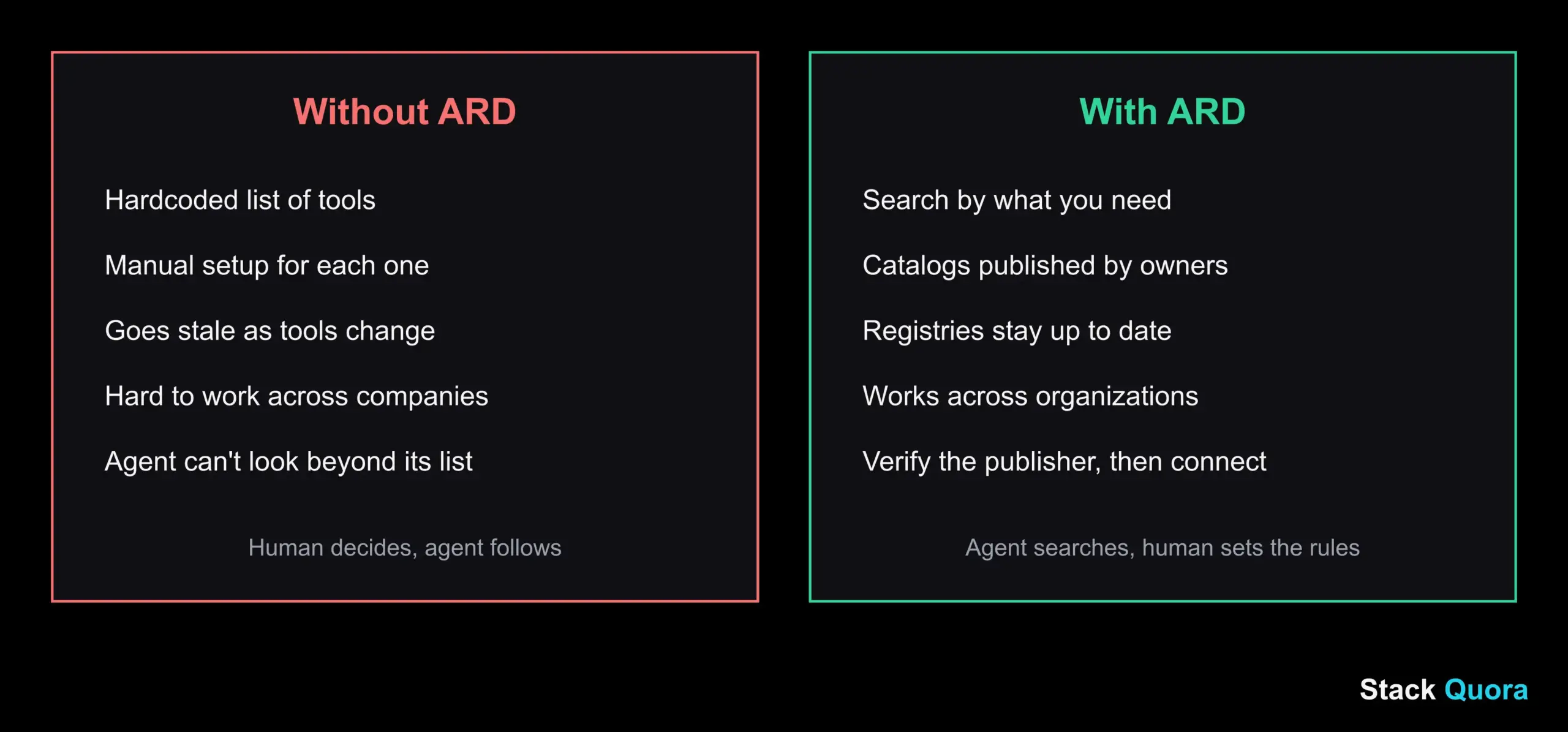
An agent is only as useful as the tools it can reach. But there are three problems with the “hand it a list” approach.
- It does not scale. Every tool description has to fit inside the model’s context window before the model can choose. With a handful of tools, that is fine. With thousands, the descriptions alone can use up the space meant for the real task.
- It goes stale. New tools appear every week. A hardcoded list is out of date the day you save it.
- It limits the agent. An agent that cannot look beyond its list can never find a better tool.
ARD moves the choosing step out of the model and into a search service. The model stays focused on the task.
The Problem With Today’s Agent Ecosystem
Today, connecting an agent to a new capability is mostly manual. A developer reads documentation, copies a server address, adds credentials, and tests it. Do that for ten tools and it is a chore. Do it across ten partner companies and it becomes a project.
There is also no shared way to ask a simple question: “Who offers a tool that does this, and can I trust them?” Each company publishes its docs in its own style. Each marketplace has its own format. This is the AI agent interoperability problem in a nutshell, and ARD is one attempt to give everyone a common starting point.
ARD and the Agentic Web
People often call the next stage of the internet the agentic web: a web where software agents do tasks for people and talk to each other and to websites directly. For that to work, agents need three things: a way to find services, a way to trust them, and a way to talk to them.
ARD covers the first two. It does not replace the third. MCP and A2A handle the actual conversation.
ARD also fits nicely next to WebMCP. WebMCP is about how an agent uses tools exposed inside a web page. ARD is about how an agent finds out which services exist in the first place. One helps with discovery. The other helps with action. Together they sketch the early outline of agentic web discovery.
How Does ARD Work?
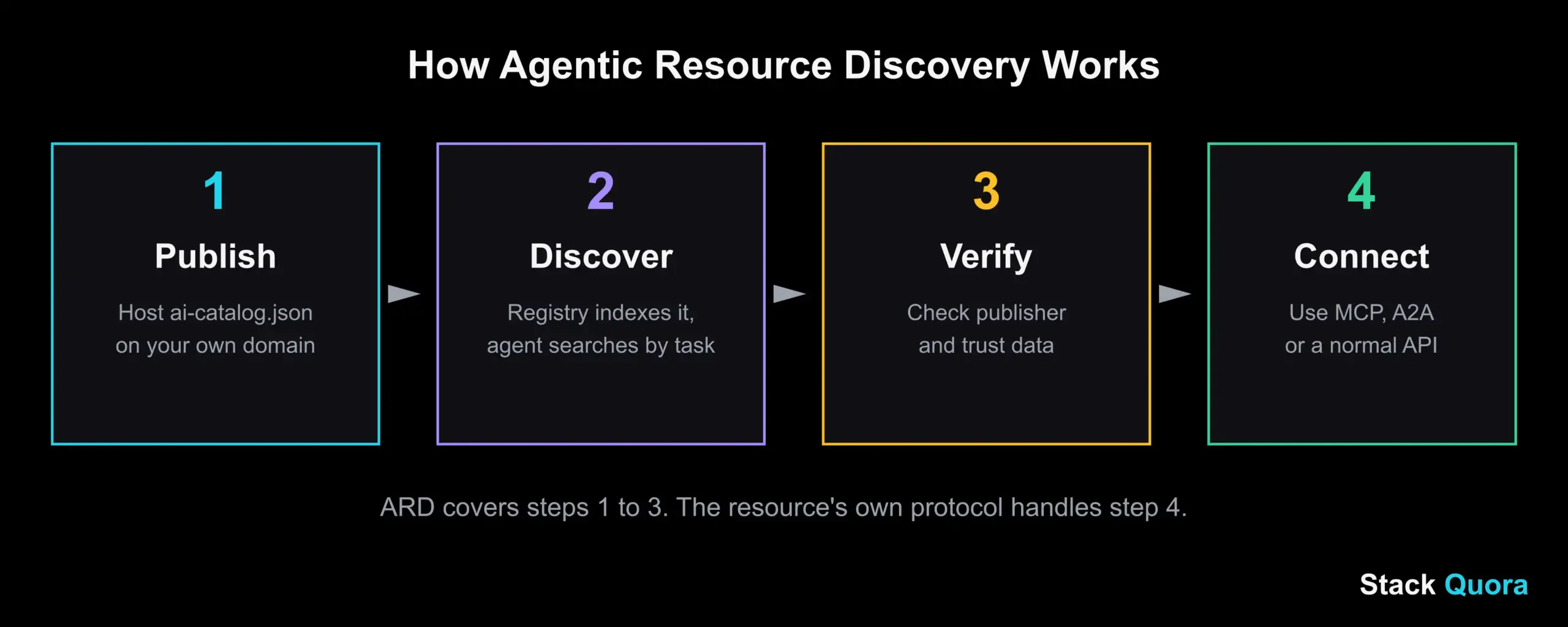
The official ARD overview describes a simple flow. In plain words, it is four steps.
Step 1: Publish
A company or developer creates an ai-catalog.json file. It lists the agentic resources they offer: servers, agents, skills, APIs. They host it on their own domain at a standard address.
Step 2: Discover
Registries crawl published catalogs and index what they find. When an agent needs something, it sends a search to a registry describing the task. The registry returns matching resources.
Step 3: Verify
Before trusting a result, the agent or its host checks who published it. At a basic level, this means confirming the publisher controls the domain. At a stronger level, it means checking signed trust information, if the publisher provides it.
Step 4: Connect
Once the agent picks a resource, it connects the normal way, through MCP, A2A or a regular API. ARD steps out of the way at this point. It never sits in the middle of the actual call.
ARD Architecture Explained
ARD has two main building blocks, catalogs and registries. Around them sit three more ideas that make the whole thing useful. Here is each one.
Catalogs
A catalog is the file a publisher hosts. It is static, which means it just sits on the domain like any other file. It describes what the publisher offers.
Registries
A registry is a service that crawls catalogs and answers search queries. According to the spec, a registry must support a search endpoint, POST /search, for task-based lookup. Other endpoints, such as POST /explore and GET /agents, are optional.
Agentic Resources
These are the things being described: MCP servers, A2A agent cards, skills, APIs and knowledge files. ARD does not redefine how each of these works. It wraps them in a common envelope and labels each one with a media type, so a client knows what it is looking at.
Trust Metadata
This is extra information about who is behind a resource. It can include publisher identity and signed claims. In the current draft this part is optional, which matters a lot, and we will come back to it in the security section.
Runtime Connections
This is the moment the agent actually uses the resource. ARD does not handle it. The agent uses the resource’s own protocol.
What Is ai-catalog.json?
ai-catalog.json is the heart of the ARD protocol. It is a machine-readable file that tells agents and registries what a domain offers. You can think of it as robots.txt for capabilities, except instead of saying what crawlers may not touch, it says what agents can use.
Where ai-catalog.json Is Hosted
The file lives at a “well-known” path on your domain:
https://your-domain.com/.well-known/ai-catalog.jsonThe /.well-known/ folder is an existing web convention (RFC 8615) that lets software find standard files without guessing. You can see a real example from Hugging Face at huggingface.co/.well-known/ai-catalog.json.
What Information Does a Catalog Contain?
At the top level, a catalog has three required parts: a spec version, a host object that names the publisher, and an entries array with one item per resource. Here is a small example. It is a simplified illustration, so always check the latest spec for exact field rules.
{
  "specVersion": "1.0",
  "host": {
    "displayName": "Example Dev Tools",
    "identifier": "did:web:example.com"
  },
  "entries": [
    {
      "identifier": "urn:ai:example.com:server:invoice-lookup",
      "displayName": "Invoice Lookup Server",
      "type": "application/mcp-server+json",
      "url": "https://api.example.com/mcp/invoices.json",
      "description": "Find and summarize customer invoices.",
      "representativeQueries": [
        "find the latest invoice for a customer",
        "show unpaid invoices from last month"
      ]
    }
  ]
}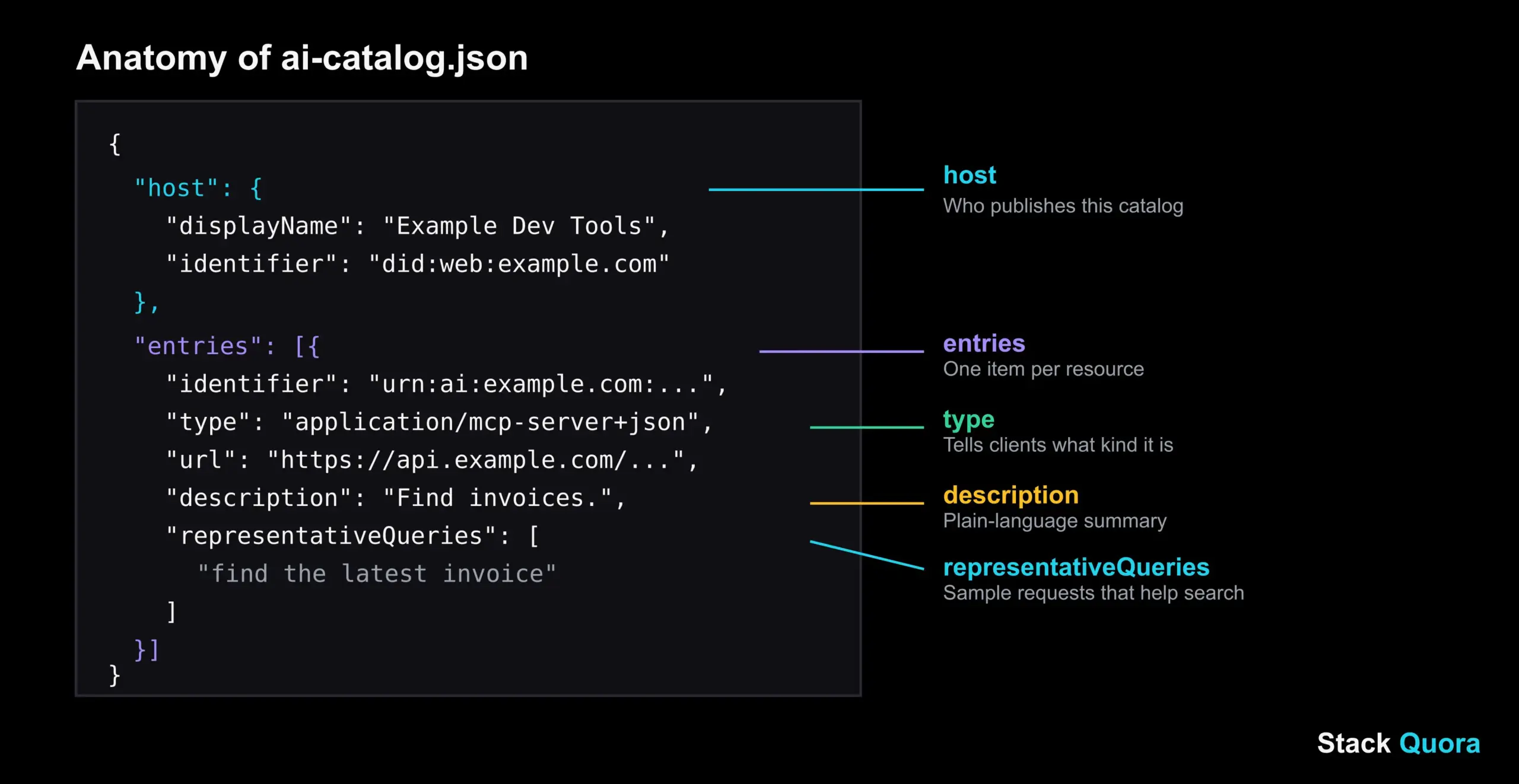
Let us read it field by field:
hostsays who publishes this catalog.identifieris a unique name for the resource, written as a URN.typeis a media type that tells the client what kind of resource this is.urlpoints to the resource’s own description. An entry uses either aurlor inlinedata.descriptionexplains what it does, in plain language.representativeQueriesare sample requests a user might make. These are a clever detail, and they matter for search, as the next part explains.
How AI Agents Read a Catalog
An agent, or more often a registry, fetches the file over HTTPS, checks that it is valid JSON, and reads the entries. Here is a small Python example that fetches a real public catalog and prints the names:
import requests

url = "https://huggingface.co/.well-known/ai-catalog.json"
response = requests.get(url, timeout=10)
response.raise_for_status()

catalog = response.json()
for entry in catalog.get("entries", []):
    print(entry.get("displayName"), "-", entry.get("type"))
If a catalog is later restructured, small scripts like this are the first thing to break, so always read fields defensively, as .get() does above.
How AI Agents Search a Registry
Static files are not enough on their own. If an agent had to download and read thousands of catalogs, nothing would improve. That is the job of the registry.
A registry indexes entries, including descriptions and those sample queries, and ranks results against what the agent asks. Many systems do this with vector search, which matches meaning rather than exact words. So a request like “turn this PDF into text” can find a tool described as “document extraction,” even though the words differ.
The Hugging Face launch also mentions federation modes called auto, referrals and none, which describe how one registry may pass a search along to others. That is a hint that the design expects many registries, not just one.
ARD and AI Agent Discovery
ARD is a layer above the protocols agents already use. Here is how it works with each type of resource.
Discovering MCP Servers
MCP, the Model Context Protocol, lets an agent call tools on a server. ARD helps an agent find which MCP server to use. For example, an agent doing browser testing could discover a server like the one in our Playwright MCP guide without a human adding it first.
Discovering A2A Agents
The Agent2Agent (A2A) protocol lets agents talk to other agents. Each A2A agent has an agent card that describes it. ARD catalogs can point to these cards, so one agent can find another agent that is good at a certain job, even across companies.
Discovering AI Skills
Skills are packaged instructions that teach an agent how to do a specific kind of work. ARD can list skills as resources too, so an agent can look for the know-how it lacks, not just for tools.
Discovering APIs and Tools
Plain APIs can be listed as well, and the OpenAPI format fits naturally here; the OpenAPI Initiative maintains it. A database tool that runs SQL queries, or a payments API, could be described in a catalog the same way. And if you build or consume APIs, strong habits such as API testing with Postman matter even more when agents start calling them on their own.
ARD vs Traditional API Discovery
ARD is not the first attempt to help machines find things. Here is how it compares with what already exists, written as plain points so it reads well on any screen.
- API documentation is written for humans. A developer reads it, then writes code. Agents cannot easily search across thousands of such pages.
- API marketplaces collect listings in one place, but each marketplace is its own closed island with its own format.
- Tool registries help within one ecosystem, such as a single agent platform, but they rarely work across vendors.
- RFC 9727
api-catalogis a standard way to list APIs on a domain. It is a useful cousin, but it does not cover agents, skills or MCP servers. You can read it at RFC 9727. llms.txtpoints AI readers to content worth reading. It is about reading, not calling.AGENTS.mdgives instructions to coding agents inside one code repository.- ARD lists callable resources, across domains, and makes them searchable by intent.
The big idea is the shift from “read the docs” to “ask a search service.” That is what makes agentic resource discovery different from classic API discovery.
ARD Security and Trust
Letting an agent discover and use new tools on its own is powerful. It is also risky. This section matters as much as any other in this guide.
Publisher Verification
The first check is simple: does the publisher really control the domain? Because catalogs live on the publisher’s own domain, domain ownership acts as a basic root of trust. If a catalog is served from example.com, then whoever controls example.com published it.
Cryptographic Identity
The spec also describes signed trust information. A publisher can sign claims about itself and its resources, so a client can verify them. This is a stronger form of AI agent verification than domain control alone.
Trust Metadata
Trust metadata can carry provenance and compliance information. But in the current draft, this is optional, and the final decision on what to trust is left to the registry or the client. In other words, ARD gives you the signals. It does not force anyone to check them.
Malicious Resources
Here is the honest warning. Anyone can host a catalog. A bad actor can describe a harmful tool in friendly words. And discovery adds a new risk: if an agent that reads untrusted content can also find and call new tools mid-task, a trick hidden in that content could steer it toward a harmful resource. Security researchers have already shown similar attacks in agent-to-agent setups.
A few practical rules help:
- Do not let an agent that handles private data and has outside network access also discover new tools freely.
- Prefer verified publishers and signed trust data.
- Use an approved allowlist for sensitive work.
- Log which resources an agent discovered and why it chose them.
Good AI agent trust is built in layers, and ARD supplies one layer, not all of them.
ARD Use Cases
Enterprise AI Agents
Large companies have many internal tools and agents. An internal registry lets a company agent find the right approved resource quickly. The official materials suggest most enterprises will want this “restricted” version: discovery limited to an approved set, not the open web.
AI Developer Tools and QA
Coding agents and test agents could discover the exact server or skill they need for a job, such as browser automation or API checks. If you follow AI agents in QA, you can see why: the best tool changes from project to project, and searching beats hardcoding.
Multi-Agent Systems
In a system with many specialist agents, a coordinator can discover which agent is best for each subtask instead of relying on a fixed wiring diagram.
Agentic Commerce
A shopping or travel agent could discover booking, payment and inventory services across many businesses. For this to be safe, strong verification is a must, since money is involved.
Cross-Organization Agent Discovery
This is ARD’s biggest promise. Two companies that have never worked together could let their agents find and verify each other. Hugging Face’s launch post shows an early real-world version: a public catalog plus a search endpoint anyone can try.
How to Publish Your First Catalog
If you run an API, an MCP server or an agent, you can publish a catalog today. Because the spec is a draft, treat this as an experiment.
- List your resources. Pick the servers, agents or APIs you want agents to find.
- Write a clear description for each. Use plain words. Add two or three
representativeQueriesthat sound like real user requests. - Create
ai-catalog.json. Follow the structure in the spec. If your project uses TypeScript, define a type for catalog entries so your editor catches mistakes early. - Validate it. A short JavaScript or Python script that checks the required fields is enough to start.
- Host it at
/.well-known/ai-catalog.jsonand serve it as JSON over HTTPS. - Keep it in version control. Store the file with Git so every change is tracked and reviewed.
- Check it automatically. Add a validation step in GitHub Actions so a broken catalog never reaches production.
- Run your server reliably. If you publish an MCP server, packaging it as a Docker container makes it easier for others to run the same thing you tested.
- Add trust data when you can. Signed information makes your resource easier to verify.
Limitations of ARD
ARD is promising, but a fair guide should tell you where it is weak.
Specification Status
The spec is a v0.9 draft with the status of a proposal. Fields, types and rules can still change. The reference repository is open, and InfoQ’s coverage is a good place to follow how the story develops. Do not build anything critical on the draft without a plan for changes.
Registry Adoption
A discovery system is only as useful as the registries that run it. As of mid-2026, Google said native support in its own agent registry would arrive in the following months. Many of the big agent platforms had not announced client support when sources were last reviewed. Check for newer news before you publish.
Trust Challenges
Because trust data is optional, “verified publisher” can end up meaning only “controls the domain.” That is a low bar. And when a client searches across several registries, it can inherit the weakest registry’s rules.
Interoperability Challenges
ARD relies on media types for MCP and A2A resources, and the spec notes that some of those type registrations are still pending. Until they settle, tools may handle them in slightly different ways.
Do You Even Need It?
If you use fewer than about twenty tools and they rarely change, a simple allowlisted config file is safer and simpler. ARD shines when the number of possible resources is large and changing.
The Future of Agentic Resource Discovery
Nobody can promise where ARD will land, but the direction is clear.
ARD and the agentic web. If catalogs become as normal as sitemaps, agents will be able to find services anywhere, and businesses will want their tools to be easy to discover. Expect “agent readiness” to become a new part of how sites are built.
ARD and AI agent ecosystems. Registries will probably compete on quality: better ranking, better trust checks, better filtering. The strongest ones will be those that agents and companies actually trust.
ARD and autonomous software. The long-term picture is software that can look for the help it needs, check it, and use it, with people setting the rules instead of the wiring. That only works if security keeps pace, so watch the trust side of the spec most closely.
For now, the smart move is simple: learn how it works, try a small catalog, and keep an eye on adoption.
Final Thoughts
Agentic Resource Discovery is a simple idea with big consequences. Instead of humans wiring every tool into every agent, publishers describe what they offer once, registries make it searchable, and agents find what they need on their own.
It is early, and the trust side still needs work. But the core pieces, a catalog file, a search endpoint and a clear split between finding and using, are easy to understand and easy to try. If you build tools or agents, now is a good time to learn how Agentic Resource Discovery works, so you are ready if it becomes a normal part of the agentic web.
Found this useful? Explore more AI, testing and development guides on StackQuora, and bookmark this page. We will keep it updated as the ARD specification changes.
Frequently Asked Questions About ARD
What is Agentic Resource Discovery?
Agentic Resource Discovery is an open specification that lets AI agents find, verify and connect to external tools, APIs, skills and other agents. Publishers host a catalog file, registries index it, and agents search by task.
What is ARD in AI?
In AI, ARD stands for Agentic Resource Discovery. It is a discovery layer for AI agents, a bit like a search engine for tools and agents, built on top of protocols such as MCP and A2A.
What is ai-catalog.json?
ai-catalog.json is a machine-readable file hosted at /.well-known/ai-catalog.json on a domain. It lists the agentic resources that domain offers, such as MCP servers, A2A agents, APIs and skills.
How do AI agents discover tools?
Without ARD, they usually rely on a list a human gives them. With ARD, an agent sends a task-based search to a registry, which returns matching resources from published catalogs. The agent then verifies the publisher and connects.
Is ARD an open standard?
It is an open specification released under the Apache 2.0 license, but it is still a draft (v0.9 at the time of the sources reviewed). It is not yet a finished, widely adopted standard.
How is ARD different from MCP?
MCP is how an agent uses a tool. ARD is how an agent finds a tool. They work together: ARD helps you locate an MCP server, and MCP handles the actual calls.
Is ARD the same as A2A?
No. A2A is a protocol for agents to talk to each other. ARD helps an agent discover which other agents exist. A2A agent cards can be listed inside an ARD catalog.
Is ARD secure?
ARD provides building blocks like domain-based identity and optional signed trust data, but it is not a complete security solution. Trust decisions are left to registries and clients, so extra safeguards are needed.
Do I need ARD for my AI project?
Probably not if you use a small, stable set of tools. It is most useful when many resources exist and change often, or when agents must find services across companies.
How do I publish an ai-catalog.json file?
List your resources, describe them in plain language, write the JSON following the spec, and host it at /.well-known/ai-catalog.json over HTTPS. Validate it before you publish.