
TypeScript Tutorial for Beginners: Complete Guide to TypeScript in 2026
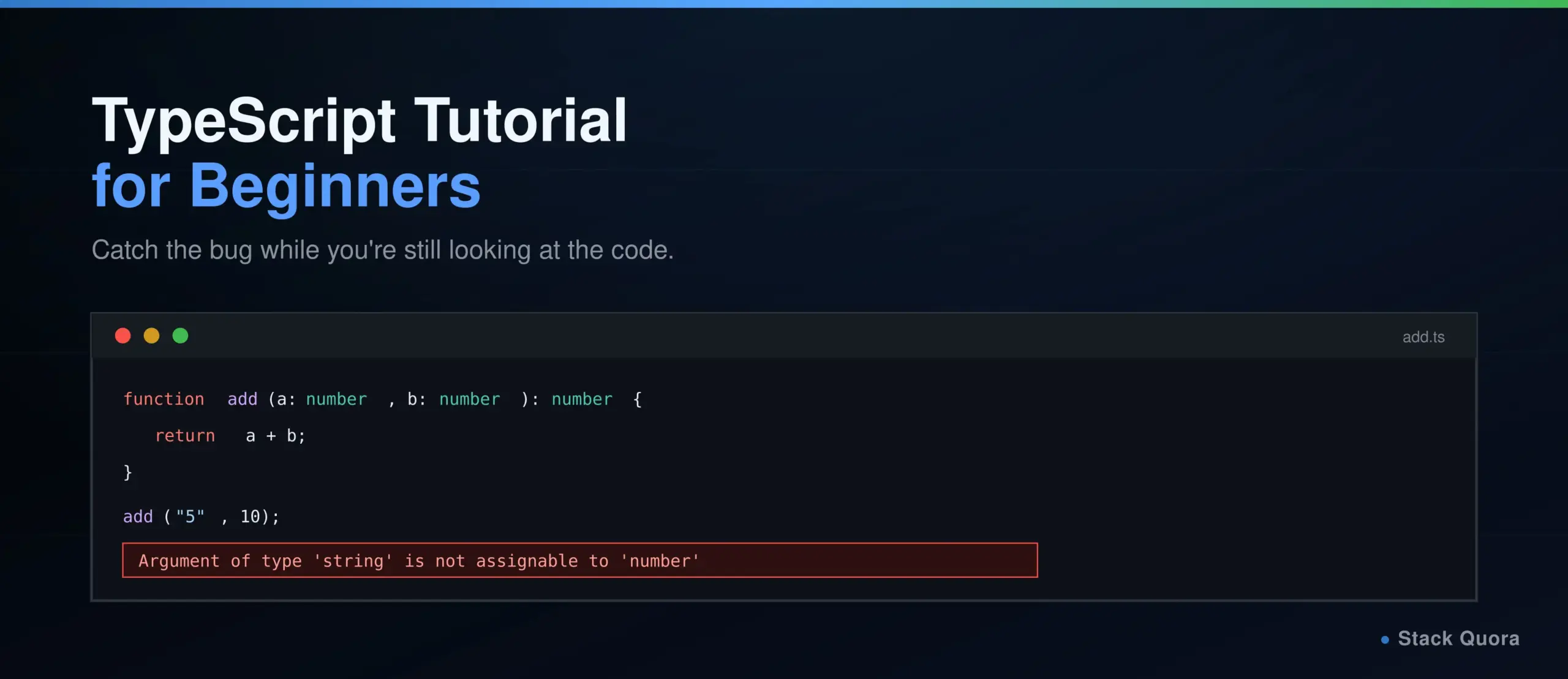
JavaScript will happily let you pass a number where a function expects a string, add a property to an object it was never designed to have, or call a method that doesn’t exist – and say nothing about it until that exact line runs, often in production, often at the worst possible moment. TypeScript catches all three before your code ever runs at all.
TypeScript is JavaScript with a type system added on top. Every valid JavaScript file is already valid TypeScript; the difference is that TypeScript lets you describe the shape of your data, and then checks that your entire codebase actually agrees with those descriptions, flagging mismatches the moment you save the file rather than the moment a user hits the bug.
This guide takes you from zero to genuinely productive with TypeScript: the type system itself, interfaces and generics, classes, the compiler and tsconfig.json, and where TypeScript fits into React, Node.js, testing and CI/CD. 2026 has actually been a landmark year for the language itself, covered in detail once we reach the compiler section, so this guide reflects TypeScript as it stands right now, not as it stood a couple of years ago.
What Is TypeScript?
TypeScript is a statically typed superset of JavaScript, created and maintained by Microsoft, that compiles down to plain JavaScript before it runs. “Superset” is the key word: TypeScript adds features on top of JavaScript, most importantly a type system, without removing or replacing anything JavaScript already does.
Why Was TypeScript Created?
As JavaScript applications grew from small scripts into large, long-lived codebases with big teams, a real gap showed up: JavaScript’s dynamic typing, flexible in small projects, became a genuine liability at scale. A typo in a property name, a function called with the wrong argument type, a value that turned out to be undefined in a spot nobody expected – these bugs were common, often subtle, and frequently only discovered at runtime, sometimes by an actual user. TypeScript, first released in 2012, was built specifically to catch this entire category of error before the code ever runs.
How TypeScript Works With JavaScript
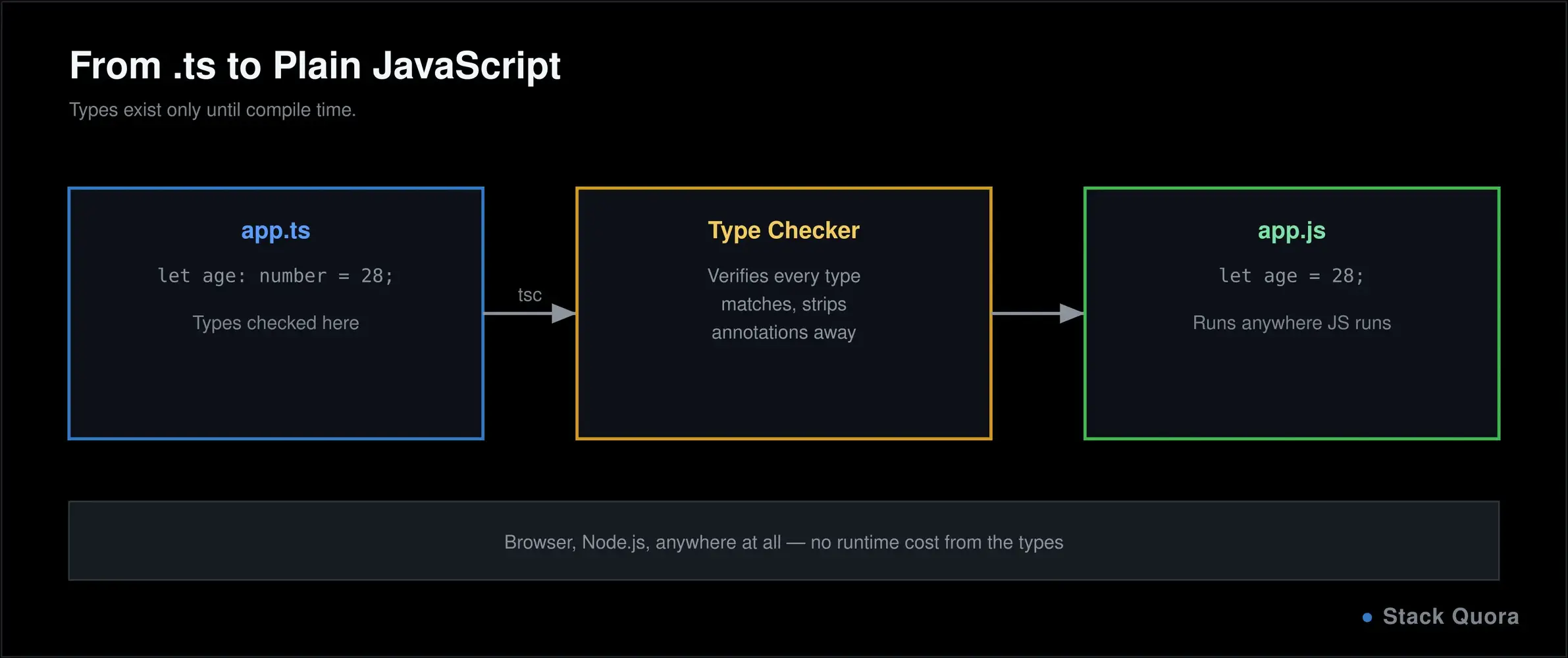
TypeScript code is written in .ts files (or .tsx for files containing JSX), checked by the TypeScript compiler (tsc), and then compiled down into plain .js files that run anywhere JavaScript already runs – a browser, Node.js, anywhere at all. The type annotations exist purely at development and build time; they’re stripped out entirely from the final JavaScript, so there’s no runtime cost to any of it. This guide assumes you’re comfortable with JavaScript’s fundamentals already; if you’re not quite there yet, our JavaScript tutorial covers everything TypeScript builds on top of.
Why Learn TypeScript in 2026?
- Modern web development expects it. A large and still-growing share of new JavaScript projects, and most major frameworks’ own documentation and starter templates, default to TypeScript now rather than treating it as optional.
- Frontend development benefits enormously from typed props, typed state and typed event handlers, catching an entire class of UI bugs before they ever reach a browser.
- Backend development through Node.js gets the same safety applied to request handlers, database models and business logic, exactly where a silent type mismatch tends to cause the most damage.
- API development is a particularly strong fit: typing a request and response shape means your editor tells you immediately if you’re accessing a field that doesn’t exist, instead of you finding out from a confusing runtime error.
- Test automation increasingly happens in TypeScript by default, covered in real depth further down.
- AI-assisted development benefits from TypeScript in a specific, practical way: when AI-generated code comes back typed, mismatches between what an AI tool assumed and what your codebase actually expects get caught immediately, by the compiler, rather than discovered later by a person.
TypeScript vs JavaScript
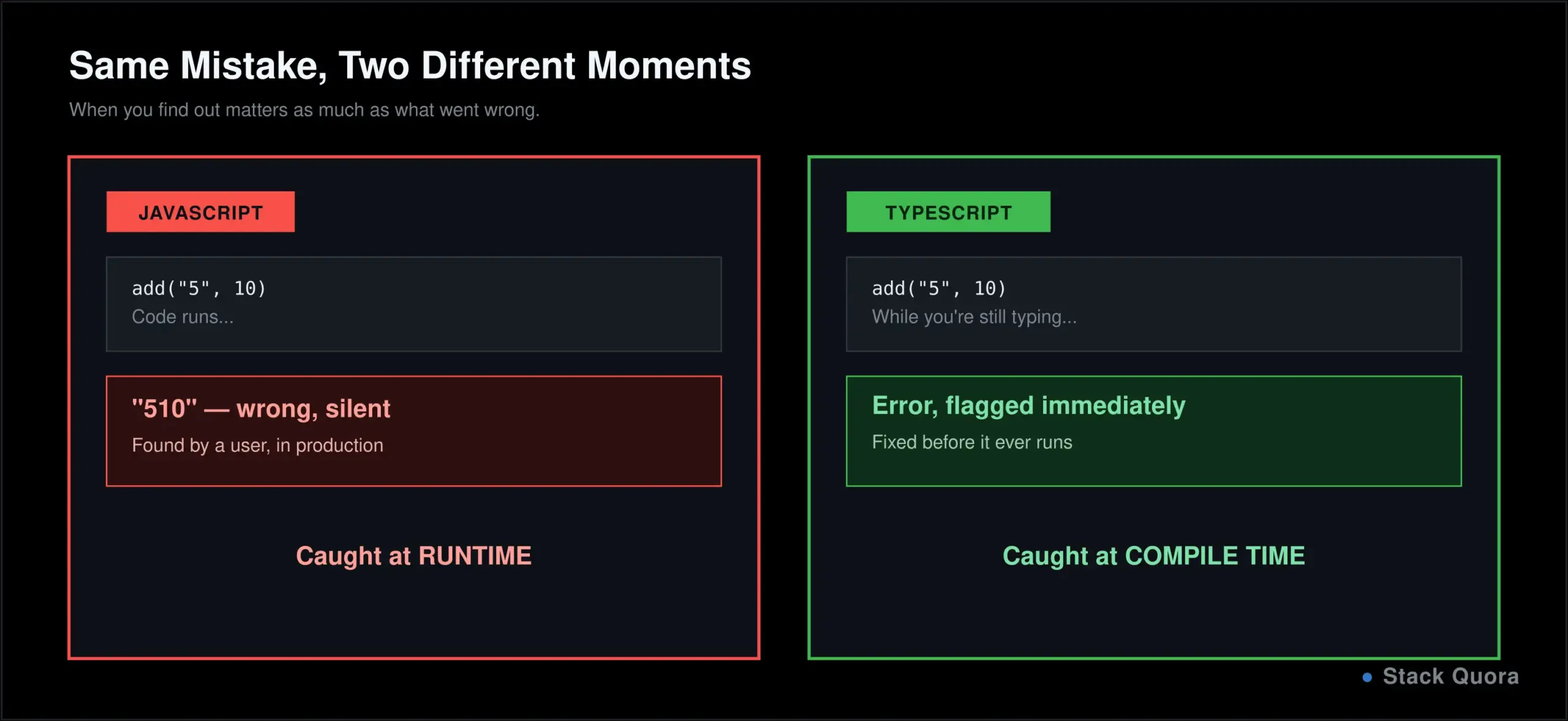
The core difference is static typing versus dynamic typing. JavaScript checks types at runtime, while the code is actually executing. TypeScript checks types at compile time, before the code ever runs, catching an entire category of bugs during development instead of in front of a user.
// JavaScript — this runs, and fails at runtime
function add(a, b) {
  return a + b;
}
add("5", 10);   // "510" — silently wrong, no warning at all

// TypeScript — this is flagged immediately, before it ever runs
function add(a: number, b: number): number {
  return a + b;
}
add("5", 10);   // Error: Argument of type 'string' is not assignable to parameter of type 'number'
TypeScript’s real advantages: errors caught before runtime, dramatically better editor autocomplete and inline documentation, safer large-scale refactoring (rename a property and every broken reference lights up immediately), and code that effectively documents its own shape through its types.
TypeScript’s real limitations: an extra compilation step, a learning curve on top of JavaScript itself, and a small amount of added verbosity, particularly for smaller scripts where the safety genuinely matters less.
Can TypeScript replace JavaScript? Not exactly, and that’s slightly the wrong way to frame it — TypeScript compiles down to JavaScript, so JavaScript remains the thing that actually runs, everywhere, always. TypeScript is better understood as a development-time layer on top of JavaScript, not a competing, separate language runtime.
When should you use TypeScript? For a quick script or a small prototype, plain JavaScript is often genuinely fine, and reaching for TypeScript adds setup you don’t need yet. For anything a team will maintain, anything with a defined API contract, or any codebase you expect to still be working on in six months, TypeScript’s caught-at-compile-time errors tend to pay for the small extra setup cost quickly.
Installing TypeScript and Writing Your First Program
Install Node.js and TypeScript
TypeScript’s compiler itself runs on Node.js, so install that first, then install TypeScript through npm:
npm install -g typescript
tsc --version
Compile and Run Your First TypeScript File
Create a file named hello.ts:
function greet(name: string): string {
  return `Hello, ${name}!`;
}

console.log(greet("world"));
Compile it, then run the resulting JavaScript with Node:
tsc hello.ts
node hello.js
tsc hello.ts produces hello.js, plain JavaScript with every type annotation stripped away, ready to run anywhere. In a real project, you’ll typically run tsc against your whole project at once, guided by a tsconfig.json file covered later in this guide, rather than compiling one file at a time.
TypeScript Basic Syntax and Type Annotations
// Comments work exactly like JavaScript// This is a comment
let age: number = 28; // mutable, explicitly typed
const name: string = "Alex"; // cannot be reassigned
// Type annotations tell TypeScript what a value should be
let isActive: boolean = true;Variable declaration rules and naming conventions are identical to JavaScript’s: use const by default, let when a value needs to change, and camelCase for variables and functions. The real addition is the : type annotation after a variable name, telling TypeScript exactly what that value is allowed to be. Full syntax detail lives in the TypeScript Handbook, worth bookmarking now.
TypeScript Data Types
let title: string = "Developer";let count: number = 42;
let isDone: boolean = false;
let tags: string[] = ["dev", "typescript"]; // array
let point: [number, number] = [10, 20]; // tuple: fixed length and types
let user: object = { name: "Alex" };
enum Status { Active, Inactive, Pending }
let current: Status = Status.Active; // enum
let anything: any = "avoid this when you can"; // opts out of type checking
let notSure: unknown = fetchData(); // safer than any, must be narrowed first
function fail(): never {
throw new Error("This never returns normally");
}
function log(): void {
console.log("logs something, returns nothing");
}
let middleName: null = null;
let notSet: undefined = undefined;A few of these deserve special attention. A tuple is an array with a fixed length and specific types at each position, useful for something like a coordinate pair where order and type both matter. any turns off type checking entirely for that value, which defeats much of the point of using TypeScript in the first place — reach for it only as a genuine last resort. unknown is the safer alternative: it also accepts anything, but forces you to check what it actually is before you can use it, which is almost always what you actually want. never describes a function that never successfully returns at all, typically because it always throws.
Type Inference in TypeScript
You don’t need to annotate every single variable. TypeScript is often smart enough to infer a type on its own, directly from the value you assign:
let city = "New York";      // inferred as string, automatically
// city = 42;                // Error: city is inferred as string

function double(n: number) {
  return n * 2;               // return type inferred as number
}
When is inference enough, and when should you annotate explicitly? Let inference handle simple, obvious cases like let city = "New York". Annotate explicitly for function parameters (which TypeScript cannot infer on its own), for anything where the intended type genuinely isn’t obvious from the value, and for public API boundaries, where being explicit is good documentation, not just safety. A common beginner mistake is annotating everything, even the obvious cases – it adds noise without adding any real safety inference wasn’t already providing for free.
TypeScript Functions
function add(a: number, b: number): number { return a + b;
}
// Optional parameter (must come after required ones)
function greet(name: string, greeting?: string): string {
return `${greeting ?? "Hello"}, ${name}!`;
}
// Default parameter
function power(base: number, exponent: number = 2): number {
return base ** exponent;
}
// Rest parameters
function sum(...numbers: number[]): number {
return numbers.reduce((total, n) => total + n, 0);
}
// Arrow function with types
const multiply = (a: number, b: number): number => a * b;
// A function type, describing the shape of a function itself
let operation: (a: number, b: number) => number;
operation = add;An optional parameter, marked with ?, might be undefined if the caller leaves it out, and TypeScript will remind you to handle that possibility. A default parameter guarantees a value is always present, since TypeScript fills in the default the moment one isn’t provided.
TypeScript Arrays, Tuples and Objects
// Typed arrayslet scores: number[] = [90, 85, 78];
let names: Array<string> = ["Alex", "Sam"]; // equivalent alternate syntax
// Readonly array: cannot be modified after creation
let ids: readonly number[] = [1, 2, 3];
// ids.push(4); // Error: push does not exist on a readonly array
// Tuples, including an optional element
let coordinate: [number, number, string?] = [10, 20];
// Typing an object directly
let person: { name: string; age: number; email?: string } = {
name: "Alex",
age: 28,
};
// Nested objects
let order: { id: number; customer: { name: string; email: string } } = {
id: 1,
customer: { name: "Alex", email: "alex@example.com" },
};Inline object typing like this works fine for small, one-off cases, but it gets unwieldy fast once a shape is used in more than one place – which is exactly the problem type aliases and interfaces, covered next, solve properly.
Type Aliases and Interfaces
A type alias gives a name to any type, so you can reuse it instead of repeating the same shape everywhere:
type Point = { x: number; y: number };

type ID = string | number;              // union type: either one or the other
type Status = "active" | "inactive";     // literal type: only these exact values allowed

type Employee = Person & { role: string }; // intersection type: combines both shapes
An interface does something very similar, specifically for describing the shape of an object, and is the more common, idiomatic choice for that specific job:
interface User {
  name: string;
  age: number;
  email?: string;          // optional property
  readonly id: number;      // cannot be reassigned after creation
}

interface Admin extends User {
  permissions: string[];    // extending adds fields on top of the base interface
}

const user: User = { id: 1, name: "Alex", age: 28 };
Type alias vs interface, in practice: interfaces are generally preferred for describing object and class shapes specifically, because they support extends cleanly and produce clearer error messages. Type aliases are the better, and sometimes only, choice for unions, intersections and anything that isn’t fundamentally an object shape. Most real codebases use both, reaching for whichever fits the specific job better rather than picking one and forcing everything through it.
TypeScript Generics
Generics let you write a function, interface or class that works with a variety of types, without giving up type safety in the process:
function firstItem<T>(items: T[]): T {
  return items[0];
}

firstItem<number>([1, 2, 3]);        // returns number
firstItem<string>(["a", "b"]);        // returns string, TypeScript infers this automatically

interface Box<T> {
  value: T;
}

const numberBox: Box<number> = { value: 42 };

// A generic constraint: T must at least have a .length property
function logLength<T extends { length: number }>(item: T): void {
  console.log(item.length);
}
Think of T as a placeholder the caller fills in – you’re writing one function that stays fully type-safe no matter which specific type actually gets used. When should you reach for generics? Whenever you’d otherwise be duplicating the same function or interface multiple times, once per type, or reaching for any to sidestep that duplication. Generics let you write it once, correctly, for every type at once.
TypeScript Classes and Object-Oriented Programming
class Animal { private name: string;
protected sound: string = "some sound";
constructor(name: string) {
this.name = name;
}
public speak(): string {
return `${this.name} makes a ${this.sound}`;
}
}
class Dog extends Animal {
protected sound = "bark";
}
const myDog = new Dog("Rex");
console.log(myDog.speak()); // "Rex makes a bark"
abstract class Shape {
abstract area(): number; // must be implemented by any subclass
}Access modifiers control visibility in a way plain JavaScript classes never could: public (the default) is accessible from anywhere, private only from inside that exact class, and protected from that class and any class that extends it. Inheritance (extends) and polymorphism, a subclass overriding a method with its own version, work exactly the same way they do in JavaScript, just with TypeScript checking the whole thing for type consistency along the way. An abstract class can’t be instantiated directly at all; it exists purely to be extended, defining a contract that every subclass must fulfill.
TypeScript Enums
An enum defines a named set of related constant values:
enum Direction {
  Up,
  Down,
  Left,
  Right,
}
let move: Direction = Direction.Up;   // 0, numbered automatically from 0

enum Role {
  Admin = "ADMIN",
  User = "USER",
}
let userRole: Role = Role.Admin;      // "ADMIN"

const enum Fast {
  A,
  B,
}   // inlined at compile time, with zero runtime overhead
Numeric enums auto-number starting from 0 unless you specify otherwise. String enums are generally the better default for anything you might log, debug, or send over a network, since "ADMIN" in a log file is immediately meaningful in a way a bare 0 never is. When should you actually reach for an enum? For a genuinely fixed, closed set of related values known at compile time – a status, a role, a direction. For simpler cases, a plain string literal union type ("active" | "inactive", from the Type Aliases section above) is often lighter-weight and increasingly the preferred modern choice.
TypeScript Modules
TypeScript uses the same export and import syntax as modern JavaScript, with types included right alongside values:
// user.ts
export interface User {
  name: string;
}
export function createUser(name: string): User {
  return { name };
}

// app.ts
import { User, createUser } from "./user";
A default export (export default) gives a module one primary export, imported without curly braces. Named exports, shown above, let a module export several things at once, each imported explicitly by name. If module syntax itself feels unfamiliar, it works identically to plain JavaScript modules, covered from the ground up in our JavaScript tutorial’s modules section.
Type Narrowing in TypeScript
Narrowing is how you go from a broad type to a more specific one within a block of code, letting TypeScript understand exactly what you’re working with at each point:
function printLength(value: string | number) {
  if (typeof value === "string") {
    console.log(value.length);   // TypeScript knows it's a string here
  } else {
    console.log(value.toFixed(2)); // and knows it's a number here
  }
}

class Cat { meow() {} }
class Dog { bark() {} }

function speak(animal: Cat | Dog) {
  if (animal instanceof Cat) {
    animal.meow();
  } else {
    animal.bark();
  }
}

interface Circle { kind: "circle"; radius: number }
interface Square { kind: "square"; side: number }
type Shape = Circle | Square;

function area(shape: Shape): number {
  if (shape.kind === "circle") {
    return Math.PI * shape.radius ** 2;   // narrowed to Circle
  }
  return shape.side ** 2;                  // narrowed to Square
}
typeof checks work for primitives like string and number. instanceof checks work for classes. The in operator checks whether a property exists on an object, useful for narrowing plain object shapes that aren’t classes. That last example is a discriminated union: a shared literal field (kind, here) that TypeScript uses to figure out exactly which specific shape you’re dealing with – genuinely one of the more elegant, useful patterns in the whole language once it clicks.
TypeScript Utility Types
TypeScript ships with built-in utility types that transform an existing type instead of making you write a new one from scratch:
interface User {
  id: number;
  name: string;
  email: string;
}

type PartialUser = Partial<User>;         // every property becomes optional
type RequiredUser = Required<PartialUser>; // every property becomes required again
type UserName = Pick<User, "id" | "name">; // keep only these properties
type NoEmail = Omit<User, "email">;         // keep everything except this property
type UserMap = Record<number, User>;         // an object type keyed by number, valued by User
type ReadonlyUser = Readonly<User>;           // every property becomes readonly

function getUser(): User { /* ... */ return {} as User; }
type UserReturn = ReturnType<typeof getUser>;   // extracts a function's return type
Partial is genuinely one of the most-used utility types in real code, especially for update functions where a caller might only want to change a couple of fields rather than supply the entire object again. Pick and Omit are the two you’ll reach for constantly when a component or function only needs part of a larger, shared type.
The TypeScript Compiler and tsconfig.json
tsc, the TypeScript compiler, is what checks your types and converts .ts files into plain .js. A tsconfig.json file at your project root configures exactly how it behaves:
{
  "compilerOptions": {
    "target": "es2025",
    "module": "esnext",
    "strict": true,
    "outDir": "./dist",
    "rootDir": "./src",
    "sourceMap": true
  }
}targetsets which JavaScript version the compiler outputs.modulesets the module system used in the output.strictturns on TypeScript’s full set of strict type-checking rules, and is worth keeping on from day one of any real project.outDirandrootDirset where compiled output goes and where your source lives.sourceMapgenerates files that let your debugger step through the original TypeScript, not the compiled JavaScript.
Full detail on every available option lives in the official tsconfig reference.
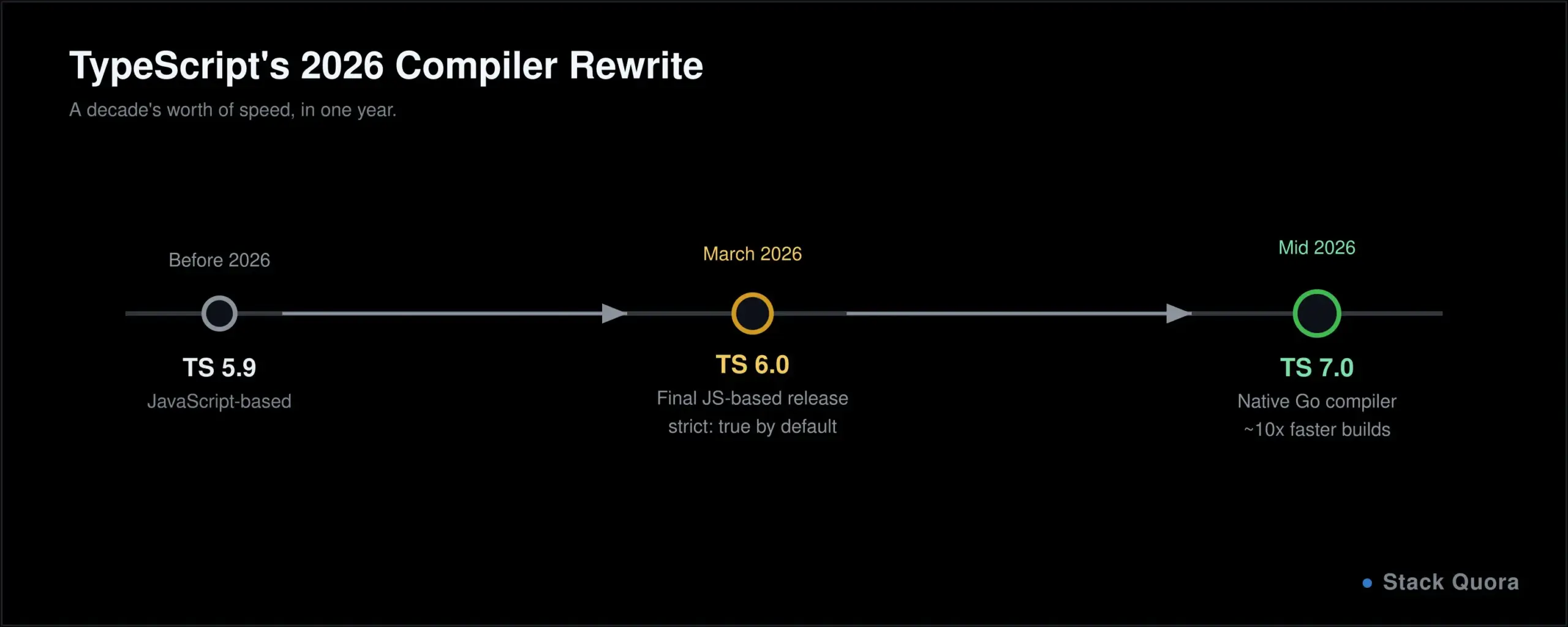
2026 has genuinely been a landmark year for TypeScript itself, worth knowing about even as a beginner. TypeScript 6.0, released in March, was the final version of the compiler built on JavaScript, and shipped with notably safer defaults out of the box: strict: true by default, module: esnext replacing the older CommonJS default, and automatic @types package scanning turned off by default, which alone meaningfully speeds up builds on larger projects. TypeScript 7.0 followed, a complete rewrite of the compiler and language service in Go rather than JavaScript, removing the compiler’s own dependency on Node.js and delivering dramatically faster compile times, commonly cited around 10x on larger codebases in Microsoft’s own benchmarks. None of this changes the language features covered in this guide; it changes how fast checking and compiling those features actually is, which matters a great deal once a project grows past a small size.
TypeScript With Node.js
Setting up a Node.js project in TypeScript follows a predictable pattern:
npm init -y
npm install --save-dev typescript @types/node
npx tsc --init
@types/node provides type definitions for Node’s built-in modules (fs, http, and so on), so you get full autocomplete and type checking against Node’s own APIs, not just your own code. From there, building an API follows the same shape as plain JavaScript on Node, just with types describing your request and response shapes along the way – covered concretely in the next section.
TypeScript With React and Next.js
Typing Props, State and Events in React
interface ButtonProps { label: string;
onClick: () => void;
disabled?: boolean;
}
function Button({ label, onClick, disabled }: ButtonProps) {
return <button onClick={onClick} disabled={disabled}>{label}</button>;
}
// Typed state
const [count, setCount] = useState<number>(0);
// Typed event handler
function handleChange(event: React.ChangeEvent<HTMLInputElement>) {
console.log(event.target.value);
}Typing props with an interface, as shown above, is the current standard approach, replacing the older React.FC pattern many existing tutorials still show – worth knowing so you’re not confused when you see both styles in the wild. useState<number>(0) explicitly types your state; TypeScript can often infer it from the initial value alone, but being explicit is common practice for anything beyond the simplest cases. The official React TypeScript guide covers this in full depth.
TypeScript in Next.js
Next.js supports TypeScript out of the box; creating a new project with the TypeScript template, or simply adding a tsconfig.json to an existing one, is enough to get started. Pages, components and API routes all get typed the same way shown throughout this guide, and Next.js provides its own additional types for things like page props and route parameters, specific to how its routing system works. Full setup detail lives in the Next.js documentation.
TypeScript for API Development
interface Post { id: number;
title: string;
body: string;
}
async function getPost(id: number): Promise<Post> {
const response = await fetch(`https://api.example.com/posts/${id}`);
if (!response.ok) {
throw new Error(`Request failed: ${response.status}`);
}
const data: Post = await response.json();
return data;
}Typing the response shape, as Post does here, means your editor immediately flags it if you try to access data.author when no such field was ever defined, instead of you finding out from an undefined deep inside a rendered page. This is exactly where TypeScript’s value compounds fastest: an API’s shape is a contract, and TypeScript actively enforces that contract every time you touch it. The same discipline applies whether you’re querying a vector database for search results or hitting a plain REST endpoint — type the response once, and every place you use it downstream stays safe. Once a real call like this is working, testing that endpoint with Postman separately from your TypeScript code remains just as useful a habit as it is in plain JavaScript.
TypeScript for Test Automation
TypeScript has become the common default for browser-based test automation specifically, not just application code.
- Why use TypeScript for test automation? Typed test data and typed page objects catch a broken selector reference or a mistyped field name at compile time, before a test even runs, rather than discovering it mid-suite.
- TypeScript with Playwright. Playwright is written in TypeScript itself and offers first-class typed support out of the box, including full autocomplete for every method and option available on a page or element.
- TypeScript with Cypress offers a similarly strong typed experience, with official type definitions covering its full API.
- TypeScript Page Object Models. Typing a page object’s properties and methods means a test using it gets full autocomplete and immediate errors if the page object’s shape ever changes.
This connects directly to two of our deeper testing guides: Playwright MCP for AI-driven testing covers agent-driven testing specifically, and how AI agents are changing QA covers where this whole category is headed next.
TypeScript With Git, GitHub and CI/CD
Managing a TypeScript project with Git works exactly as it does for any other codebase – our Git tutorial covers that foundation in full if you need it. A couple of TypeScript-specific habits are worth calling out: commit your tsconfig.json so every teammate compiles with identical settings, and treat a type error the same way you’d treat a failing test in code review – a change that doesn’t type-check shouldn’t get approved.
A typical GitHub Actions step for a TypeScript project:
- name: Install dependencies
  run: npm ci

- name: Type-check and compile
  run: npx tsc --noEmit

- name: Run tests
  run: npm test
tsc --noEmit type-checks the whole project without writing any output files, exactly the check you want running on every pull request. If tests pass and the project compiles cleanly, a typical pipeline then builds the real output – often building a Docker image from the compiled JavaScript – and deploys it. Full detail on building that entire pipeline lives in our GitHub Actions guide.
Common TypeScript Errors and How to Fix Them
“Type ‘X’ is not assignable to type ‘Y’” You’re trying to assign a value of the wrong type. Read the two types the error names carefully; the fix is almost always either correcting the value or correcting the annotation, whichever one is actually wrong.
“Property ‘X’ does not exist on type ‘Y’” You’re accessing a property TypeScript doesn’t believe exists on that type. Check for a typo first, then confirm the property is genuinely part of the type’s definition.
“Object is possibly ‘undefined’” TypeScript has correctly noticed a value might not exist. Handle it with a conditional check, optional chaining (?.), or a non-null assertion (!) only when you’re genuinely certain it can’t be undefined at that specific point.
“Cannot find module ‘X’ or its corresponding type declarations” Either the package isn’t installed, or it doesn’t ship its own types. Try installing a matching @types/ package for it, or, as a last resort, declare the module yourself in a .d.ts file.
“Parameter implicitly has an ‘any’ type” You’re under strict mode with a parameter TypeScript can’t infer. Add an explicit type annotation to it.
General compilation errors Read the specific line and message the compiler names; TypeScript’s error messages are usually genuinely precise about exactly what’s wrong and where, which is a large part of what makes them worth reading carefully rather than skimming past.
TypeScript Best Practices
- Enable strict mode from the very start of a project, not as an afterthought once errors have already accumulated.
- Avoid excessive use of
any. Each one is a small, deliberate hole in your type safety; useunknowninstead wherever you genuinely can. - Use meaningful types, not just
stringandnumbereverywhere. Atype UserId = stringdocuments intent in a way a barestringnever does. - Prefer interfaces for object and class shapes, and type aliases for unions, intersections and anything that isn’t fundamentally an object.
- Keep types reusable. Extract a shape used in more than one place into a shared type or interface, instead of copying it around.
- Use type narrowing rather than reaching for a type assertion (
as) to silence an error you haven’t actually resolved. - Keep your
tsconfig.jsonconsistent across a team, committed to the repository, not left to each person’s local defaults. - Write tests for anything important, exactly as you would in JavaScript – types catch a real category of bugs, but they are not a substitute for actually testing your logic.
Common TypeScript Mistakes Beginners Make
- Using
anyeverywhere. It quietly turns off the exact safety you installed TypeScript to get in the first place. - Ignoring type errors instead of fixing them, often by reaching for
as anyto make an error message go away without understanding why it appeared. - Overusing type assertions.
as SomeTypetells the compiler “trust me,” but the compiler isn’t actually checking anything at that point – if you’re wrong, you’ll find out at runtime, exactly what TypeScript was supposed to prevent. - Confusing interfaces and classes. An interface is purely a type-level description with zero runtime presence; a class exists at runtime too, and can be instantiated.
- Writing overly complex types that are genuinely harder to read than the bug they were meant to prevent. If a type needs a paragraph to explain, it’s usually a sign to simplify.
- Not enabling strict mode, which quietly allows a wide range of type-unsafe patterns you’ll eventually have to clean up anyway, at a worse time than now.
TypeScript vs JavaScript vs Java
- TypeScript vs JavaScript. TypeScript adds static typing, checked before runtime; JavaScript checks types dynamically, only while running. TypeScript compiles to JavaScript, so the two aren’t really competitors, more like two layers of the same stack.
- TypeScript vs Java. Java is statically typed and compiled to run on the JVM, with typing enforced strictly at every level, including at runtime. TypeScript’s types exist only during development and compilation; they vanish entirely from the final, running JavaScript.
- Differences in typing. Java’s type system is enforced by the runtime itself. TypeScript’s type system is a development-time check only – nothing stops incorrectly-typed JavaScript from being handed to your compiled output some other way, outside TypeScript’s view entirely.
- Differences in runtime. Java runs on the JVM. TypeScript’s compiled output runs wherever JavaScript already runs: a browser, Node.js, anywhere at all.
- Differences in use cases. Java remains dominant in large enterprise backends and Android development. TypeScript dominates modern web frontend development and is rapidly become the default for Node.js backends too.
Is TypeScript Difficult to Learn?
For JavaScript developers, the transition is genuinely gentle. You already know the language underneath; you’re adding a type system on top of syntax you already understand, not learning something from scratch.
For complete beginners, TypeScript works, but learning JavaScript’s fundamentals first, without the extra layer of the type system on top, tends to be a smoother path. If you’re also weighing a statically typed language against something more flexible for other reasons, our Python tutorial is worth comparing against this one, though Python and TypeScript solve fairly different problems in practice.
How long does it take to learn TypeScript? Comfort with the core type system, annotations, interfaces, basic generics, typically takes a couple of weeks once you already know JavaScript. Real fluency, including generics, utility types and narrowing patterns, takes a few months of genuine, regular use.
What should you know before learning TypeScript? Solid JavaScript fundamentals: variables, functions, objects, arrays and asynchronous code. TypeScript adds a layer on top of all of it; it doesn’t replace the need to understand what’s underneath.
TypeScript Interview Questions
What is TypeScript? A statically typed superset of JavaScript that compiles to plain JavaScript, adding compile-time type checking on top of everything JavaScript already does.
TypeScript vs JavaScript? JavaScript checks types at runtime; TypeScript checks them at compile time, catching a category of bugs before the code ever executes.
What are interfaces? A way to define the shape of an object, describing exactly which properties it must have and what type each one is.
What are generics? A way to write reusable functions, interfaces and classes that work across many types, without giving up type safety for any of them.
What is type inference? TypeScript’s ability to automatically determine a value’s type from context, without you needing to annotate it explicitly.
What are union types? A type that allows a value to be one of several specified types, written with a pipe, like string | number.
What is type narrowing? The process of refining a broad type down to a more specific one within a block of code, typically using a check like typeof or instanceof.
What is the difference between any and unknown? any turns off type checking entirely for that value. unknown also accepts any value, but requires you to narrow it to a specific type before you’re allowed to actually use it, making it the meaningfully safer choice of the two.
Final Thoughts
TypeScript’s real value isn’t any single feature; it’s catching an entire category of bugs at the moment you introduce them, while you’re still looking at the code, instead of months later when a user hits them in production. That shift, from “hope it works” to “the compiler already checked,” is what makes it worth the small extra setup for almost any project meant to last.
You don’t need generics, utility types or discriminated unions in your first week. Get comfortable with basic type annotations, interfaces and functions, let your editor’s autocomplete teach you as you go, and let the more advanced sections here pull you back in once a real project genuinely needs them.
2026’s native compiler rewrite means TypeScript is faster than it has ever been, on top of already being safer than plain JavaScript. There’s rarely been a better year to actually start.
Found this useful? Explore more JavaScript, testing and development guides on StackQuora, and bookmark this page as a reference to come back to.
Frequently Asked Questions
What is TypeScript?
TypeScript is a statically typed superset of JavaScript, created by Microsoft, that adds compile-time type checking and compiles down to plain JavaScript before it runs anywhere.
Is TypeScript easy to learn?
For developers who already know JavaScript, yes, genuinely – you’re adding a type system on top of syntax you already understand. For complete beginners, it’s still approachable, though learning JavaScript’s fundamentals first tends to be the smoother path.
Is TypeScript better than JavaScript?
Not universally “better” – it’s a different trade-off. TypeScript adds real safety and tooling benefits at the cost of some setup and verbosity, which is a strong trade for most team and long-term projects, and a less necessary one for small scripts and quick prototypes.
Is TypeScript still worth learning in 2026?
Yes. Adoption has grown substantially, most major frameworks default to it, and 2026 specifically brought a major performance overhaul to the compiler itself, TypeScript 7.0’s native Go rewrite, making the language noticeably faster to work with on large projects than it was even a year earlier.
What is TypeScript mainly used for?
Frontend development with frameworks like React and Next.js, backend development with Node.js, API development, and increasingly, typed test automation.
Is TypeScript good for beginners?
It’s a reasonable addition once JavaScript fundamentals feel solid, rather than the very first thing to learn. Most developers learn JavaScript first, then add TypeScript on top within their first year.
Can TypeScript be used for backend development?
Yes, extensively, through Node.js. Full APIs and backend systems are commonly built entirely in TypeScript, giving the backend the same type safety as a typed frontend.
Can TypeScript be used for test automation?
Yes. TypeScript has become a common default for browser test automation, particularly with Playwright, which is itself written in TypeScript and offers full typed support out of the box.
Can TypeScript be used with React?
Yes, extensively. Typing props, state and event handlers is now the standard, expected way to write React components in any serious production codebase.
Can TypeScript be used with Node.js?
Yes. Combined with @types/node, TypeScript gets full type checking and autocomplete against Node’s own built-in modules, not just your own application code.
What is the difference between TypeScript and JavaScript?
TypeScript adds a static type system on top of JavaScript, checked at compile time rather than at runtime, and compiles down to plain JavaScript before it actually runs anywhere.
What should I learn before TypeScript?
Solid JavaScript fundamentals: variables, functions, objects, arrays and asynchronous code. TypeScript builds directly on top of all of it, rather than replacing the need to understand it.